Need help?
Do you have a question about the AIC 11101 and is the answer not in the manual?
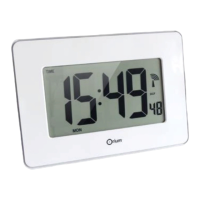
This document describes the Ephemeris Multi-language DST Calendar Clock #11101, a digital clock designed for clear readability with yellow-orange LED displays.
The Ephemeris Multi-language DST Calendar Clock #11101 is a digital clock that displays the time, date (day, date, month, and year), and automatically adjusts for Daylight Saving Time (DST). Its primary function is to provide an easy-to-read display of essential time and date information in multiple languages.
Key Features:
The clock is designed for ease of use with a straightforward setup and adjustment process.
Initial Setup:
Setting the Clock (Normal Display Mode): The clock is set using three buttons (A, B, C) located at the back.
To enter setting mode, hold down Button A. The display will then guide you through the following steps:
Note: Once the year, month, and date are set, the day of the week is automatically determined. If the day is incorrect, it indicates an incorrect year setting, and the adjustment process should be repeated from step 3. If no action is taken for 30 seconds during setting, the clock will revert to displaying the time.
Activating/Deactivating DST Mode:
Replacing the Battery: The clock includes a CR2032 button battery for data memory during power outages. This battery has an estimated life of 4 to 5 years and can be replaced.
Procedure for Battery Replacement:
Troubleshooting: The manual provides solutions for common issues:
Environmental Considerations: The product complies with WEEE and ROHS Directives. Electrical and electronic products, including batteries, should not be disposed of with household waste. They should be taken to appropriate collection points for recycling in accordance with local regulations.


 To Next Page
 General