EasyManua.ls Logo

AIC Orium - User Manual

AIC Orium
19 pages
Go to English
Print Icon
To Next Page IconTo Next Page
Loading...
Importé par :
AIC International - 44980 Ste Luce sur Loire - France
FR- Horloge digitale radio-contrôlée sensitive
Manuel d’utilisation
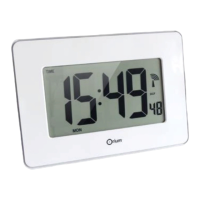
Horloge digitale multifonctions avec fonction tactile permettant le rétro-éclairage
- Excellente lisibilité : grands chiffres
- Contrôle tactile permettant le rétro-éclairage
- Radio-contrôlé : facilite le réglage
- Décorative par sa finition blanche laquée
1. Caractéristiques :
- Grand format : hauteur chiffres 7.5 cm
- Radio-contrôlée : mise à l’heure / date automatiques, et changements d’heure
été/hiver automatiques
- Multifonctions :
Heure
Calendrier (jour / mois)
Température -10° à 50°C et hygrométrie intérieures 1 à 99%
Alarme
- Affichage des différentes fonctions en alternance (possibilité de mode automatique)
- Rétro-éclairage bleu : activation par fonction tactile (sur partie haute et basse du
cadre blanc)
- Fonction éclairage automatique dans le noir : luminosité atténuée, n’éblouis pas
- Horloge à poser ou à accrocher
- Composition : ABS
- Dimensions (environ) : 28*3.1*19.5 cm
- Fonctionne avec 3 piles LR6 (non fournies)
2. Installation :
Retirer délicatement l’horloge de son emballage. Retirer doucement le film protecteur.
Insertion des piles : ouvrir le compartiment à piles situé au dos de l’horloge en tirant
doucement sur le couvercle.
Installer 3 piles LR6 dans le sens indiqué (respecter la polarité +/-). Une position incorrecte
pourrait endommager l’article. Refermer le couvercle.
2 modes d’installation :
- A accrocher au mur
- A poser : soulever le pied
Question and Answer IconNeed help?

Do you have a question about the AIC Orium and is the answer not in the manual?

Summary

Clock Features and Installation

Clock Characteristics

Details on the digital clock's features including display size, radio control, multifunctionality, automatic functions, and physical attributes.

Installation Guide

Instructions for installing batteries and setting up the clock for wall mounting or tabletop use.

Clock Settings and Operation

Radio-Controlled Signal Setup

Guidance on automatic time synchronization via radio signal and manual override procedures.

Display Function Selection

How to cycle through and select different display modes for time, date, temperature, and alarm.

Manual Time Setting

Step-by-step instructions for manually setting time, date, and time zone.

Alarm and Snooze Functions

Instructions for setting alarms, snooze intervals, and activating/deactivating alarms.

Backlight and Cleaning

Information on activating the blue backlight and recommended cleaning methods.

Battery Replacement

Procedure for replacing batteries when the display attenuates or backlight fails.

Troubleshooting Common Issues

Guidance on identifying and resolving common defects like poor RCC signal or display errors.
AIC Orium Specifications

General IconGeneral
BrandAIC
ModelOrium
CategoryClock
LanguageEnglish

Related product manuals