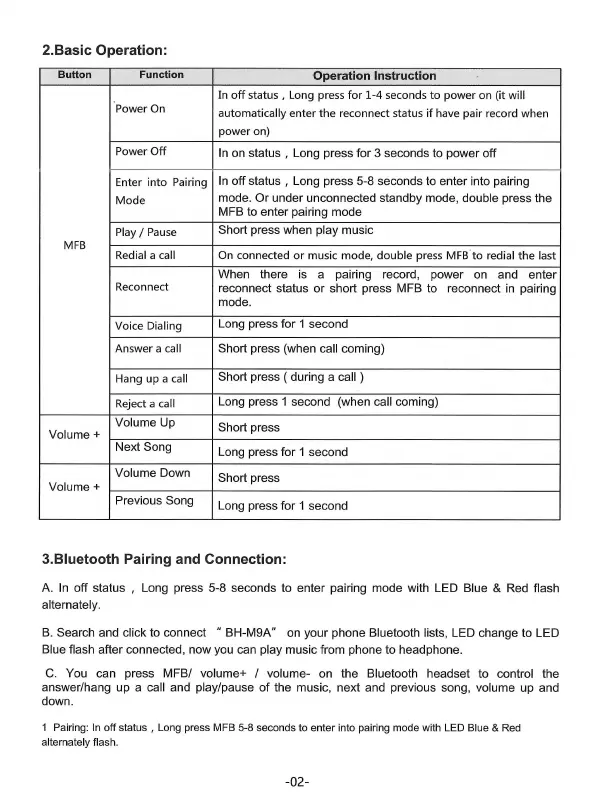
2.Basic Operation:
Button
Function
Operation Instruction
In
off
status , Long press
for
1-4
seconds
to
power
on (it will
Power On
automatically
enter
the
reconnect status
if
have pair record when
power
on)
Power
Off
In on status , Long press for 3 seconds to power off
Enter
into
Pairing
In
off
status
,
Long
press
5-8
seconds
to
enter
into
pairing
Mode
mode.
Or
under
unconnected
standby
mode,
double
press
the
MFB to enter pairing mode
Play/
Pause
Short press when play music
MFB
Redial a call
On connected
or
music mode, double press
MFB
. to redial
the
last
When there is a
pairing
record
,
power
on and
enter
Reconnect
reconnect status
or
short press MFB to
reconnect
in
pairing
mode.
Voice Dialing
Long
press
for
1
second
Answer
a call
Short press (when call coming)
Hang up a
call
Short press ( during a call )
Reject a call
Long press 1 second (when call coming)
Volume Up
Short press
Volume+
Next Song
Long
press
for
1
second
Volume Down
Short press
Volume+
Previous
Song
Long press for 1 second
3.Bluetooth Pairing and Connection:
A.
In
off status , Long press 5-8 seconds to enter pairing mode with LED Blue & Red flash
alternately.
B.
Search and click to connect " BH-M9A" on your phone Bluetooth lists, LED change to LED
Blue flash after connected, now you can play music from phone to headphone.
C.
You can press MFB/ volume+ / volume- on the Bluetooth headset to control the
answer/hang up a call and play/pause
of
the music, next and previous song, volume up and
down.
1 Pairing: In off status , Long press MFB 5-8 seconds to enter into pairing mode w
ith
LED
Blue & Red
alternately flash.
-02-


 To Next Page