18
Home Screen Data
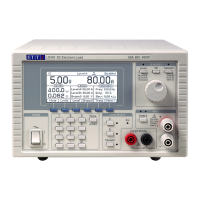
Below the status line are the meter displays which show the actual measured source voltage and,
once the load is enabled, the load current. Below this, the screen is divided into three areas. On
the left, under the heading
METERS, the display shows the present power in the load and the
equivalent resistance; these values are computed from the measured voltage and current
readings. Any of these meter displays will show
HIGH (or MAX for power) if the measured value
is beyond the capabilities of the unit.
In the centre, under the heading
LEVELS, the display shows the present settings for Level A and
Level B (the units depend on the operating mode) and the Dropout Voltage setting.
On the right, under the heading
TRANSIENT, the display shows the settings for the Frequency
and Duty cycle of the internal oscillator, and the Slew Rate of the transitions.
All six of these parameters can be modified either by direct numeric entry or by using the knob to
increment or decrement the present value as described below.
Soft-Keys
The soft-keys are the six blue keys found directly below the LCD. The function of each of these
keys changes as the instrument is operated. The available function is shown on the bottom line
of the display in a tab above each key. If any of the keys have no functionality in a particular
menu then the tab is lowered to show it is inactive.
On the home screen there are two sets of soft-key functions available; the right hand key,
alternately labelled More > or More < switches between the two. All additional menus are
accessed through the soft-keys in one of these sets.
The major parameters accessible in the first set are:
To select the operating mode.
Limits
To impose cut-off limits on the applied voltage or current values,
or to enter the 600 Watt short term operation mode.
To enter numeric values for Level A and Level B.
To enter a numeric value for the Dropout Voltage.
To access a second level to set-up the transient functionality.
The second set includes:
To setup, review and use saved settings of the unit.
Extern
To enable or disable analogue remote control of the level, or logic (TTL)
level selection between the two levels, as described in the chapter on
‘Analogue Remote Control’.
Utilities
To configure some secondary facilities of the instrument and to set
parameters of the remote interfaces.
The Transient second level menu (when selected from the first set above) includes:
To enter a numeric value for the Frequency of the internal oscillator.
To enter a numeric value for the Duty cycle of the internal oscillator.
To enter a numeric value for the Slew Rate of the transitions.
To enable or disable the Slow start and stop facility.
On most of the lower level menus, the left hand key, labelled Back or Cancel, can be used to
return to the previous menu. This allows exploration of the various menus without risk of putting
the unit into unexpected configurations. Back returns to the previous menu, keeping any
changes that have been made in the current menu, while Cancel (if offered) will undo any
change made before reverting to the previous menu. The
Home key reverts directly to the home
screen and the top level of the menu structure (also abandoning any incomplete value entry).


 To Next Page