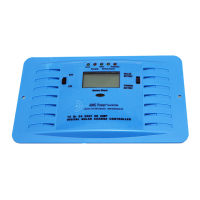
PB5 Quick function key to the Main Menu: Data Log
PB6 Quick function key to the Main Menu: Programming
PB7 Quick function key to the Main Menu: Initialize
PB8 Quick function key to the Main Menu: Operation
4 LED Indicators
LEDs Flashing/
Solid
Description
FAULT Solid Red Read the LCD meter for fault condition displayed.
4 fault conditions could be displayed as follows:
EQUAL Flashing
Orange
The unit is in equalization mode. Refer to constant B-09~B-12 for
the setting details.
CHARGE Flashing
Green
The unit is in charge mode. This indicates that it is functioning
properly.
READY Solid Green When the voltage from the PV array is first received, the unit is in
standby mode to charge.
LCD Meter
1 LCD Meter of 20 x 2 characters is built in each AIMS MPPT+ unit.
2.2 Control Terminal Connection


 To Next Page