Pairing your PTT Voice Responder with
your iPhone via Bluetooth
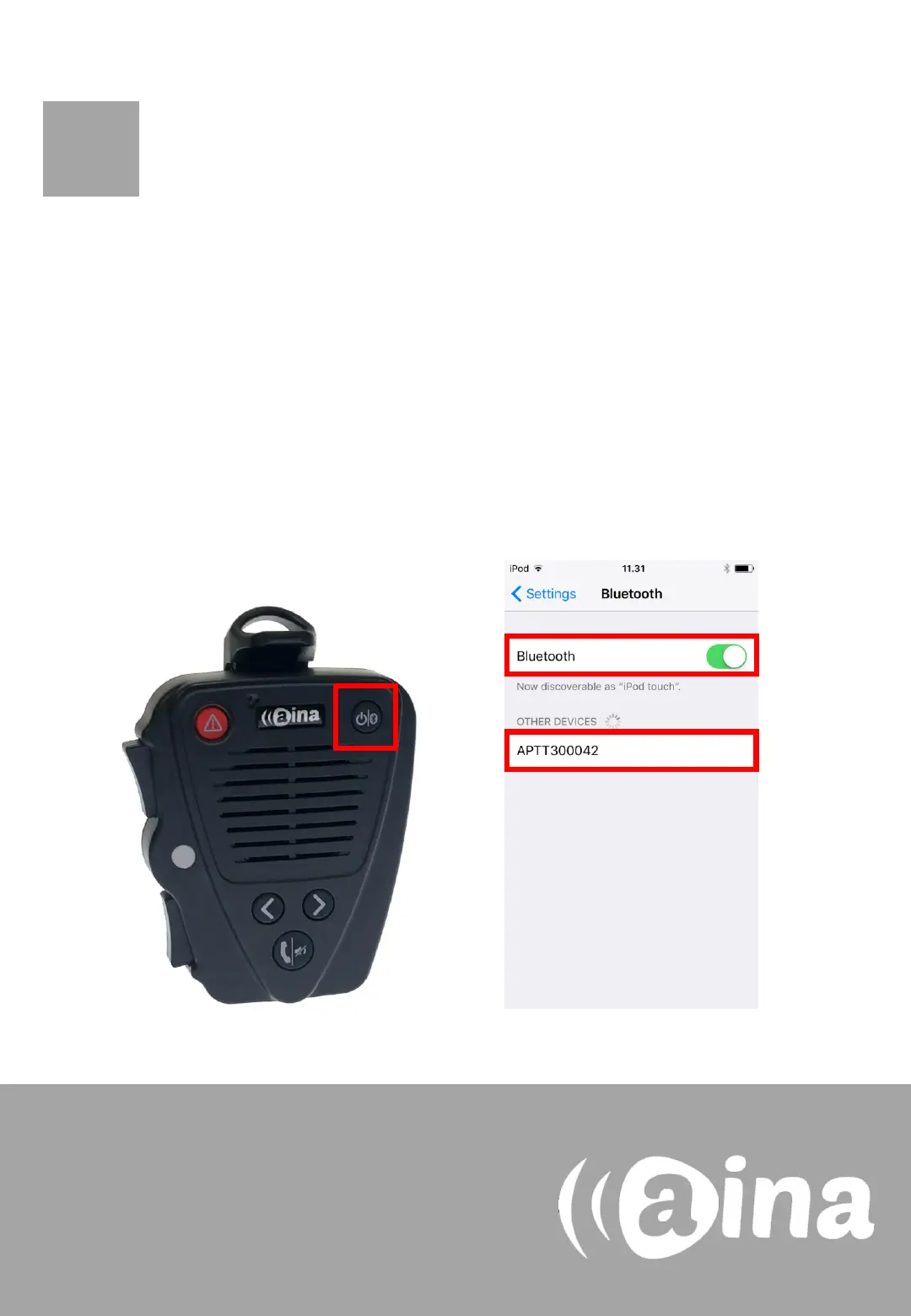
1. Turn on your PTT Voice Responder by holding down the Power
button for more than 3 seconds. After it is on, a blinking green light
will indicate that the device is ready for pairing.
2. Turn on your iPhone’s Bluetooth by going to: Settings —> Bluetooth
—> Turn on.
3. Pair your PTT Voice Responder to your iPhone by selecting it from
the Devices list. To know which device to select from the list, check
the unique MAC-address on the back of your Voice Responder.
Once it has successfully paired, a blue light will begin blinking on
your device.
NOTE: The Voice Responder can only be paired
with one device at a time. If you want to pair it
to another device you need to perform an
Unpairing/ Software reset by pressing and
holding both soft buttons and both PTT buttons
simultaneously, until the LED blinks once in
yellow.
1.
2.
3.
A


 To Next Page