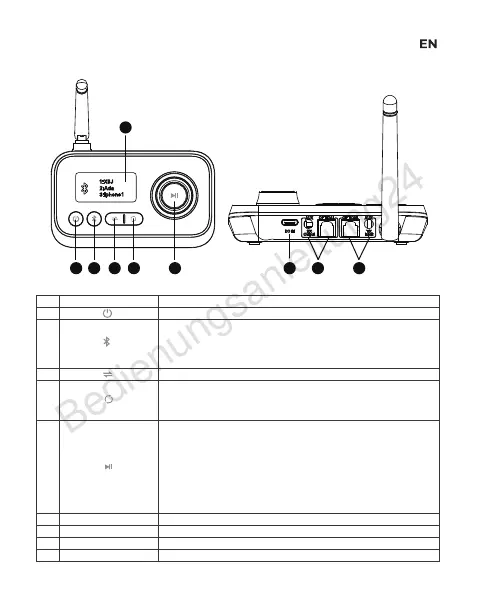
Product Overview:
1 2 3 4 5 6 7 8
NO.
①
②
③
④
⑤
⑥
⑦
⑧
⑨
Button & Interface Function & Operation
Click to choose TX, RX, BYPASS mode
TX mode: short press to quickly disconnect the connected
Bluetooth device, restart the search mode, select the second
Bluetooth device and connect.
RX mode: Short press to quickly disconnect the connected
Bluetooth device and re-enter pairing mode.
TX mode: short press to disconnect the connected Bluetooth
device, re-open the blind search mode for other Bluetooth
devices and connect automatically.
RX Mode: No function
MFB button
RX-Mode:
Rotate clockwise: volume +
Rotate counterclockwise: volume -
Short press: Pause / Play
TX Mode:
Rotate clockwise: Screen options move down
Rotate counterclockwise: Screen options move down
Short press: Confirm selected device
Short press to power on or power off
Type-C charging port
Output (RX mode)
Input (TX mode)
Display working status
DC IN
RX Output
TX Input
Display
9


 To Next Page
 Loading...