EasyManua.ls Logo

Aiphone C-123LW - User Manual

Aiphone C-123LW
1 page
Print Icon
Loading...
Component
Module*
- INSTRUCTIONS -
C-123LW
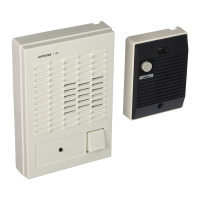
DUAL MASTER CHIME-COM SYSTEM
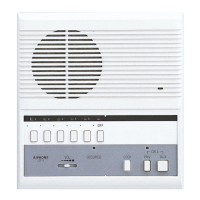
Set contains: 1 C-D Door Station, 2 C-ML/A Masters & 1 DAK-2S Kit
Aiphone Communication Systems
1700 130th Ave. N.E.
Bellevue, WA 98005
(425) 455-0510
FAX (425) 455-0071
C-123LW
092898bkjd
OPERATION NOTES:
1. Only one master can be used at a time.
2. If both masters are activated, a feedback will be heard through the system when either TALK button is pressed.
3. If feedback occurs, wait approximately 15 seconds, or until the master turns off automatically. At that time,
communication can continue normally.
INSTALLATION GUIDELINES:
1. Use 2 conductor wire from the door station to the first master, then to the second master.
2. Install the units at the desired locations.
3. Separate SKK-620 power supplies, or four "C" batteries are required for each master station.
4. DO NOT install both a power supply and batteries at any one master.
5. Install the bare wire leg of the component module directly onto the "1" terminal of the C-ML/A's.
6. Attach the wire coming form the "1" terminal of the C-D to the colored wire end of the component modules at both
masters. (The component modules will easily fit within the space available.)
7. Connect the "E" terminals between the door station and master stations.
8. If door release is included, use a separate 2-conductor wire from the "L" terminals of the masters through an AC
transformer and to the door strike.
9. The EL-9S is designed for a standard wood framed door, and for light and medium usage. If a different type of door is
used, install a strike appropriate for the door.
10. The door release button on the master station is a "Normally Open" contact closure.
C-D
1
E
+
-
SKK-620
1
E
+
-
L
L
C-ML/A
Component
Module*
+
-
SKK-620
1
E
+
-
L
L
C-ML/A
Door
Master #1
Master #2
EL-9S
PT-1210N
(AC Transformer)
Please read and understand all
instructions before installation.
IMPORTANT!!!
Each master REQUIRES an SKK-620 power supply (or batteries).
TOLL FREE TECHNICAL SUPPORT:
(800) 692-0200
TOLL FREE FAX LINE:
(800) 832-3765
TECHNICAL SUPPORT E-MAIL:
tech-serv@aiphone.com
* Install bare wire
end to "1" terminal
(DAK-2S contains two
component modules, one
for each master station.)


Other manuals for Aiphone C-123LW

Questions and Answers

  • T
    Tonya WoodwardAug 15, 2025
    What to do if my Aiphone C-123LW Intercom System appears dead?
    • J
      James WallsAug 15, 2025
      If your Aiphone Intercom System appears dead with no functionality, check the terminal connections. Ensure that the positive (+) and negative (-) terminals are correctly connected on the left column and the E/1 terminals are on the right column. Specifically, verify that terminal 1 from the door station connects to terminal 1 on the master station, and the negative terminal of the power supply connects to the negative (-) terminal on the master station. If these are swapped, the unit will not function.
  • J
    Jesus BriggsAug 18, 2025
    What to do if there is no call from the door to the master on my Aiphone C-123LW Intercom System?
    • F
      floydtammyAug 18, 2025
      If there's no call from the door to the master on your Aiphone Intercom System, but communication works fine, the DAK-2S component module may be reversed. When the door calls, it shorts the #1 terminal to the E terminal. If the DAK-2S is installed backwards, the chime from the door call-in will not be heard. Install the DAK-2S component module with the bare wire under the 1 terminal, and the door station 1 wired to the colored wired end of the DAK-2S.
  • A
    allenhinesAug 21, 2025
    What to do if the RY-AC external signaling relay is not working on my Aiphone Intercom System?
    • L
      lewisaaronAug 22, 2025
      If the RY-AC external signaling relay is not working on your Aiphone Intercom System, check the connections. Ensure that the negative from the 12VDC supply for the RY-AC is connected to the negative of the C-ML/A master. Also, make sure the WHITE wire of the RY-AC is connected to the DAK-2S component module to terminal 1, and not the negative terminal.
  • E
    Eric AndersonAug 25, 2025
    Why does my Aiphone C-123LW squeal and the batteries get hot?
    • J
      Jennifer YorkAug 25, 2025
      If your Aiphone Intercom System squeals and the batteries get hot, it's likely because you have both a power supply and batteries installed simultaneously. Remove the batteries from the master station, as both power sources cannot be used at the same time.
  • J
    John SantosAug 27, 2025
    How to adjust the voice volume on my Aiphone C-123LW?
    • B
      Brian DavisAug 27, 2025
      To adjust the voice volume on your Aiphone Intercom System, remove the front cover of the C-ML/A unit. Locate the volume potentiometer through the hole at the bottom. Use a small screwdriver to adjust the volume. Turn it clockwise to increase the volume.
  • A
    Aaron ConradAug 30, 2025
    Why doesn't my Aiphone C-123LW master station time out?
    • M
      Marissa RyanAug 31, 2025
      If the master station of your Aiphone Intercom System stays on and does not time out, the issue might be due to the cable being used. If the wire's resistance is too high, often caused by exceeding distance limitations, the master station may not time out as designed. Refer to the wire specifications in the instructions.
  • V
    victoria66Sep 2, 2025
    What causes feedback at both masters when the talk button is pressed on my Aiphone Intercom System?
    • J
      Jack HicksSep 3, 2025
      Feedback at both masters when the talk button is pressed on your Aiphone Intercom System is likely due to a common power supply. If both C-ML/A units share the same power supply, a ground loop feedback will occur. To resolve this, install a separate power source for each master.
  • B
    barbara10Sep 5, 2025
    Why does the chime tone on my Aiphone Intercom System sound weak?
    • M
      Megan PooleSep 5, 2025
      A weak, low-frequency chime tone on your Aiphone Intercom System indicates weak batteries or low voltage. If batteries are installed, replace them. If you're using a power supply, check that it provides 6VDC. If the voltage is low, install a new SKK-620 power supply.
  • C
    Christine ClineSep 8, 2025
    Why does the other master ring when the talk button is pressed on my Aiphone C-123LW Intercom System?
    • A
      Amy JohnsonSep 8, 2025
      If the other master rings when you press the talk button on your Aiphone Intercom System, it could be due to a missing or reversed DAK-2S component module. Install the DAK-2S component module as described in the dual master instructions.
  • N
    nicoledelacruzSep 12, 2025
    How to adjust the chime tone volume on my Aiphone C-123LW Intercom System?
    • W
      walshkennethSep 12, 2025
      There is not a separate call tone volume adjustment on the Aiphone C-ML/A Intercom System, so the volume level cannot be altered. Surface mount component level modification would be required, which is not practical.

Aiphone C-123LW Specifications

General IconGeneral
BrandAiphone
ModelC-123LW
CategoryIntercom System
LanguageEnglish

Related product manuals