– 3 –
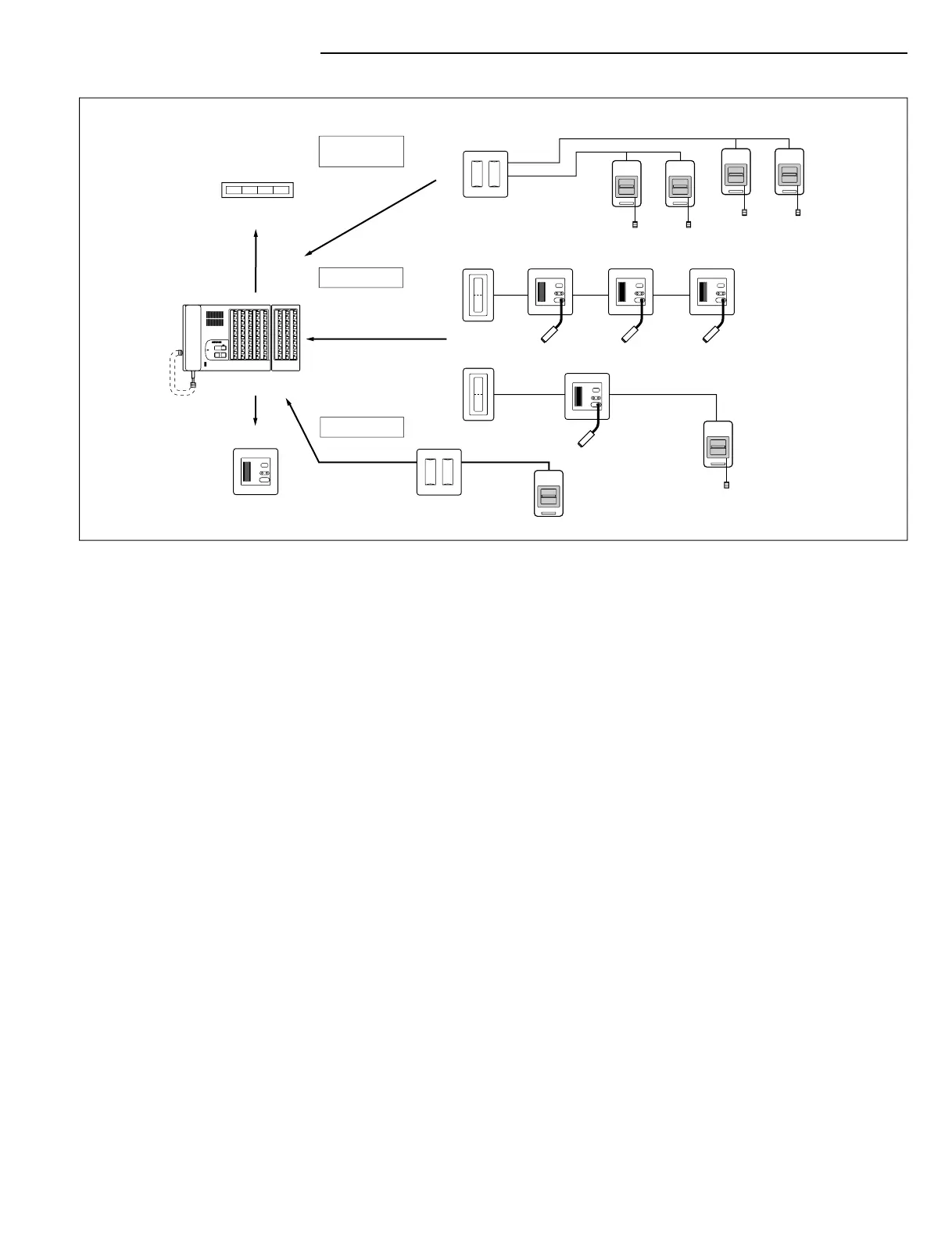
NHR-4A
Staff call area
Common area
restrooms
NH-1SA/A or
NH-2SA/A
NHR-8A
NHR-7A
NHR-4A
NHR-7A
NH-1SA/A,
NH-1SA,
NH-2SA/A,
orNH-2SA
Corridor lamp
Bathroom call sub
Bedside sub (single station)
with pullcord
pullcord
Lights on when
any call has
been placed.
NHR-3TS
(up to 3)
NHR-7A (up to 3)
NHR-8A
Zoom lights
NHR-3A-4 (up to 4)
Duty station
NHR-SP
NHX-50M
Urgent staff call
Routine call,
Urgent bathroom call or
Cord-out trouble call
Urgent bathroom call
pullcord
Corridor lamp
Bedside sub (Up to 6)
NHR-3TS
NHR-7A
with pullcord
Patient rooms
Tone & LED
utline of NHX s
ste
UN
TI
N DIA
RA
apacit
in
le-master system with 50 station master and 30-station expander, for maximu
apacity of 80 stations
ommunicatio
1. Communication is hands free at the room station, and
ush-to-talk or voice-actuate
n
t
t t
m
t
r
t
t
on
2. Three types o
call-in si
nals : routine, ur
ent call, or cord-out trouble call,
identified differently by tone and LED li
ht
3. Press TONE-OFF button at master to mute incoming call tone if necessary
4. To begin communication, simply li
t handset or press TALK button
. To initiate a call, press selector button.
orridor lamp and zone li
ht do not li
ht when
call is initated from the master station
Bas
c o
erat
on
Reply by intercom for routine calls only, or press CANCEL button on the bedside su
tation. To respond to an urgent or cord-out trouble call, press TONE-OFF button a
master an
o
rect
y to ca
n
ocat
on.
eset t
e ca
at t
e ca
n
stat
on
B
i
t
ti
Bedside sub station hears a pretone when channel is selected, then the voice o
th
erson callin
from the master station
all-in priorit
1. Master station automatically connects to the highest priority call first when multiple call
ave
een
ace
2.
all-in si
nals durin
communication li
ht the LED on the master and have an audibl
ton
3. Up to 5 incomin
calls are displayed at the master at a time. Additional calls will be hel
in queue and will be displa
ed and answered in order of priorit
A
r
1. Zone light will light when any call is placed (if stations are wired for zone lamp feature)
2. NHR-3T
mmon area
all
tation places an ur
ent bathroom call or ur
ent staff call i
n area where there is not a bedside sub station
3. Duty Station annunciates the call-in signal the same as at the master station
Volume ad
ustment
djust receive and call tone volumes as needed
on side of master
. Preset volum
ontrols are on the bottom o
the NHX-50M
Resetting syste
ystem resets itself when NHX-80X power switch is turned off and back on a
ain
ine-off Trouble indicatio
ine-off Trouble at the NHX-50M sounds when wires to the sub stations or duty station ar
horted or broken
NHX-
X:
entral
ontrol
nit not show


 To Next Page
 Loading...