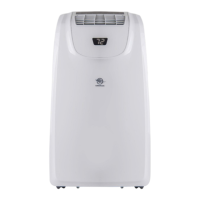
This document describes the AIREMAX Portable Air-conditioner, model APE514C, providing detailed instructions for its use, care, and maintenance. It is designed for indoor use and offers various modes to enhance comfort in your living space.
Function Description
The AIREMAX Portable Air-conditioner is a versatile appliance capable of performing several functions to regulate indoor climate. Its primary modes of operation include:
- Cooling Mode: This mode actively cools the room to a user-defined set temperature, providing relief during warm weather.
- Dehumidification Mode (DRY): In this mode, the unit focuses on reducing the humidity levels in the room, which can be particularly useful in damp environments. The fan speed cannot be adjusted in DRY mode as the unit prioritizes moisture removal.
- Fan Mode: This mode circulates air within the room without engaging the cooling or heating functions, offering a gentle breeze and improved air circulation.
- Heating Mode: (Mentioned in remote control operation, suggesting a heat pump model) This mode allows the unit to provide warmth, making it suitable for use in cooler conditions.
The unit incorporates a self-evaporative system, particularly efficient in cooling mode, where condensate is recycled to cool the condenser and enhance overall performance. However, in high humidity or heating mode, manual or continuous drainage may be required.
Usage Features
The air conditioner is designed for user-friendly operation, featuring both a control panel on the unit and a remote control.
Control Panel:
The control panel includes an LED digital display and several buttons for direct interaction:
- TIMER Button: Allows programming the unit to turn ON or OFF automatically after a set number of hours (1 to 24 hours). A dedicated indicator light illuminates when the timer is active.
- FAN SPEED Button: Enables adjustment of the fan speed between Low and High settings in COOL or FAN modes. The corresponding indicator light shows the selected speed.
- UP/DOWN Arrow Buttons: Used to adjust the set temperature in COOL mode or the hours for the Timer function.
- MODE Button: Toggles between COOL, DEHUM, and FAN operating options, with an indicator illuminating for the selected mode.
- POWER Button: Turns the unit ON or OFF. It's important to note that pressing this button does not disconnect the appliance from the power supply.
- CONTROL PANEL DISPLAY: Shows the set temperature in degrees Fahrenheit or Celsius, or the remaining hours for a Time Delay.
Remote Control:
The remote control offers convenient operation from a distance and includes:
- Power Button: To start or stop the unit.
- Timer Button: For setting automatic ON/OFF times.
- Fan Button: To select high, medium, or low fan speeds (not available in dehumidify mode).
- Up/Down Buttons: To increase or decrease temperature or timer settings.
- Mode Button: To select Heat, Cool, Dehumidification, or Fan modes.
- Sleep Button: Gradually increases the set temperature by 2°F (1°C) over a few hours for comfortable sleep.
- Air Sweep Button: Activates or deactivates the auto swing function for the outlet louver, allowing for adjustable wind direction.
The remote control requires two AAA alkaline batteries, with instructions provided for installation and proper polarity. A dedicated storage bracket at the back of the unit body is available for the remote control to prevent loss.
Additional Usage Features:
- Compact Design: The unit boasts a new appearance with a compact design, making it aesthetically pleasing and suitable for various indoor spaces.
- Automatic Louver Swing: The outlet louver swings automatically, and the wind direction can be adjusted to meet user preferences.
- Power Cord Management: A winding pillar and universal socket are integrated to protect the power cord and keep it tidy.
- 24-hour Timer Function: Provides flexibility in scheduling operation, complemented by a unique on/off reminding music.
- Protection Functions: The unit is equipped with several safety and operational protection features, including:
- Water-full Protect: An indicator flashes ("FL" on LED) when the water tank is full, signaling the need for drainage.
- Anti-freeze Protection: Automatically turns off the compressor and water spraying motor if the tube temperature drops too low during cooling, displaying "E4". The unit recovers once the temperature rises.
- Compressor Delay Protection: A 3-minute start delay after the compressor shuts down, except for the initial power-up.
- Sensor Auto-diagnosis: Detects failures in room temperature (E2) or coil temperature (E1) sensors, turning off the unit and displaying an error code.
- Handling and Transportation: The unit is designed to be moved in an upright position using handles on the side panels. It is crucial to drain all water before moving to prevent leakage.
Maintenance Features
Regular maintenance is essential to ensure the longevity and optimal performance of the AIREMAX Portable Air-conditioner.
- Surface Cleaning: The unit's surface should be cleaned with a wet and soft cloth. Chemical solvents like alcohol or gasoline should be avoided to prevent damage.
- Filter Cleaning: The air filter should be cleaned every two weeks. A blocked filter can negatively impact the unit's performance.
- Removal: Filters are removed by gripping their handles and pulling them out in the indicated direction. Care should be taken to apply even force to avoid twisting or damage.
- Cleaning: Filters should be gently cleaned in warm water (around 40°C) mixed with detergent and then dried in the shade. It's important not to squash the mesh or hit it with sharp objects.
- Installation: Filters are reinstalled by aligning them with the slots and pushing them gently.
- Handle Position and Remote Control Storage Area Cleaning: These areas should be cleaned with a wet and soft cloth, ensuring no water drips into the unit.
- End of Season Storage: For long-term storage, several steps are recommended:
- Complete Drainage: The drain cover should be unscrewed, and the stopper pulled out to completely drain all water. The unit should be tilted no more than 30 degrees during this process.
- Drying: Run the unit in fan mode for half a day to thoroughly dry the interior and prevent mold growth.
- Power Cord Management: Turn off the unit, unplug it, wrap the power cord around the winding pillar, and insert the plug into the universal fixing hole. Reinstall the water plug and drain cap.
- Exhaust Hose Removal and Storage: The heat exhaust hose assembly should be removed, cleaned, and stored properly. This involves holding the assembly with both hands, pushing fasteners aside, and then pulling it out.
- Packaging: Pack the air conditioner in a soft plastic bag and store it in a dry, dust-proof location away from children.
- Battery Removal: Remove batteries from the remote control before storage.
- Accessory Protection: All accessories should be properly protected and stored together with the unit.
Drainage Instructions
The unit offers two drainage methods:
- Manual Drainage: Recommended for cooling mode, especially in high humidity when the internal water tank is full ("FL" indicator). Water is drained from the lower drain port into a tray.
- Continuous Drainage: Recommended for heating mode, as the self-evaporative system is less effective. This involves connecting a 13mm PVC drain hose to the drain hole (preferably the higher drain port for dehumidification mode) and directing it to a bathroom or outdoor area. The drain hose must be installed before operation and kept straight without flexure.
Important Safety Instructions
The manual emphasizes critical safety precautions, including:
- All wiring must comply with local and national electrical codes and be installed by a qualified electrician.
- The unit must be properly grounded.
- Do not use outdoors or in humid environments like bathrooms.
- Do not remove the ground prong, use adapters, or extension cords.
- Avoid sharing power outlets with other appliances.
- Never handle the power plug with wet hands.
- Do not turn off the unit by unplugging it.
- Unplug the air conditioner before servicing.
- Unauthorized dismantling, repair, or modification is prohibited.
- Ensure secure power cord placement to prevent tripping.
- Do not insert objects into the unit or obstruct air inlets/outlets.
- Avoid hitting or shaking the unit, spraying water, or placing it near flammable liquids or heat sources.
- The unit should be moved and installed by two or more people.
- Children aged 8 and above, and individuals with reduced physical, sensory, or mental capabilities, can use the appliance under supervision and with proper instruction. Children should not play with the appliance or perform cleaning/maintenance without supervision.

 Need help?
 General

 To Next Page