This document describes a Smart Fan, model AGF01UK, designed for household and indoor use. It provides essential information regarding its function, assembly, operation, maintenance, and safety.
Function Description
The Smart Fan is an appliance designed to circulate air within a room. It offers various operating modes and speeds to suit different preferences and environments. Its "Smart" capabilities allow for control via a mobile application, enhancing user convenience. The fan can also be used during colder seasons to help circulate warm air throughout the home.
Important Technical Specifications
- Model No.: AGF01UK
- Power supply: 220-240V ~ 50-60Hz
- Power: 55W
- Net weight: 5.6kg
- Gross weight: 6.5kg
- Gross dimension (W x H x D): 495 x 230 x 450 mm
- Warranty: 2 years from the date of purchase.
Usage Features
The Smart Fan offers a range of features for user convenience and customizable air circulation:
Assembly:
The fan requires assembly, which involves:
- Attaching the pedestal bar to the base using four screws and inserting the base ring.
- Adjusting the fan's height by loosening and tightening the height adjustment ring.
- Inserting the fan body into the main tube and securing it with a screw.
- Mounting the rear grille onto the motor and tightening the nut to secure it.
- Attaching the fan blades to the axis and securing them with a reversed nut, ensuring they turn freely.
- Placing the front grille on the rear grille and tightening the locking screw.
Operating Instructions:
Before operation, ensure the fan is fully assembled and the grilles are in place and locked.
- Placement: Place the fan on a level and dry surface.
- Power Connection: Plug the fan into a suitable mains socket (220-240V ~ 50-60Hz).
- Power On/Off: Touch the ON/OFF button on the control panel or use the App to turn the fan on or off.
- Speed Control: Press the SPEED button to cycle through three fan speeds: Low, Medium, and High. The corresponding indicator will illuminate.
- Operating Modes:
- NORM mode: The fan operates at a constant speed set by the SPEED button.
- SMRT mode: The unit simulates a natural breeze.
- NGHT mode: The unit provides a gentle breeze suitable for night-time use.
The desired mode can be selected using the MODE button on the control panel or via the App.
- Timer Function: Use the TIMER button to set an automatic turn-off delay. The delay can be set in two-hour increments from 2 to 8 hours, with indicators for 2H, 4H, 6H, and 8H.
- Oscillation (Swing): Press the SWING button to start or stop the fan's oscillation. The swing indicator will turn on when active.
- Tilt Adjustment: To adjust the vertical tilt, hold the Main Body with one hand and push the Motor Housing to the desired position with the other hand. Caution: Always switch off the fan before making this adjustment.
Smart Features (App Connectivity):
The fan can be controlled via a mobile application.
- Download App: Download the dedicated app from the App Store or Google Play.
- Registration: Register by entering a phone number to receive a verification code or by inputting an email address.
- Connection:
- Connect the fan to an electricity outlet.
- Press the "on/off" button, then the "mode" button for 5 seconds until the indicator rapidly blinks.
- Confirm the indicator is blinking in the app.
- Enter your Wi-Fi password to connect your phone to the Wi-Fi router and the internet.
- The app will display a 'Connecting' page as it links to the smart fan.
- Once configuration is successful, tap "Complete" to enjoy the Smart Fan.
All functions available on the control panel can also be carried out through the App.
Maintenance Features
Regular cleaning and proper storage are essential for the longevity and safe operation of the Smart Fan.
Cleaning:
Warning: Always unplug the appliance before cleaning.
- Disconnection: Disconnect the appliance from the mains by switching it off and removing the plug from the power outlet.
- Outer Surface: Clean the outer surface with a lightly damp cloth, then dry thoroughly with a soft, dry cloth.
- Motor Protection: Do not allow water to penetrate the motor during cleaning.
- Reconnection: Do not reconnect the unit until it is completely dry.
Fan Blade Cleaning:
- Access: Remove the front grille and blade cap to access the fan blade.
- Cleaning: Clean the fan blade, front, and rear grilles with a soft, moist cloth.
- Reassembly: Place the fan blade back, tighten the blade cap, and securely fasten the front grille according to the assembly instructions.
Fan Head, Base, and Pole Cleaning:
Use a soft, moist cloth, with or without a mild soap solution, to carefully clean the fan base, pole, and head.
Important: Exercise caution around the motor housing area and do not allow the motor or other electrical components to be exposed to water.
Storage:
The Smart Fan can be stored during the off-season, either partially disassembled or fully assembled.
- Disassembled Storage: If stored disassembled, it is recommended to use the original (or appropriately sized) box.
- Assembled/Partially Assembled Storage: If stored assembled or partially assembled, protect the fan head from dust and ensure it is unplugged when not in use. Store in a safe and dry location.
Important Safeguards and Warnings
- The fan is intended for household and indoor use only.
- Always switch off the fan from the supply mains before removing the guard.
- Children shall not play with the appliance. Cleaning and user maintenance should not be performed by children without supervision.
- This appliance can be used by children aged 8 years and above, and persons with reduced physical, sensory, or mental capabilities or lack of experience and knowledge, provided they have been given supervision or instruction concerning safe use and understand the hazards.
- If the supply cord is damaged, it must be replaced by the manufacturer, its service agent, or a similarly qualified person to avoid hazards.
- Never place the fan near gas appliances, fire, or flammable liquids.
- Never hit or shake the fan to prevent damage.
- Never cover or obstruct the air inlet or outlet to prevent overheating.
- Never spray water or place the fan near water to prevent electric shock.
- A professional technician, manufacturer, or service agent must replace a damaged power cord.
- Never share the power outlet with other appliances.
- Never connect or disconnect the power plug with wet hands.
- Never put rods or objects into the opening of the unit.
- Never use an extension cord.
Cautions
- Ensure the fan is placed on a stable surface to avoid overturning.
- Do not use the fan if the guards are not fastened according to instructions.
- Do not plug into the power socket before installation is complete.
- Never insert fingers, pencils, or any other object through the guard when the fan is running.
- Remove the power plug from the socket before cleaning, servicing, maintenance, or moving the fan.
- Do not place the fan in a damp place or where humidity is high (e.g., a bathroom).
- Keep the unit at least 1 meter away from electric appliances (TVs, radios) to avoid electromagnetic interference.
- Do not expose the unit to direct sunlight to avoid surface color fading.
- Do not tilt the unit more than 35 degrees or upside down while transporting.
- Place the unit on a flat surface with less than 5 degrees inclination.
- Do not use chemical solvents (e.g., Benzene, alcohol-grazer) to clean the unit surface to avoid scratching and damage.
- Do not use the appliance with an extension cord unless it has been checked and tested by a qualified electrician or electrical supplier.
- Children should be supervised to ensure they do not play with the appliance.
This symbol indicates that used electrical and electronic products should not be mixed with general household waste. For proper disposal, treatment, recovery, and recycling, take these products to designated collection points where they will be accepted free of charge. In some countries, products can be returned to local retailers upon purchasing a new product. Correct disposal helps save valuable resources and prevents potential negative effects on human health and the environment. Contact your local authority for more details on WEEE collection points.

 Need help?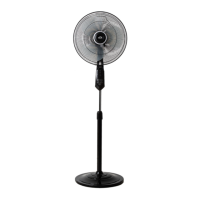

 To Next Page
 General