EasyManua.ls Logo

AirLive N450R - User Manual

AirLive N450R
108 pages
Print Icon
To Next Page IconTo Next Page
Loading...
1
N450
R
3T3R Wireless-N Dual Band Gigabit
Router
Use
r
s Manual

Other manuals for AirLive N450R

Questions and Answers

Summary

Introduction

Getting Start

2.3 Configure with Setup Wizard

Wizard walkthrough for configuring password, time zone, WAN type, and wireless parameters.

Configuration

3.2.1 Network Setup

Configuring LAN IP settings and various WAN connection types (Ethernet, 3G, PPPoE, etc.).

3.2.3 Wireless 2.4 G Settings

Configuring the 2.4GHz wireless network: mode, channel, SSID, security, and encryption.

3.2.4 Wireless 5 G Settings

Configuring the 5GHz wireless network: mode, channel, SSID, security, and authentication.

3.4 Security Settings

Security features: Packet Filter, Domain Filter, URL Blocking, MAC Control, and passthrough.

3.5.3 QoS

Prioritizing network traffic for different applications, users, or data flows.

3.7.3 Firmware Upgrade

Upgrading the router's firmware.

3.7.5 Reset to Default

Restoring the router to its factory default settings.

Appendix A: Troubleshooting

Router Configuration Issues

Troubleshooting why the router cannot be configured despite being plugged in and powered on.

Wireless Connection Troubleshooting

Diagnosing wireless setup, client internet access, and connection dropping problems.

Summary

Introduction

Getting Start

2.3 Configure with Setup Wizard

Wizard walkthrough for configuring password, time zone, WAN type, and wireless parameters.

Configuration

3.2.1 Network Setup

Configuring LAN IP settings and various WAN connection types (Ethernet, 3G, PPPoE, etc.).

3.2.3 Wireless 2.4 G Settings

Configuring the 2.4GHz wireless network: mode, channel, SSID, security, and encryption.

3.2.4 Wireless 5 G Settings

Configuring the 5GHz wireless network: mode, channel, SSID, security, and authentication.

3.4 Security Settings

Security features: Packet Filter, Domain Filter, URL Blocking, MAC Control, and passthrough.

3.5.3 QoS

Prioritizing network traffic for different applications, users, or data flows.

3.7.3 Firmware Upgrade

Upgrading the router's firmware.

3.7.5 Reset to Default

Restoring the router to its factory default settings.

Appendix A: Troubleshooting

Router Configuration Issues

Troubleshooting why the router cannot be configured despite being plugged in and powered on.

Wireless Connection Troubleshooting

Diagnosing wireless setup, client internet access, and connection dropping problems.

AirLive N450R Specifications

General IconGeneral
Frequency Band2.4 GHz
Max Wireless Speed450 Mbps
WAN Ports1 x 10/100Mbps
LAN Ports4 x 10/100Mbps
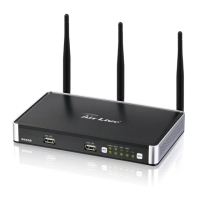
Antenna3 x 5dBi Detachable Antennas
FirewallSPI Firewall
Button FeaturesWPS Button, Reset Button
Operating Temperature0°C to 40°C
Storage Temperature-20°C to 70°C
Operating Humidity10% to 90% Non-condensing
Storage Humidity5% to 90% Non-condensing
Wireless StandardIEEE 802.11b/g/n
SecurityWEP, WPA, WPA2
FeaturesQoS, WDS

Related product manuals