Need help?
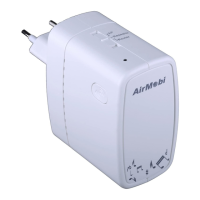
Do you have a question about the AirMobi ISHARE 2 and is the answer not in the manual?
Details the physical ports and indicators on the iShare2 device.
Configures iShare2 to create a WiFi hotspot from a wired connection.
Extends the coverage of an existing wireless router.
Sets iShare2 to function as a wireless router.
Step-by-step guide to setting up the device in Access Point mode.
Connects iShare2 to an existing router using WPS button.
Configures Repeater mode through the web interface.
Configuring Static IP, DHCP, or PPPoE for internet access.
Setting up the wireless network name (SSID) and password.
Instructions for downloading and installing the AirMobi app on iOS/Android.
Viewing and managing files from USB via AirMobi app.
Accessing shared files from USB via Windows/Mac and DLNA.
 General
| Brand | AirMobi |
|---|---|
| Model | ISHARE 2 |
| Category | Wireless Router |
| Language | English |

 To Next Page