6
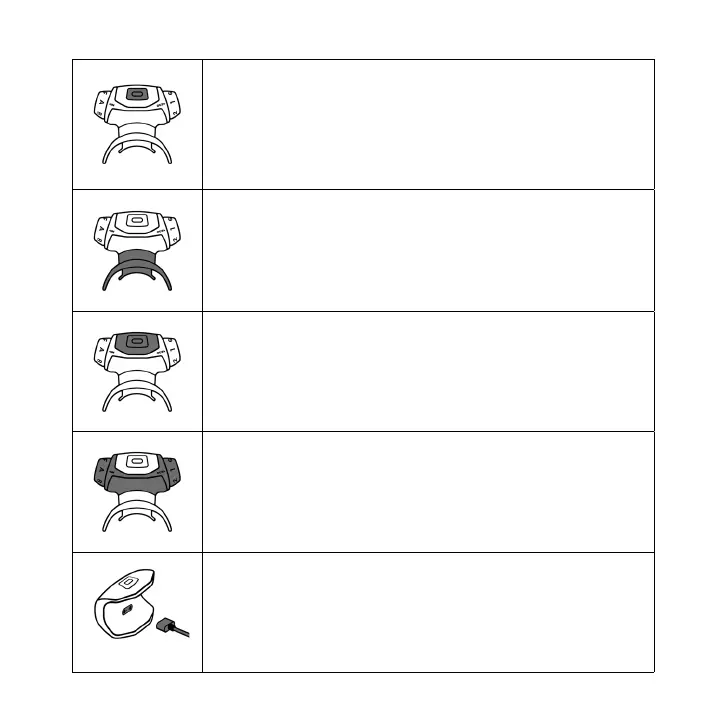
Power Button
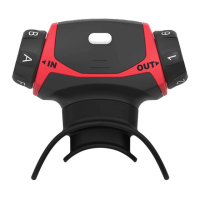
Press the Power button to turn ON the Airot PRO Breathing Trainer.
It will begin to blink green to indicate that the device is ON - at this
point, it is ready to be paired with the mobile application.
To turn the device OFF, press and hold the Power button for 3
seconds.
The Mouthpiece
The Mouthpiece is made of a softer material than the rest of the
Airot PRO Breathing Trainer to ensure complete comfort during
exercise.
To use it, gently bend the sides of the Mouthpiece and put it in your
mouth.
Removable E-Unit
The E-Unit contains electronic components. Do not expose it to any
liquids.
To clean or charge your Airot PRO Breathing Trainer, gently squeeze
the grips and remove the E-Unit from the rest of the Trainer.
Trainer Unit
The term ‘Trainer Unit’ is used for your Airot PRO Breathing Trainer
once the E-Unit and Mouthpiece are removed.
Charging
The charging port can be found on the inside of the E-Unit. Insert the
Micro USB cable to charge. If the light is blinking green, the cable is
inserted correctly, and your E-Unit is charging.
When fully charged, the light will show as solid green


 To Next Page