9
CONTROL PANEL FUNCTIONS
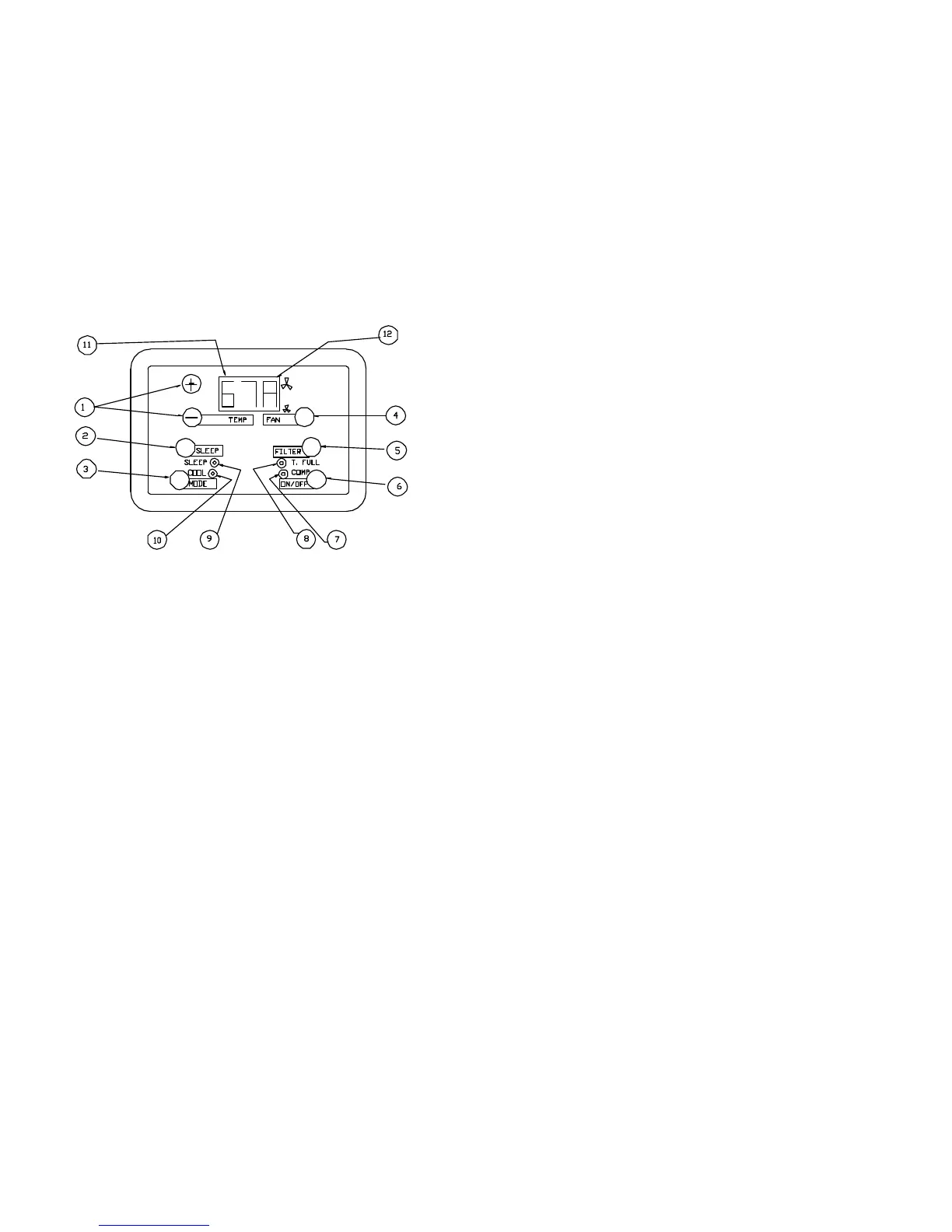
1. (TEMP) Push-buttons to set desired temperature, (+) for set point higher
and (-) for set point lower. Range is 60° to 85°F. Continuous pressing of 2 push
buttons simultaneously for instant display of ambient (return) air temperature.
While display is blinking by pressing the (+) button once to read the condenser
coil temp (does not display leading “1”). Press the (+) again to read the evapo-
rator coil temp. Display will return to normal after blinking stops.
2. (SLEEP) Push button to start sleep program. Timer that will raise the set
point temperature by 4°F after two hours. After 8 hours, the normal set point
temperature setting will resume.
3. (MODE) Push button to select operation mode: Cool, Dry, Ventilation (fan
only)
4. (FAN) Push button to select fan speed: Low, High, Automatic mode
5. (FILTER) Push button resets operation timer to zero. “FIL” appears in dis-
play after 250 hours of operation time. A reminder to clean or change your filter.
6. (ON/OFF) Push button for complete start and stop of the system
7. LED—Compressor: Steady light when compressor is on, flickering indi-
cate 3.5 minute count down to compressor start up.
8. LED—Tank Full: Condensate alarm. Flickers and beeps on any of these
conditions: front door open—not latched; tank(s) full; tank plug not in place; or
condensate pump emergency shut off (fans and compressor are disabled).
Turn unit off, clear tank fault, and restart for normal operation.
CONTROL PANEL FUNCTIONS
9. LED—Sleep: Steady light when Sleep program is selected.
10. LED-COOL : Steady light when COOLING mode is
selected by pressing the MODE button. Flickering indicates
timer program activated by remote control (optional).
11. LED –Display: Left and center digit displays desired
temperature or operational temperatures when flickering.
12. LED—Display: Right digit displays indoor fan status. Low
line for low speed, high line for high speed. “A” in display
means alternating fan speed according to the temperature.
Additional displays and features:
__F– Ventilation mode selected. Left digit “F” is displayed.
D__- Drying mode selected. Right digit “D” is displayed.
ER1—communication failure between controller and board
ER2—Short or open circuit of the room sensor
ER3—short or open circuit of either coil sensor
FIL—Reminder to clean or change filters every 250 hours
OFF—System off. Ready for input.
BLANK—No power to system board or controller.
Board and controller are connected with a 6 wire telephone
cable. Control panel can be mounted remote up to 50m. Do not
cross wires or connectors in telephone cable. Do not
disconnect controller from cable without disconnecting power
Memory at power failure or shut down—Restarts system at
latest operating mode and set points.
Drying Mode Operation—To reduce humidity. If temperature is
above set point temperature: compressor operate
continuously. If temperature is at requested temperature:
Compressor operates in 8 minutes ON and 4 minutes OFF
cycles. If temperature is below set point—compressor cycles 6
minutes on, 6 minutes off. Inside fan at low speed On and Off
at 30 second delays.
Control Panel
10


 To Previous Page
 Loading...