
 Need help?
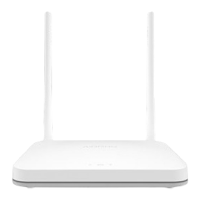
Do you have a question about the Airpho AR-W200 and is the answer not in the manual?
Turn off the modem and remove its backup battery if available.
Connect the router's WAN port to the modem's LAN port using an Ethernet cable.
Power on the modem and wait approximately one minute for it to restart.
Connect the router to power and wait one minute for it to boot.
Connect your computer to a router LAN port via Ethernet cable, disabling WiFi.
Connect using the router's SSID and Wireless Password found on the product label.
Open a web browser and navigate to http://192.168.2.1 to access the management page.
Follow the prompts of the Quick Setup Wizard to configure the router.
Select the correct WAN connection type and enter ISP-provided parameters.
Customize your WiFi network name (SSID) and password.
Establish a password for future access to the router's web management page.
Review your configurations and confirm to apply changes or go back.
Click Finish to exit the Quick Setup process.
Steps to resolve issues with the router's login window not appearing.
Solutions for when the router fails to provide internet access.
Instructions on how to reset the router to its original factory settings.
Steps to follow if the web management password is forgotten.
How to retrieve or reset the wireless network password.
 General
| Brand | Airpho |
|---|---|
| Model | AR-W200 |
| Category | Network Router |
| Language | English |

 To Next Page