
 Need help?
Do you have a question about the Airpixel AIR Commander Entire and is the answer not in the manual?
Guidelines for safe operation of the AIR Commander Entire.
Connect power cable to PWR connector for 5V power source.
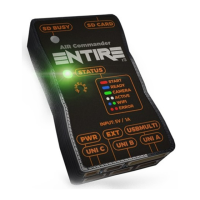
Describes LED status during system startup and operation.
Warning about interconnected input/output pins and voltage limits.
Load Entire's overview page via browser using a URL.
Displays system info and navigation to Control page.
Warning about exceeding input voltage and potential harm to the camera.
Connecting the AIR Commander Link using PORT A or B for remote commanding.
Steps for wirelessly binding the AIR Commander Link Receiver and Transmitter.
Explains the PWR, STAT, and CONN LEDs on the transmitter.
Assigning AIR Commander Link commands to specific functions of the Entire.
Using SBUS input for controlling the Entire and Camera with an RC controller.
Combining multiple functions into two channels for simplified control.
Using QGroundControl plugin for camera control via MavLink.
Controlling compatible cameras using the Entire's Wi-Fi connection.
Notes on automatic scan and Wi-Fi hotspot availability during setup.
Steps to configure the Entire for Bluetooth camera control using a dongle.
Critical warning about power source stability during firmware updates.
Troubleshooting missing HDMI feed during USB recording on SONY cameras.
Solution for missing HDMI feed in Movie mode using WiFi control.
Addresses WiFi hotspot issues related to unstable input power.
Explains the 'Don't reconnect USB after photo' feature for efficiency.
Clarifies the SD card slot usage for GeoTagging purposes only.
Contact information for the manufacturer, AIRPIXEL.CZ.
 General
| Battery Life | Up to 6 hours |
|---|---|
| Charging Time | Approximately 2 hours |
| Function | Remote control for triggering camera actions |
| Connection | Wireless |
| Material | Plastic |
| Package Contents | AIR Commander, USB-C charging cable |

 To Next Page