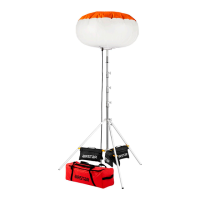
The Airstar Crystal Pixel White & Dynamic White is a versatile lighting solution designed for various applications, offering both static white and dynamic white light options. This user guide covers models with diameters of 90, 130, 160, and 200 cm.
Function Description
The Crystal Pixel is a balloon light system that provides illumination through an LED stage housed within an inflatable envelope. It can be used for events, film sets, and other professional lighting needs. The system allows for control over light animations, ambiance, DMX address, LED stage type (White or Dynamic White), inflation fan speed, and Airstar Mesh network functions.
Important Technical Specifications
The Crystal Pixel operates on a voltage of 100-240 VAC at a frequency of 50-60 Hz, with a power factor (Cos φ) of 0.94.
- Overall Performance: 132 lm/W for both Crystal Pixel White and Dynamic White models.
- Overall Energy Consumption: 500 W for Crystal Pixel White, and 500-250 W for Crystal Pixel Dynamic White.
- Luminous Flux: 66,000 lm for Crystal Pixel White, and 2x33,000 lm for Crystal Pixel Dynamic White.
- Number of LED Modules: 12.
- Power of LED Module: 35 W.
- Color Temperature: 4,000 K for Crystal Pixel White, and 3,000-6,500 K for Crystal Pixel Dynamic White.
- Lifetime: 50,000 hours.
- Diameter of the Envelope: Available in 90 cm (35.44 in), 130 cm (51.19 in), 160 cm (63 in), and 200 cm (78.75 in).
- Envelope Shape: Sphere.
- Weight (kg/lbs):
- Crystal Pixel White & Dynamic White 90: 10.1 kg / 22 lbs
- Crystal Pixel White & Dynamic White 130: 10.9 kg / 24 lbs
- Crystal Pixel White & Dynamic White 160: 11.5 kg / 25 lbs
- Crystal Pixel White & Dynamic White 200: 12.5 kg / 27 lbs
- Operating Temperature Range: From -20 to +40 °C (From -4 to +104 °F).
- Storage Temperature Range: From -30 to +60 °C (From -22 to +140 °F).
- Power of the Generator: 1 KVA.
- Maximum Wind Speed (km/h - mph):
- Crystal Pixel White & Dynamic White 90: 80 km/h / 49 mph
- Crystal Pixel White & Dynamic White 130: 70 km/h / 43 mph
- Crystal Pixel White & Dynamic White 160: 60 km/h / 37 mph
- Crystal Pixel White & Dynamic White 200: 50 km/h / 31 mph
Usage Features
The Crystal Pixel offers both local control and remote control via the Airstar Light app.
Local Control:
The local control display, located below the service stage, allows users to:
- Define Predefined Light Animations/Ambiance: Choose from various settings like "Basic," "Pulse," "Beacon," "Random Light Ball," "Random Light Spot," and "Fire."
- Set DMX Address: Assign a DMX address for external control.
- Modify Parameters: Adjust the type of LED stage (White or Dynamic White), inflation fan speed, and disable/enable Airstar Mesh network functions.
- User Mode: For normal use and setting animations. Options include:
- Animation: Off, Basic, Pulse, Beacon, Random Light Ball, Random Light Spot, Fire, DMX address, Full Light (with Airstar Light app).
- Ambiance (Crystal Dynamic White): Cold White, 89% Cold 11% Warm, 78% Cold 22% Warm, 67% Cold 33% Warm, 56% Cold 44% Warm, 45% Cold 55% Warm, 34% Cold 66% Warm, 23% Cold 77% Warm, 12% Cold 88% Warm, Warm White.
- Ambiance (Crystal White): Only Cold White and Warm White options are available.
- Brightness: Adjustable from 0% to 100% in 10% increments.
- Frequency: One-way animation and reverse animation direction, adjustable from 0% to 100% in 10% increments.
- Expert Mode: Accessed by pressing and holding the right button for 10 seconds. This mode allows for modification of product parameters and management of network functions.
- Product Settings: Change LED stage type (White or Dynamic White).
- Network Settings: Enable or disable network functions.
- Fan Settings: Adjust fan speed (Silent, Usual, Windy) to control noise level.
Airstar Light App:
The Airstar Light mobile application (available on App Store and Google Play) provides remote control over light intensity and characteristics.
- Airstar Mesh Network: The status is lit when this feature is enabled.
- Security: Important to change administrator (default: 1994) and user (default: 2020) passwords, and the network name. Up to 5 authorized users can be set.
DMX and WDMX (Wireless DMX):
The Crystal Pixel supports DMX control with two main modes:
- Macro Mode: Offers predefined and customizable animations. Requires 4 to 16 channels depending on the balloon type (White or Dynamic White) and chosen animation. The Crystal Pixel is divided into 6 columns for fine-tuning color animation.
- Crystal Pixel White: Channels for Animation, Intensity, Frequency, Ambiance, and 6 color columns (cW C1-C6).
- Crystal Pixel Dynamic White: Channels for Animation, Intensity, Frequency, Ambiance, and 6 color columns (cW wW C1-C6).
- Pixel Mode: Allows users to control the LED matrix as desired. Overall brightness can be adjusted with a dedicated channel.
- Crystal Pixel White: Channels for Intensity and 6 color columns (W Column1-6, Row1-2).
- Crystal Pixel Dynamic White: Channels for Intensity and 6 color columns (cW wW Column1-6, Row1-2).
- WDMX Option: Integrates a W-DMX module from Wireless Solution. A Wireless Solution transmitter box is required. The WDMX LED indicates the status of the WDMX link and DMX data presence. To unlink WDMX, press the button for 4 seconds.
Installation:
- Assemble the LED stage, service stage, and pipes.
- Connect the electrical harness between the service stage and the LED stage.
- Place the envelope from top to bottom, screwing the wheel on top, unfolding the envelope, and closing the zipper.
- Install the Crystal Pixel on a stand (e.g., P500TA).
- Connect the power cord under the service stage.
- Plug into a power source.
Stand Installation (P500TA):
- Use Airstar approved stands.
- Tighten all T-handles firmly.
- Stands are for vertical mounting only.
- Unfold the stand, lock the base, slide support legs horizontally, and place sandbags on horizontal bars.
- Ballast bags are mandatory (minimum 11.3 kg/25 lbs).
- Wind speed guidelines for ballast and guy ropes:
- Crystal Pixel 90: Up to 80 km/h (49 mph) with guy ropes and 6 bags (68 kg/150 lbs).
- Crystal Pixel 130: Up to 70 km/h (43 mph) with guy ropes and 6 bags (68 kg/150 lbs).
- Crystal Pixel 160: Up to 60 km/h (37 mph) with guy ropes and 6 bags (68 kg/150 lbs).
- Crystal Pixel 200: Up to 50 km/h (31 mph) with guy ropes and 6 bags (68 kg/150 lbs).
Maintenance Features
Envelope Maintenance:
- Repair/Replacement: A damaged envelope should be repaired or replaced immediately.
- Cleaning: Clean regularly with mild soap and water only.
- Changing an Envelope:
- Removal: Open the zipper, unscrew the wheel on top, and remove the envelope from bottom to top.
- Installation: Place the new envelope from top to bottom, screw the wheel, unscrew it a quarter turn, and close the zipper.
- Repairing a Hole: Clean the area, cut a repair patch from the provided kit (J) large enough to cover the damaged area, place the patch both inside and outside the envelope, and apply strong pressure.
Storage:
- Cover the envelope when deflated on site.
- Store in a dry, ventilated area away from heat sources and chemicals.
- Ensure the envelope is completely dry before storing.
General Precautions:
- Do not look at the light source without the envelope.
- Installation must be performed by a qualified team.
- Repairs must be performed by an Airstar authorized technician.
- Unplug the product and allow 15 minutes to cool before servicing.
- Do not use with a damaged envelope, electronic components, or missing parts.
- Do not use on uneven surfaces or slopes greater than 8°.
- Do not use if wind speed exceeds recommendations.
- Use referenced stands.
- Adjust stand height based on weather conditions.
- Use only grounded extension cords and outlets.
- A ground fault circuit interrupter is required in humid environments.
- Do not use chemical solvents to clean the envelope.
- Protect the envelope from walls, projectiles, electrical wires, trees, and animals.
- Do not modify electrical components or structure.
- Do not use if the power cord is damaged, twisted, or tangled.
- Never plug/unplug the harness while powered on.
- Operate with a clean, unclogged filter.
- Handle with care when stored in original packaging.
- Replace any damaged or torn container.
Warranty:
- Envelope: 6 months against manufacturing defects from the date of purchase.
- Electronic and Structural Components: 2 years against manufacturing defects from the date of purchase.
- Warranty Claim: Contact an authorized Airstar dealer with a copy of the original invoice for technical analysis. Repairs covered by warranty will be shipped back at Airstar's expense (express shipping available for an additional fee).
- Replacement: Original unit must be received before shipping a replacement.
- Exclusions: Mishandling, unauthorized operations, or use of unapproved tools/components are not covered.

 Need help?
 General

 To Next Page