ELECTRICAL
G - 9
G
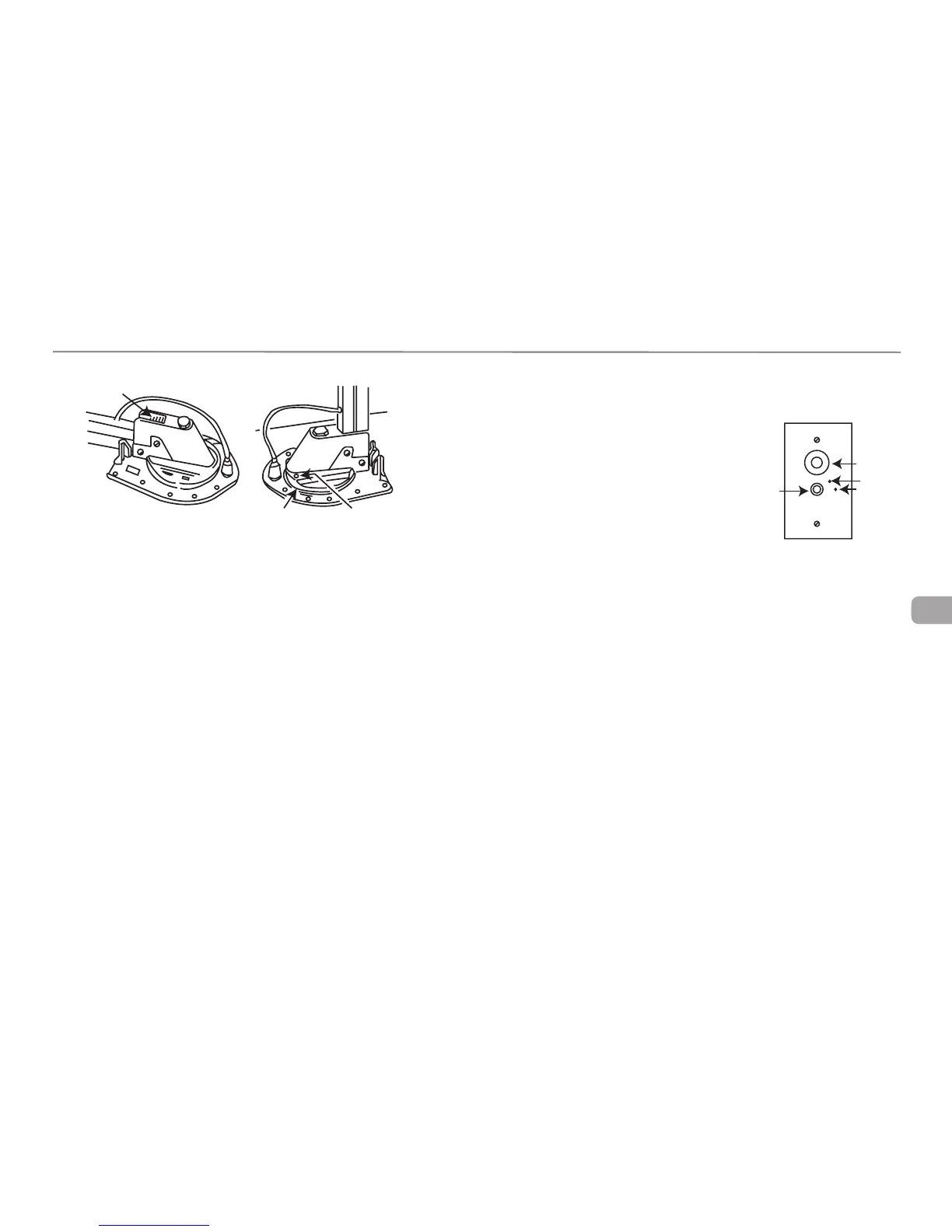
Elevate antenna and remove setscrew from rotating gear housing as shown.
Spray lubricant into hole and around edges of gear housing. Rotate gear hous-
ing until lubricant coats bearing surfaces and antenna rotates freely.
TV Booster/12 Volt Outlet
The TV booster amplifies the signal from
the TV antenna. Pushing the booster button
switch activates and deactivates the booster.
A green light comes on when the booster is
activated. For viewing while hooked up to an
exterior cable TV source, turn the booster
off.
NOTE: The TV Booster must be on to receive antenna signals and off for
cable/satellite TV operation.
Please review the antenna and booster manuals include in your owner’s
packet before operating the system.
TV Outlet
w/Booster &
12 Outlet
12 V
Outlet
Booster
Switch
TV Cable
Hook Up
Light
LUBRICATE HERE
SPRAY AROUND EDGES
REMOVE SET SCREW




 To Next Page