EasyManua.ls Logo

AirTurn PED - User Manual

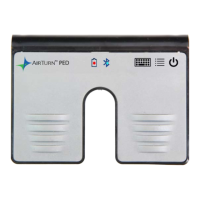
AirTurn PED
16 pages
Print Icon
To Next Page IconTo Next Page
Loading...
HANDS-FREE
BLUETOOTH CONTROLLER
for SMART READY TABLETS AND COMPUTERS
Operating Manual
Question and Answer IconNeed help?

Do you have a question about the AirTurn PED and is the answer not in the manual?

Summary

Before Turning on Your PED

Power Management

Product Modes

PED-APP-Direct Mode (Mode 1)

For Apple iOS apps, requires specific app support and URL.

Up;Down Arrow Mode (Mode 2)

Left pedal Up Arrow, Right pedal Down Arrow. Common for iOS/Android.

Left;Right Arrow Mode (Mode 3)

Left pedal Left Arrow, Right pedal Right Arrow.

PgDn;PgUp Keys Mode (Mode 4)

For PC/MAC document apps like Word, PowerPoint, Acrobat.

Space;Enter Keys Mode (Mode 5)

For Assisted Technology Apps. Left pedal Space, Right pedal Enter.

Mouse Click Mode (Mode 6)

Left pedal Left Mouse click, Right pedal Right Mouse click.

Changing the Mode

Connecting and Pairing

Pairing in PED-APP-Direct Mode 1

Steps for pairing the PED with specific apps using the PED-APP-Direct mode.

Pairing in Modes 2-6

Instructions for pairing the PED with iOS, Android, PC, and MAC devices.

Resetting Pairing

Procedure to clear existing Bluetooth pairings and reset the device.

Power Consumption

Virtual Keyboard in iOS

Battery Replacement and Life

Firmware Updates and Custom Modes

Unit Identification

Care and Maintenance

Product Warranty Information

Radio Information

Recycling and Disposal

Trademarks

AirTurn PED Specifications

General IconGeneral
BrandAirTurn
ModelPED
CategoryNetwork Router
LanguageEnglish