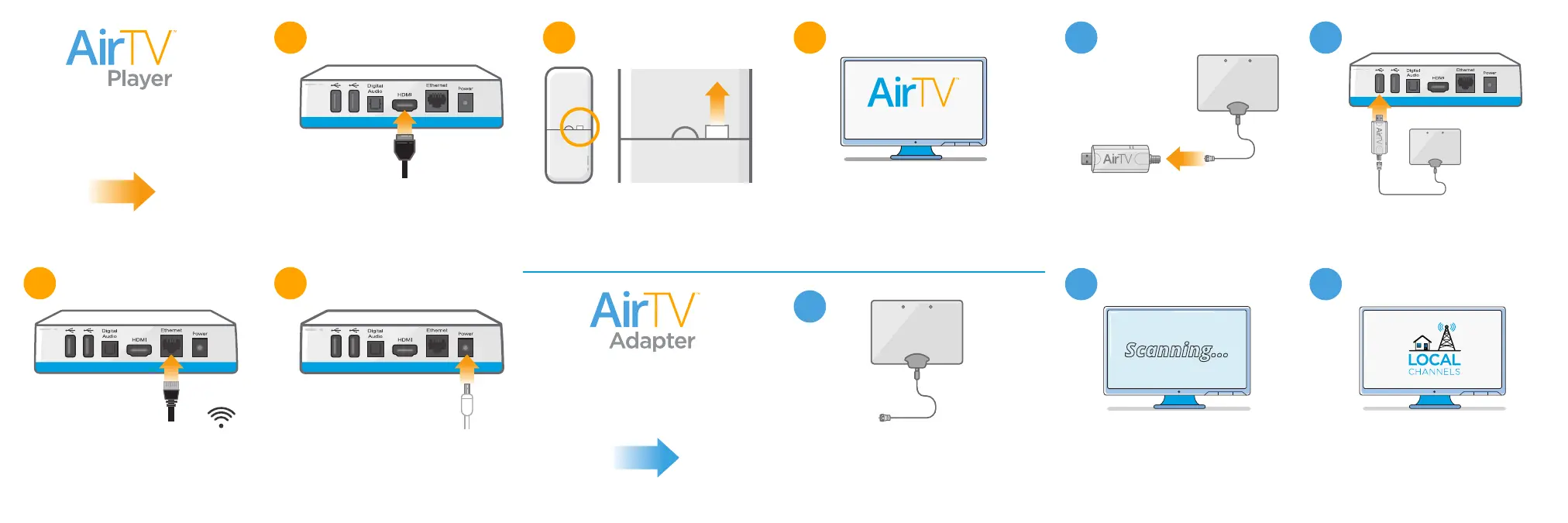
Connect AirTV Player… to your
TV using the included HDMI cable.
Set up your OTA antenna…
by placing it in the best location
in your home. See Antenna Tips
for additional help.
Connect AirTV Adapter…
to your antenna using a coax
cable (not included).
Connect AirTV Adapter… to
AirTV Player directly or with the
included USB extension cable.
Connect to Internet… using
your own Ethernet cable from your
router. Or connect to your WiFi
network during on-screen setup.
Connect to power… and the
light on the front of the AirTV
Player will turn on.
Get the remote ready… by
pulling the plastic tab to activate
the batteries.
Complete on-screen setup…
by following the prompts, and
logging in to Sling TV and Google
(you can create an account during
setup if you need to).
– OR –
7
9
2
1 8
10
6
54
3
PULL
Scan for OTA channels…
by following the on-screen
prompts.
Start watching live OTA
channels! If you don’t see all
your OTA channels, visit
AirTV.net/Help.
Scanning...
First, set up your
AirTV Player
Next, set up your
AirTV Adapter
setup


 To Previous Page