8
HOW TO CLEAN THE FLAT PANEL
The at panel must be cleaned by soft cloth with water or
mild cleanser. Avoid using abrasive or corrosive cleaner.
Never apply any chemical for cleaning.
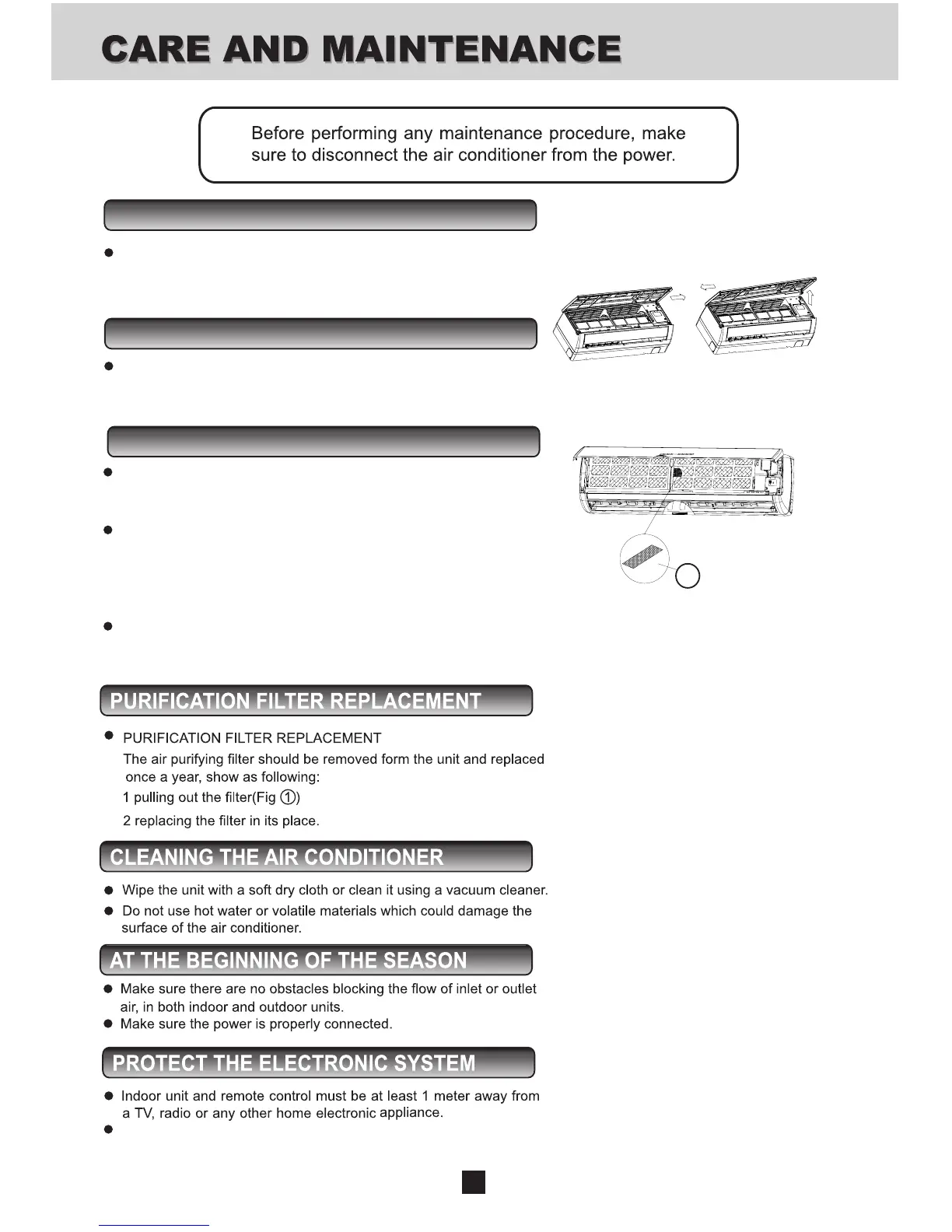
HOW TO REMOVE THE PANEL
Open the front panel and push it to the right, then pull out
the right crank, and then pull the front panel to the left and
take it out from the front frame.
CLEANING THE FILTER
Your air conditioner is provided with a lter cleaning
indicator. When the indicator lights up, the lters should
be removed for cleaning.
To remove the air lters, lift up the panel, push the air
lters up slightly to unlock them. Pull out the lters,
clean the lter by washing in warm soapy water and dry
thoroughly, align and t the lters in place, close the panel
by pushing it in the center to lock it in place.
RESET button to turn off indicator.
DO NOT OPERATE THE UNIT WITHOUT FILTERS!
1
Protect the indoor unit from direct sun or lighting.



 To Next Page