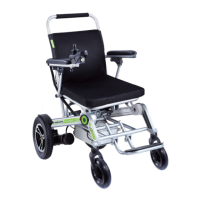
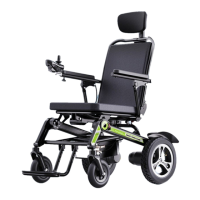
The Airwheel H3TS is a smart wheelchair designed for personal mobility, offering both manual and electric modes of operation, along with automatic folding and extending functions. It is designed for ease of use, portability, and safety, catering to individuals who require assistance with mobility.
Function Description:
The Airwheel H3TS functions as an electric wheelchair controlled by a joystick, allowing users to move forward, backward, left, and right, as well as accelerate and decelerate. It features an automatic folding and unfolding mechanism, which can be activated via the controller. The wheelchair can also be operated in a manual mode by disengaging the clutch, allowing it to be pushed by an attendant. For safety, it includes a braking system that is active in electric mode. The armrests are adjustable, capable of being lifted up and down, and moved forward and backward. The foot backer and footrest are also adjustable for user comfort. The device incorporates indicator lights and a rear light for visibility. An optional backpack can be attached for carrying personal items. The H3TS can also be controlled via a smartphone app, offering remote control and additional smart features.
Important Technical Specifications:
- Size: 1100x620x980mm
- Folding size: 960x620x680mm
- Item weight: ~37kg
- Max. load: 130kg
- Rotation radius: 1.2m
- Standard max. speed: 6km/h
- Braking performance: ≤ 1.5m
- Charging time: about 5H
- Frame: Aluminum alloy 6061
- Climbing capacity: about 8°
- Slope capacity: about 8°
- Battery: lithium 25.2V 524Wh
- Reduction gearbox: worm and gear reduction ratio 1:32
- Applicable temperature: -15℃ ~50℃
- Over-obstacle capacity: <40mm
- Trench crossing capacity: <100mm
- Front wheel: 8 inch
- Rear wheel: 12.5 inch, inflatable tire
- Motor: Dual-drive brush motor with clutch pull rod. Power: 200W; voltage: 24V; revolving speed: 3776rpm
- Automatic folding function: a key to automatically contract and extend, armrest can be lifted up and down, and moved forward and backward
Usage Features:
- Unpacking and Initial Setup:
- Open the carton, take out the wheelchair, and place it gently on the floor.
- Locate and remove the accessory box from the rear of the wheelchair.
- Remove the cardboard near the motor lock.
- Turn the motor lock to drive mode (electric mode).
- The accessory box contains a charger, controller, rear stand, user manual, plastic tie, and assembling tools.
- Turning on the Main Power:
- The power switch is located at the rear of the battery box.
- An extended charging plug is located underneath the front light.
- Controller Setup and Wheelchair Unfolding:
- Take out the controller from the accessory box.
- Ensure the main power on the battery box is turned on.
- Press the power switch on the controller.
- To unfold, press and hold the folding key (①) for 3 seconds; release the button when the LEDs are on and a beep sound is heard.
- To fold, press and hold the unfold key (②) for 3 seconds.
- Press key (③) to stop folding or unfolding.
- Joystick and Armrest Installation:
- Insert the joystick into the armrest slot, tighten the screws, and fix the wiring with cable ties.
- Unscrew the screw on the armrest bracket, insert the armrest, then tighten the screw.
- Controller Operation:
- Power Switch: Press to turn on/off the wheelchair. If the wheelchair is folded, turn on the power on the battery box first, then the controller.
- Horn Button: Press to activate the buzzer.
- Headlight Switch: Turn on/off the headlight.
- Speed down / Fold: In power-off state, press for 2 seconds to enter extending/contracting mode. In ready mode, decreases speed.
- Speed up / Unfold: In power-off state, press for 2 seconds to enter extending/contracting mode. In ready mode, increases speed.
- Stop folding / unfolding: Stops extending or contracting.
- 5-level LED power indicator: Shows remaining battery capacity (each LED represents 20%).
- Speed indicator: LED lights indicate current speed.
- Joystick: Push forward for forward movement, backward for backward movement, left for left turn, and right for right turn. Release the rod to slow down and stop.
- Clutch Operation:
- Pull the tie rod to the open position (hand mode) to disengage the brake, allowing the wheelchair to be pushed manually.
- Push the tie rod to the closed position (electric mode) to engage the brake, enabling electric drive.
- Warning: The clutch lever must be in electric mode for driving. It is prohibited to use hand mode when going uphill or downhill to ensure safety.
- Armrest Operation:
- Press button ① and hold to slide the armrest forward and backward.
- Press button ② and hold to draw up and down to an appropriate position; release the button for fine tuning until the lifter is stuck.
- Foot Backer Instructions:
- Retract: Push the lever in the direction of the vehicle tail (Figure 6-1), and simultaneously push the foot backer in the direction of Figure 6-1.
- Extend: Pull the lever in the direction of Figure 6-2.
- Height Adjustment: Rotate the backer in the direction of Figure 6-3, slide it to a comfortable position, and secure the screw into the bayonet.
- Indicator Light/Rear Light Instructions:
- The rear light is always on when the power switch is on.
- When the indicator light switch is turned to arrow ①, the left indicator turns on and blinks.
- When the indicator light switch is turned to arrow ②, the right indicator turns on and blinks.
- When the indicator light switch is in the middle, the indicator does not work.
- App Download (Optional):
- Scan the QR code to download the app (compatible with Android 4.3 or higher, iOS 7.0 or higher).
- Turn on H3TS power, start the app, and connect via Bluetooth.
- Search for the device, select the Airwheel model, and input the verify password (11111111) to connect.
- The app allows power on/off, headlight control, buzzer activation, and remote control of movement and folding/unfolding.
Maintenance Features:
- Charging: Connect the charger to the wheelchair's charging port before connecting to AC power. Align the notch on the charger with the protruding part of the charging port, insert, and tighten the fixing cap. Loosen the fixing cap before removing the charger.
- Battery Usage:
- For short delivery times, users can directly use the battery. For longer delivery times (2 months or more), the battery will lose power during storage and transport. It is recommended to charge the battery before use.
- The battery requires plugging the exclusive charge to the battery charging hole and connecting to AC100-240V power source for 5 hours until the charger is full.
- The normal charge of the battery is the discharge process. The battery should be charged immediately after the use of the power-assisted vehicle.
- Turn off the power if not riding.
- The connectors of the battery box should be fixed tightly. Loosened or wrong connections can cause related parts to be abnormal and lead to serious damage.
- Lithium batteries cannot be exposed to open fire or high temperature heat sources, nor can they be thrown into water.
- Do not disassemble and decompose the internal part of the lithium battery.
- The waste lithium battery is to be recycled by the enterprise or dealer, and the government designated outlets. Do not throw away waste batteries.
- General Maintenance:
- Do not expose the electrical system to humid environments (rain, snow, fog).
- Do not wash the vehicle with water, which will damage the electrical system. If wet, it should be dried and confirmed for good condition.
- Do not drive the H3TS under hostile weather conditions such as rain, snow, fog, strong wind, or temperatures lower than -20°C or higher than 40°C.
- Do not drive the H3TS on desert, beach, muddy road, road with pooled water, iced road, too smooth road, or saline and alkaline land to prevent damage.
- Folding Malfunction: If the wheelchair cannot be folded automatically due to an electrical malfunction, remove the screws located at the rear of the wheelchair to fold/unfold it manually.
- Power Off When Not in Use: Turn off power to prevent the battery from over-discharging if riders don't use it.
- After Operation: If not using the H3TS for over 48 hours, turn off the power switch. When bringing H3TS to other vehicles, ensure the battery is fixed.
Safety Precautions:
- Read the User Manual carefully and follow riding requirements.
- Familiarize yourself with local traffic rules.
- H3TS is designed for non-motor vehicles, suitable for the elderly and people with mobility problems. No driving license is needed, but traffic laws must be observed.
- Familiarize yourself with all traffic signals and do not turn suddenly when driving.
- Practice operations like moving forward, increasing speed, reducing speed, stopping, moving backward, moving uphill, moving downhill, and turning direction in a safe pace.
- If possible, have a person familiar with H3TS accompany you during your first on-road operation.
- Do not drive H3TS after drinking, when exhausted, or if not clear to guarantee your safety.
- Confirm that the operator is not suffering from any mental disease or other diseases that may affect driving ability.
- If taking medicine, confirm with your doctor that it will not adversely affect your ability to operate H3TS.
- Check the vehicle condition to confirm if the brake and various properties are normal, if the seat is locked, and if the charge volume is enough.
- Do not refit H3TS without authorization.
- H3TS is designed with only one seat, not allowing for taking passengers.
- H3TS is not intended to be used for moving or loading cargos.
- The operator should sit on the seat and grip the handle for operation.
- Do not drive in a zigzag manner, take sudden turns at high speed, or incline your body to prevent H3TS inclination.
- Drive slowly on uneven or soft roads (grassland), when making a turn, on streets with a lot of traffic, in shopping centers or parks.
- Do not use wireless communication devices such as mobile phones while driving. These devices could only be used when you stop the H3TS in a safe place and cut off the power supply.
- When moving backward, pay attention to road conditions and pedestrians.
- Drive at a slow speed when getting out of a door or elevator. It is not permitted to sit on the H3TS on an escalator.
- Keep highly concentrated, fasten the safety belt, and drive straightly at a slow speed when driving uphill or downhill. It is not permitted to drive the H3TS across slopes exceeding the limit of this vehicle.
- Do not cross the slope exceeding 5° at a high speed.
- Do not cross over obstacles or steps higher than 4cm, which may impede H3TS from moving forward.
- Do not cross any gap wider than 10cm. Drive H3TS straightly when crossing gaps less than 10 cm in width.
- Follow traffic rules when driving through cross streets and do not run a red light. When passing railways, stop to observe the surrounding conditions, and then drive across the railway slowly in a direction perpendicular to tracks to avoid dropping into the gap between different sleepers.
- Do not frequently lock or unlock the electrical door. Do not frequently start or stop the H3TS.
- Do not lend your H3TS to anyone who is not familiar with or has never used this vehicle. Do not let children play with the electrical door lock or operational handle.
- Do not use this vehicle with too much load (higher than 130KG).
- When releasing the operation handle during driving and the handle has returned to the central position, but the H3TS does not stop, immediately lock the electrical door and contact the nearest dealer.

 Need help?
 General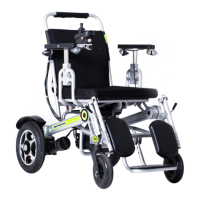

 To Next Page