Need help?
Do you have a question about the AIS Fibre HUMAX ONT and is the answer not in the manual?
Describes the status of the POWER LED indicator.
Describes the status of the CONNECTION LED indicator.
Describes the status of the ALARM LED indicator.
Describes the status of the ETH LED indicator.
Identifies and describes the physical ports on the device's back panel.
Explains the HUMAX ONT application interface and its functions.
Step-by-step guide for activating the device using the application.
Step-by-step guide for registering the device via the web portal.
Guides on reconnecting, changing LAN, and measuring Rx/Tx optical power.
Explains the meaning of LED states during normal device operation.
Details on initial power-up, fiber cable connection, and related LED indicators.
Explains LAN connection status and fiber issue indication via Alarm LED.
 General
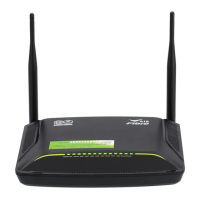
| Model | HUMAX ONT |
|---|---|
| Category | Network Router |
| Manufacturer | HUMAX |
| LAN Ports | 4 x Gigabit Ethernet |
| USB Ports | 1 x USB 2.0 |
| Wi-Fi | Yes |
| Power Supply | 12V DC |
| Weight | 500 g |
| Type | Optical Network Terminal (ONT) |
| WAN Port | GPON |
| Wi-Fi Standards | 802.11b/g/n/ac |


 To Next Page