The Aiwa AR2203 Handheld Cordless Vacuum Cleaner is designed for efficient and flexible cleaning, offering continuous large suction to effectively remove dust and debris from various surfaces. Its wireless design enhances user comfort and convenience by eliminating the need for power cords and frequent socket changes.
Technical Specifications:
- Product Name: Handheld Wireless Vacuum Cleaner
- Product Model: AR2203
- Rated Voltage: 14.4V
- Lithium Battery Capacity: 2,500mAh
- Rated Power: 160W
- Dimensions: 235 x 175 x 1,150mm
- Charge Voltage: 18V
- Charge Current: 500mA
- Weight: 1.85kg
- Dust Cup Capacity: 0.6L
- Battery Life (Standard/High-end): Approximately 20 minutes / 13 minutes
- Charge Time: Approximately 5.5 hours
- Degree of Vacuum: Max. 7KPa
- Material: ABS/PC
Usage Features:
The vacuum cleaner boasts an attractive, fashionable appearance, with the ground brush connected to the body via an elegant aluminum pipe. Its 360° anti-static design, coupled with a soft woolen rolling brush, ensures superior cleaning results, especially for fine dust.
The device offers free disassembly and assembly, allowing users to switch between push rod and handheld modes. The ground brush can be easily removed to install other fittings, enabling multiple functions to meet diverse cleaning demands. This flexibility allows the ground brush to turn at multiple angles, reaching deep into wall corners and under furniture, ensuring thorough cleaning of difficult areas.
Inside the dust cup, a cyclone filtering structure prevents dust backflow. This structure is removable, washable with water, and recyclable after cleaning, contributing to a cleaner living environment.
Instructions for Use:
-
Assembly:
- Insert the connecting pipe assembly into the body's connecting point until it's securely in position.
- Install the ground brush assembly into the connecting point in the same manner.
- For specific needs, insert optional fittings into the body or the connecting pipe assembly, ensuring a firm connection.
-
Operation:
- Long-press the power button to start the cleaner in standard dust suction mode.
- A short press of the button again will switch the cleaner to strong dust suction mode.
- Pressing the button once more will put the cleaner into shutdown mode. These modes can be cycled through by repeatedly pressing the button.
-
Indicator Lamp Display States: The cleaner features four LED indicator lamps.
- When turned on, all four lamps are constantly blue.
- As battery charge is consumed, lamps turn off from top to bottom: 25% used (first lamp off), 50% used (second lamp off), 75% used (third lamp off), and fully used (fourth lamp off).
- If the battery is depleted and the cleaner is forcibly turned on, all four lamps will flash red for three seconds, indicating the need for charging.
- During Charge: Lamps illuminate cyclically in blue from top to bottom.
- 25% charged: One LED lamp is constantly blue.
- 50% charged: Two LED lamps are constantly blue.
- 75% charged: Three LED lamps are constantly blue.
- 100% charged: Four LED lamps are constantly blue, indicating a full charge.
Maintenance Features:
- Cleaning the Cleaner Body: Clean the cleaner with a dry cloth. Avoid using chemical solvents like gasoline, alcohol, or banana oil, as these can crack or fade the casing.
- Power Off for Maintenance: Always turn off the cleaner before cleaning or repairing it.
- Dust Cup Cleaning:
- Rotate the dust cup to align the triangle arrow with the unlock symbol, then remove it.
- Separate the dust cup from the body.
- Remove the HEPA filter holder and cyclone tower assembly. Empty the dust from the cup and clean it.
- The dust cup can be washed directly with water and reused after drying. It is recommended to wash the cup once a week.
- Rolling Brush Replacement and Cleaning:
- Move the rolling brush release button downward to remove and replace the brush.
- Clean any hair or fibers from the brush surface. It is recommended to check for and remove hair/fiber tangles after each use to ensure normal operation of the ground brush.
- Filter Replacement: It is recommended to replace the filter every three months. Frequent use may shorten this period.
Safety Notices:
- Only use the detachable supply unit provided with the appliance for recharging.
- The appliance can be used by children aged 8 and above and persons with reduced physical, sensory, or mental capabilities, or lack of experience, if supervised and instructed on safe use.
- The plug must be removed from the socket-outlet before cleaning or maintaining the appliance.
- Children should not play with the appliance or perform cleaning/user maintenance without supervision.
- Batteries are only replaceable by skilled persons.
- Handle with care to avoid impact.
- Do not store or use near fire or high-temperature places (recommended 0-35°C).
- Charge every three months if stored for a long time.
- Before first use or filter replacement, ensure the specified filter is correctly installed.
- Do not use with inflammable/explosive gases, detergents, kerosene, glass dregs, pins, wet dust, sewage, matches, cement, gypsum powder, calcimine, or large objects.
- Do not block the suction opening or prevent the ground brush from turning.
- Do not suck water or other liquids; do not wash the cleaner with water.
- If the ground brush is abnormal, turn off the power, check for and remove any tangled hair/fibers.
- If the cleaner doesn't work after full charge, seek professional inspection/maintenance; do not disassemble yourself.
- Do not use without the dust cap installed.
- Do not allow children or persons without disposing or mental capacity to use the cleaner.
Notices for Using Power Supply:
- During charge, the cleaner is in standby and cannot operate normally.
- Used batteries must be recycled, not discarded randomly.
- Do not charge the battery with other adapters.
- Do not use the provided adapter with other devices.
- If the power cord is damaged, it must be replaced or repaired by the manufacturer or its repair person to avoid dangers.
Failure Analysis and Solution:
The manual provides a detailed troubleshooting guide for common issues such as the ground brush not rotating, the motor not operating, dropped suction force, and the charge indicator lamp not lighting up. Each issue is accompanied by potential causes and corresponding solutions, ranging from removing foreign matters and charging the cleaner to cleaning filters and checking adapter connections. Users are advised to attempt self-troubleshooting first or contact customer service if problems persist.
Environmental Protection:
- The product complies with requirements for restricting hazardous substances in electrical and electronic equipment (2011/65/EU).
- During its environmentally-friendly use period (ten years under normal conditions), no hazardous substance leakage or precipitation will occur.
- The WEEE symbol indicates that the product should not be mixed with general household waste. For proper disposal, treatment, recovery, and recycling, products should be taken to designated collection points. Users may return products to local retailers upon purchasing a new product. Correct disposal helps conserve resources and prevent adverse effects on human health and the environment. Contact local authorities for WEEE collection points.

 Need help?
 General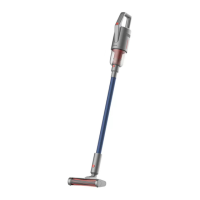

 To Next Page