Need help?
Do you have a question about the Aiwa BST-330 and is the answer not in the manual?
Key precautions for device placement and handling, including avoiding heat sources and using specified accessories.
Strict warnings against fire, disassembly, excessive heat exposure, and immersion in liquids.
Identifies and describes the function of physical controls and ports on the device.
Instructions for adjusting volume, skipping tracks, and controlling playback.
How to answer, hang up, or reject incoming phone calls.
Details on switching between different audio input sources.
How to switch or turn the lighting effects on and off.
Explanation of LED indicators for charging state and low battery alerts.
Automatic power-off feature to conserve energy after a period of inactivity.
Information on battery type, charging voltage, charger selection, and battery lifespan.
Details on restricted substances in electronic components according to regulatory standards.
Details on warranty service, terms, and contact information for support.
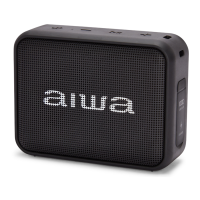
The AIWA BST-330 is a portable Bluetooth speaker designed for on-the-go audio enjoyment, featuring a compact and robust design. It offers multiple playback modes, including Bluetooth, AUX, and Micro SD card, providing versatile options for users to enjoy their music. The speaker is equipped with a single 50mm horn, delivering clear and engaging sound.
The core function of the BST-330 is to play audio wirelessly via Bluetooth or through wired connections. It supports Bluetooth version V5.0, ensuring a stable and efficient wireless connection with compatible devices. The speaker can maintain a Bluetooth connection over an open distance of 10 meters or more.
Beyond Bluetooth, the BST-330 includes an AUX port, allowing for a direct wired connection to audio sources using the provided 3.5mm Aux cable. This is particularly useful for devices without Bluetooth capabilities or when a more stable connection is preferred. Additionally, it features a Micro SD card slot, enabling users to play music directly from a TF card, making it a standalone music player without the need for a connected external device.
The speaker incorporates a "Light key" which controls lighting effects, adding a visual dimension to the audio experience. This key allows users to switch between different lighting effects or turn the lighting on and off completely.
For hands-free communication, the BST-330 supports answering and ending phone calls when connected via Bluetooth. A short press of the designated button answers a call, while a long press hangs up, providing convenience for users who need to manage calls while listening to music.
The BST-330 is designed for user-friendly operation with clearly labeled buttons for various functions.
Power and Mode Control: The "On/off/Audio/Play/Pause" button (labeled with a power icon and play/pause symbol) serves multiple purposes. A long press turns the speaker on or off. When powered on, the speaker announces "Welcome to aiwa" and "Bluetooth Mode." If not connected to a Bluetooth device, the lighting will run fast, indicating it's in pairing mode. Users can then search for "AIWA BST-330" on their Bluetooth device and connect. Once connected, the speaker will announce "Bluetooth connected." A long press again will power off the speaker, with an announcement of "Bye bye." A short press of this button functions as a play/pause control during audio playback. A double short press of this button switches between audio modes (Bluetooth, AUX, Micro SD card). When an audio device is inserted, it will play from the last inserted device first. The speaker provides voice prompts to guide users through different modes. A triple short press of this button activates or deactivates Siri (or other voice assistants) on a connected smartphone.
Volume and Track Control: The speaker features dedicated buttons for volume and track navigation. The "Volume'-'" button (labeled with a minus sign and a rewind symbol) allows for a short press to decrease volume and a long press to go to the previous song. Similarly, the "Volume'+'" button (labeled with a plus sign and a fast-forward symbol) allows for a short press to increase volume and a long press to go to the next song. The speaker provides voice feedback when it reaches maximum or minimum volume, announcing "Maximum volume" or "Minimum volume."
Bluetooth Disconnection: To disconnect a Bluetooth device, users can short press the "Volume'-'" and "Volume'+'" buttons together. The speaker will announce "Bluetooth disconnected." Pressing these two buttons together again will automatically reconnect to the previously paired Bluetooth device.
Charging Indicator: The charging indicator light provides clear status updates. A red light indicates that the battery is charging, while the light turning off signifies that the battery is fully charged.
Reset Functionality: A "Reset key" is included, allowing users to troubleshoot or reset the device if needed.
The BST-330 incorporates features and guidelines to ensure its longevity and optimal performance.
Battery Preservation: To preserve battery lifespan, it is recommended to fully charge the speaker at least once every 45 days, even if it's not in regular use. This helps maintain the battery's health and capacity over time.
Intelligent Power Saving: The speaker is equipped with an intelligent power-saving function. If there are no operations for approximately 5 minutes, the speaker will automatically power off to conserve battery. To power it back on, users simply need to long press the power button.
Charging Guidelines: The device has a built-in non-removable and rechargeable battery. It should be charged using the provided Type-C cable. The charging input is DC 5V 1A (Max). It is crucial to use a charger that has passed regular manufacturer's safety certification to ensure safe and efficient charging. Repeated charging is a normal process for rechargeable batteries, and while it may lead to some performance degradation over time, this is a common characteristic of all rechargeable batteries.
Safety Cautions: The manual emphasizes several safety instructions to prevent damage to the device and ensure user safety. These include:
These features collectively make the AIWA BST-330 a versatile, user-friendly, and durable portable speaker, designed for a wide range of audio listening scenarios while prioritizing safety and ease of maintenance.
 General
| Brand | Aiwa |
|---|---|
| Model | BST-330 |
| Category | Portable Speakers |
| Bluetooth | Yes |
| Waterproof | No |
| Output Power | 10W |
| Battery Life | Up to 8 hours |
| Bluetooth Version | 5.0 |
| Input | USB |

 To Next Page