Listening to the radio
1 Press RADIO BAND/AUTO PRESET until the band you want appears in the
display (direct power-on).
Each time you press the button, the indication changes as follows:
“FM” t “AM”
2 Hold down TUNE + or – until the frequency digits begin to change in the
display.
The player automatically scans the radio frequencies and stops when it finds a
clear station.
If you can't tune in a station, press the button repeatedly to change the frequency
step by step.
Tip
If the FM broadcast is noisy, press MODE until "Mono" appears in the display and the radio will play in
monaural.
Changing the AM tuning interval (except US and Canadian models)
If you need to change the AM tuning interval, do this following:
1 While keeping the RADIO BAND/AUTO PRESET button and x button pressed,
disconnect the AC power cord from the AC outlet.
2 While keeping the RADIO BAND/AUTO PRESET button and x button pressed,
reconnect the AC power cord to the AC outlet. The tuning interval is changed and
“AM 9” or “AM 10” appears in the display for 2 seconds.
After changing the tuning interval, you need to reset your preset radio stations.
Presetting radio stations
You can store radio stations into the player’s memory. You can preset up to 30 radio stations, 20
for FM and 10 for AM in any order.
1 Press RADIO BAND/AUTO PRESET to select the band.
2 Hold down RADIO BAND/AUTO PRESET for 2 seconds until “AUTO” flashes
in the display.
3 Press DISPLAY/ENTER/MEMORY.
The stations are stored in memory from the lower frequencies to the higher ones.
If a station cannot be preset automatically
You need to preset a station with a weak signal manually.
1 Press RADIO BAND/AUTO PRESET to select the band.
2 Tune in a station you want.
3 Hold down DISPLAY/ENTER/MEMORY for 2 seconds until the preset number flashes in
the display.
4 Press PRESET + or – repeatedly that you want to preset the new station.
5 Press DISPLAY/ENTER/MEMORY.
On the remote (for CSD-XD55 only)
1 Press BAND until the band you want appears in the display.
2 Tune in a station you want.
3 Hold down the number buttons that you want to preset the new station on for about 2 seconds.
To select the preset number over 10, press >10 first, then the corresponding number buttons.
You need to hold down the last number button to enter for about 2 seconds.
(Example: To select 12, press >10 and 1 first, then hold down 2 for about 2 seconds.)
Playing preset radio stations
1 Press RADIO BAND/AUTO PRESET to select the band.
2 Press PRESET + or –.
On the remote (for CSD-XD55 only)
1 Press BAND.
2 Press the number buttons to to tune in the stored station.
To tune in a preset station over 10, press >10 first, then corresponding number buttons.
(Example: To tune in a preset station 12, press >10 and 1 first, and then press 2.)
Playing a tape
1 Press TAPE (direct power-on).
(On the remote, press POWER and then press FUNCTION repeatedly until
“TAPE” appears in the display.)
2 Press xZ to open the tape compartment and insert a recorded tape. Close the
compartment. Use TYPE I (normal) tape only.
3 Press n.
To
stop playback
fast-forward or rewind the tape
pause playback
eject the cassette
Recording
1 Press xZ to open the tape compartment and insert a blank tape. Use TYPE I
(normal) tape only.
2 Select the program source you want to record.
To record from the CD player
Press CD and insert a CD (See “Playing a CD”).
To record from the radio
Press RADIO BAND/AUTO PRESET and tune in the station you want (See
“Listening to the radio”).
3 Press z to start recording.
(n is depressed automatically.)
To Press
stop recording xZ
pause recording X
Press the button again to resume recording.
Tips
• Adjusting the volume or the audio emphasis will not affect the recording level.
• If the AM program makes a whistling sound after you've pressed z in step 3, press MODE to select
the beat mode (“bEAt 1”, “bEAt 2” or “bEAt 3”) that most decreases the noise.
• For the best results, use the AC power as a power source for recording.
• To erase a recording, proceed as follows:
1 Insert a tape with the recording you want to erase.
2 Press TAPE.
3 Press z.
Adjusting the sound emphasis
To reinforce the bass sound
Press S-BASS.
“S-BASS” appears in the display.
To return to normal sound, press the button again.
To get the SURROUND effect
Press SURROUND.
"SURROUND" appears in the display.
You can get the effect of expansion of the sound field.
To return to normal sound, press the button again.
Falling asleep to music
1 Play the music source you want.
2 Press SLEEP to display “SLEEP.”
3 Press SLEEP to select the minutes until the player goes off automatically.
Each time you press the button, the indication changes as follows: “60” t “90” t “120”
t “OFF” t “10” t “20” t “30”
To cancel the sleep function
Press POWER to turn off the power.
Note
When you are playing a tape using this function:
If the tape length of one side is longer than the set time, the player will not go off until the tape reaches
the end.
Press
xZ
m or M
X
Press the button again to resume play after pause.
xZ
To turn on/off the power
Press POWER.
To adjust the volume
Press VOLUME +, – (VOL +, – on the remote).
To listen through headphones
Connect the headphones to the HEADPHONES jack.
Remote Control (for CSD-XD55 only)
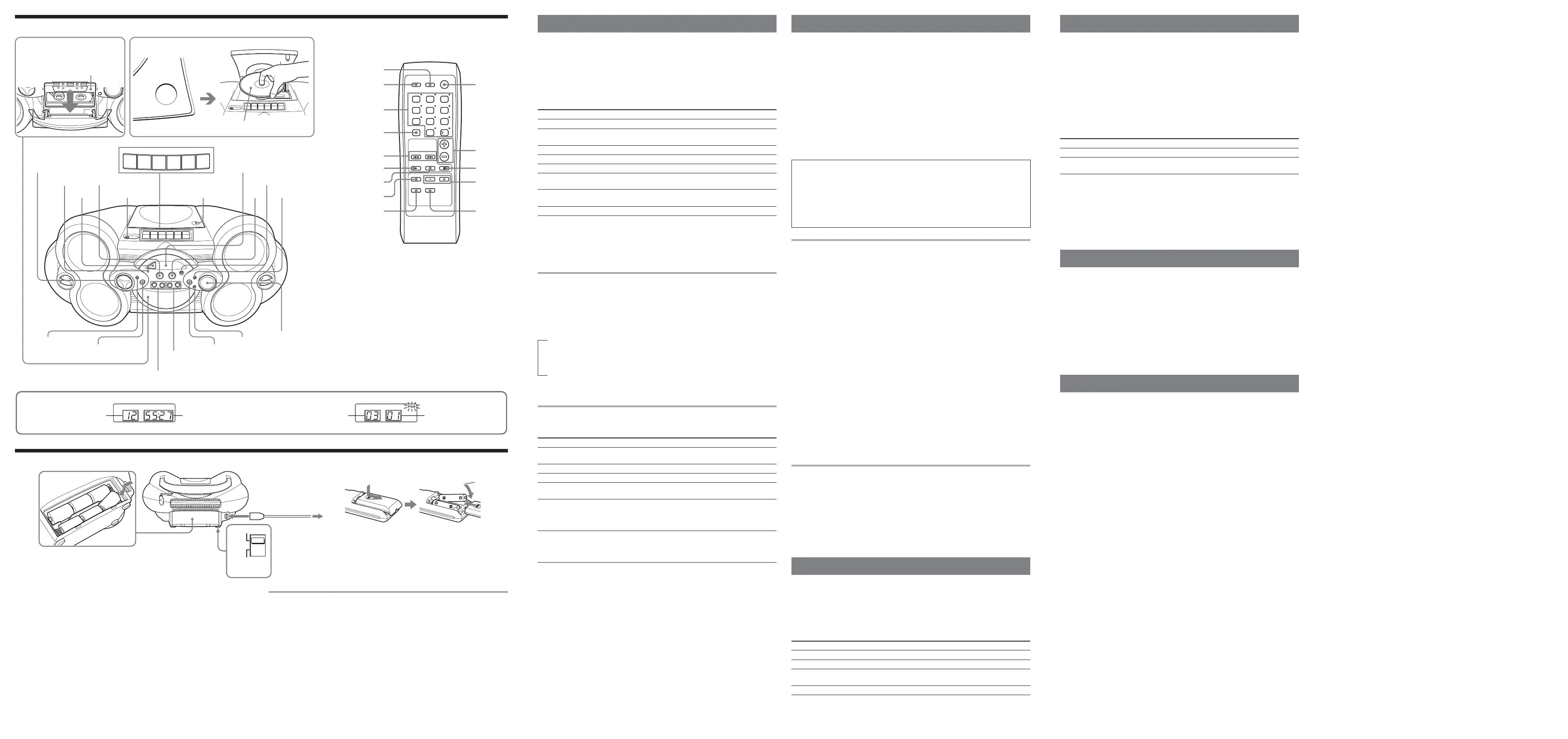
Location of controls
VOL
BAND
CD/RADIO
CD
123
45
0/10
10
6
78
9
SLEEPFUNCTION
MODE
POWER
RADIO TUNE
S-BASS
SURROUND
(AC ONLY)
SLEEP
N
X
MODE
BAND
SURROUND
FUNCTION POWER
VOL +*,–
TUNE –,+
S-BASS
x
.,>
Playing a CD
1 Press CD (direct power-on).
(On the remote, press POWER and then press FUNCTION repeatedly until “Cd”
appears in the display.)
2 Load a CD in the CD compartment.
3 Press Z PUSH OPEN/CLOSE to close the CD compartment.
4 Press u (N on the remote).
The player plays all the tracks once.
To
stop playback
pause playback
go to the next track
go back to the previous track
remove the CD
locate a point while listening
to the sound
locate a point while observing
the display
locate a specific track directly*
* You cannot locate a specific track if "SHUF" or "PGM" is lit in the display. Turn off the indication by
pressing x.
Tip
To locate a track numbered over 10, press >10 first, then the corresponding number buttons on the
remote.
Example:To play track number 23, press >10 first, then 2 and 3.
Using the display
To check the total track number and playing time
Press DISPLAY/ENTER/MEMORY in stop mode (see fig. E).
To check the remaining time
Press DISPLAY/ENTER/MEMORY repeatedly while playing a CD. The display changes as
follows:
t the current track number and playing time
r
the current track number and the remaining time on the current track*
r
the number of tracks left and remaining time on the CD
* For a track whose number is more than 20, the remaining time appears as “- -:- -” in the display.
Selecting the play mode
Press MODE until “REP 1” “REP ALL” “SHUF” “SHUF REP” “PGM” “PGM REP” appears in
the display. Then proceed as follows:
To Select
repeat a single track “REP 1”
repeat all tracks “REP ALL”
shuffle play “SHUF”
repeat tracks “SHUF REP”
in random order
program play “PGM”
repeat programmed tracks “PGM REP”
On the remote (for CSD-XD55 only)
When you’ve selected “PGM” or “PGM REP”, press the number buttons for the track you want
up to 20 tracks, then press N.
To cancel selected play mode
Press MODE until the selected mode disappears from the display.
To check the programmed track and playing order in the display
To check the order of tracks before play, press DISPLAY/ENTER/MEMORY.
Every time you press the button, the track number appears in the programmed order.
To change the current program
Press x once if the CD is stopped and twice if the CD is playing. The current program will be
erased. Then create a new program following the programming procedure.
Tip
You can record your own program. After you’ve created the program, insert a blank tape and press z to
start recording.
Then do this
Press . or > to select the track that you
want to repeat, then press u.
Press u.
Press u.
Press u.
Press . or > then press DISPLAY/ENTER/
MEMORY for the tracks you want to program in
the order you want up to 20 tracks (see fig. F).
Then press u.
Press . or > then press DISPLAY/ENTER/
MEMORY for the tracks you want to program in
the order you want up to 20 tracks. Then Press
u.
ZPUSH
OPEN/CLOSE
PAUSE
STOP/EJECT
FF
REW
PLAY
REC
TUNE –,+
VOLUME –,+*
ZPUSH OPEN/CLOSE
SURROUND
S-BASS
SLEEP
u
POWER HEADPHONES
OPR/BATT
MODE
DISPLAY/ENTER/MEMORY
.,>
PRESET –,+
CD, RADIO BAND/
AUTO PRESET, TAPE
x
Loading a CD
With the labeled side up
Inserting a cassette
With the side you want
to play facing you
Total track number
Programmed track Playing order
EF
Total playing time
Display
Press
x
u (
XX
XX
X on the remote)
Press the button again to resume play after pause.
>
.
Z PUSH OPEN/CLOSE
> (forward) or . (backward) while playing until you
find the point
> (forward) or . (backward) in pause until you find
the point
a number button of the track on the remote.
Number buttons
*The button has a tactile dot.
Display
Remote sensor
(for CSD-XD55 only)
Connect the AC power cord A or insert six size D (R20) batteries (not supplied) into the battery
compartment B.
Notes
• Replace the batteries when the OPR/BATT indicator dims or when the player stops operating.
Replace all the batteries with new ones. Before you replace the batteries, be sure to take out the CD
from the player.
• To use the player on batteries, disconnect the AC power cord from the player.
• When you operate the player on batteries, you cannot turn on the player using the remote.
Central American model and South American model only: Adjusting the voltage C
Be sure to set the VOLTAGE SELECTOR (at the bottom) to your local power supply.
Tip
Only for the customers supplied with an AC plug adaptor:
Use the supplied AC plug adaptor if the plug of the mains lead does not match your outlet.
Power Sources
E
E
E
e
e
e
E
e
E
e
E
e
110-127V
VOLTAGE
SELECTOR
220-240V
1 to AC IN
2 to a wall outlet
A
B
D
C
Preparing the remote (for CSD-XD55 only) D
Insert two size AA (R6) batteries (not supplied).
Replacing battery
With normal use, the batteries should last for about six months. When the remote no longer
operates the player, replace all the batteries with new ones.


 To Previous Page
 Loading...