EasyManua.ls Logo

Aiwa GE-950 E - CREATING A NEW CURVE; Adjusting Frequency Bands

Aiwa GE-950 E
28 pages
Print Icon
To Next Page IconTo Next Page
To Previous Page IconTo Previous Page
Loading...
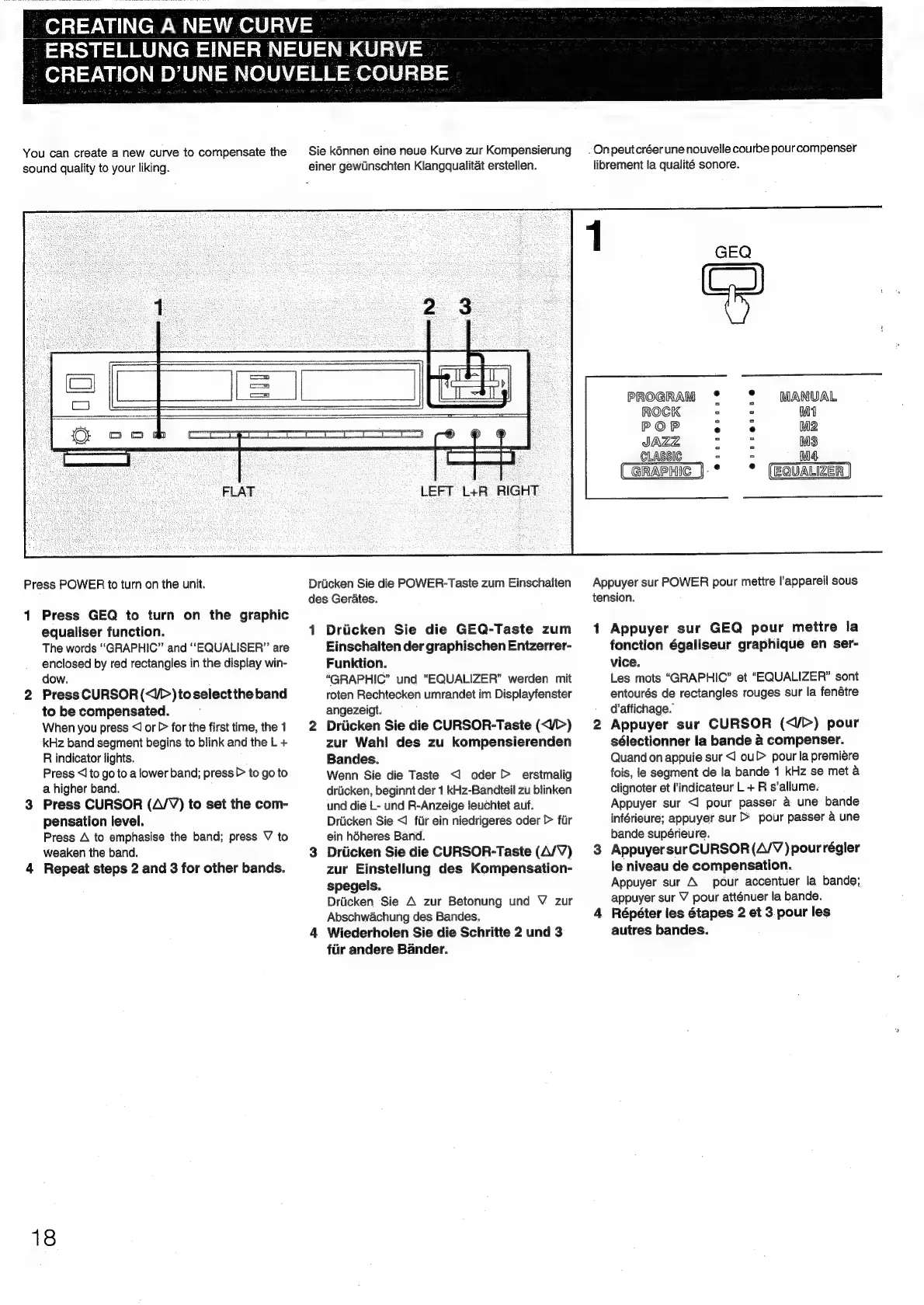
CREATING
A
NEW
CURVE
ERSTELLUNG
EINER
NEUEN
KURVE
-
CREATION
D’UNE
NOUVELLE
COURBE
You
can
create
a
new
curve
to
compensate
the
Sie
kénnen
eine
neue
Kurve
zur
Kompensierung
§
Onpeutcréerune
nouvelle
courbe
pourcompenser
sound
quality
to
your
liking.
einer
gewUinschten
Klangqualitat
erstellen.
librement
la
qualité
sonore.
f
PROGRAM
*
°°
MANUAL
Pa
Cemicenereeems
Pichi
ateen
emcee
gennaneemeneae
ROCK
3
3
M4
POP
ar)
M2
JAZZ
a
MS
_GLASSIC
rs
oe
M4
GRAPHIC
].°
*
LEFT
L+R
RIGHT
Press
POWER
to
turn
on
the
unit.
Driicken
Sie
die
POWER-Taste
zum
Einschalten
|
Appuyer
sur
POWER
pour
mettre
l'appareil
sous
des
Gerates.
tension.
1
Press
GEQ
to
turn
on
the
graphic
equaliser
function.
1
Driicken
Sie
die
GEQ-Taste
zum
1
Appuyer
sur
GEQ
pour
mettre
la
The
words
“GRAPHIC”
and
“EQUALISER”
are
Einschalten
der
graphischen
Entzerrer-
fonction
égaliseur
graphique
en
ser-
enclosed
by
red
rectangles
in
the
display
win-
Funktion.
vice.
dow.
“GRAPHIC”
und
“EQUALIZER”
werden
mit
Les
mots
“GRAPHIC”
et
“EQUALIZER”
sont
2
Press
CURSOR
(<J>)toselectthe
band
roten
Rechtecken
umrandet
im
Displayfenster
entourés
de
rectangles
rouges
sur
la
fenétre
to
be
compensated.
angezeigt.
d’affichage.
When
you
press
<I
or
>
for
the
first
time,
the
1
2
Driicken
Sie
die
CURSOR-Taste
(</>)
2
Appuyer
sur
CURSOR
(<V>)
pour
kHz
band
segment
begins
to
blink
and
the
L
+
zur
Wahl
des
zu
kompensierenden
sélectionner
la
bande
a
compenser.
R
indicator
lights.
Bandes.
Quand
on
appuie
sur
<1
ou>
pour
la
premiére
Press
<I
to
go
to
a
lower
band;
press
>
to
go
to
Wenn
Sie
die
Taste
<1
oder
>
erstmalig
fois,
le
segment
de
la
bande
1
kHz
se
met
a
a
higher
band.
driicken,
beginnt
der
1
kHz-Bandteil
zu
blinken
clignoter
et
lindicateur
L
+
R
s’allume:
3
Press
CURSOR
(A/V)
to
set
the
com-
und
die
L-
und
R-Anzeige
leuchtet
auf.
Appuyer
sur
<]
pour
passer
&
une
bande
pensation
level.
Driicken
Sie
<1
flr
ein
niedrigeres
oder
>
fur
inférieure;
appuyer
sur
>
pour
passer
a
une
Press
A
to
emphasise
the
band;
press
V
to
ein
héheres
Band.
bande
supérieure.
weaken
the
band.
3
Driicken
Sie
die
CURSOR-Taste
(A/V)
3
Appuyersur
CURSOR
(A/V
)pourrégler
4
Repeat
steps
2
and
3
for
other
bands.
zur
Einstellung
des
Kompensation-
le
niveau
de
compensation.
spegels.
Appuyer
sur
A
pour
accentuer
la
bande;
Driicken
Sie
A
zur
Betonung
und
V
zur
appuyer
sur
V
pour
atténuer
la
bande.
Abschwachung
des
Bandes.
4
Répéter
les
étapes
2
et
3.pour
les
4
Wiederholen
Sie
die
Schritte
2
und
3
autres
bandes.
fiir
andere
Bander.
18

Related product manuals