EasyManua.ls Logo

Aiwa HS-PX310 - Servicing Operations; Caution When Servicing; OZM-1 CHECK KIT Assembly and Usage

Aiwa HS-PX310
12 pages
Print Icon
To Next Page IconTo Next Page
To Previous Page IconTo Previous Page
Loading...
4.Caution
When
Servicing
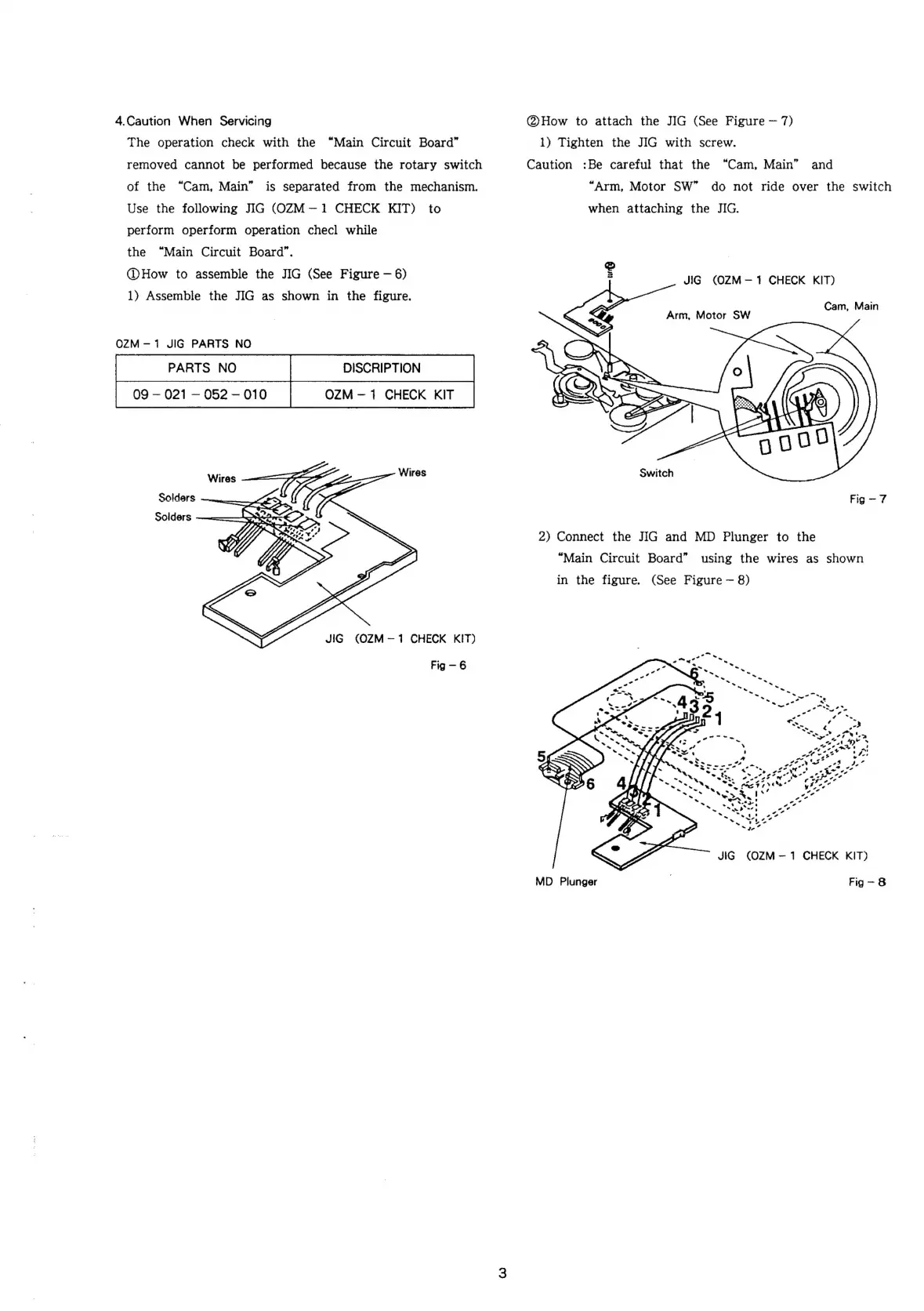
@How
to
attach
the
JIG
(See
Figure
7)
The
operation
check
with
the
“Main
Circuit
Board”
1)
Tighten
the
JIG
with
screw.
removed
cannot
be
performed
because
the
rotary
switch
Caution
:Be
careful
that
the
“Cam,
Main”
and
of
the
“Cam,
Main”
is
separated
from
the
mechanism.
“Arm,
Motor
SW”
do
not
ride
over
the
switch
Use
the
following
JIG
(OZM—1
CHECK
KIT)
to
when
attaching
the
JIG.
perform
operform
operation
checl
while
the
“Main
Circuit
Board”.
@How
to
assemble
the
JIG
(See
Figure
6)
1)
Assemble
the
JIG
as
shown
in
the
figure.
JIG
(OZM—
1
CHECK
KIT)
Cam,
Main
Arm,
Motor
SW
QOZM-1
JIG
PARTS
NO
PARTS
NO
09
021
052
010
Wires
———
FG
:
Wires
Switch
Solders
Fig
-7
Solders
2)
Connect
the
JIG
and
MD
Plunger
to
the
“Main
Circuit
Board”
using
the
wires
as
shown
in
the
figure.
(See
Figure
8)
SA
JIG
(OZM—1
CHECK
KIT)
Fig
—6
-”
-
7
ger
oa
Lae
?
“e
<
)
.”
o
-
“ee
a
rn
se
ae
,
ae
\
aa!
%)
Pe
ana
a!
“v
“4
rd
a4
oy
va?
*
*
oe
oy
tes
v4
7
a
~~
HD
<
we
yf
a
iad
——2--
«
org”
ft
‘~*~
Port
t
~~
4
Py
ed
o
o
est,
4-4
2?
vv
PN
all
es
-
\<
*
*
"~~
He
ed
“e
4,7.
a
y
1s!
on”
wont
Yt
«tye
oe
JIG
(OZM—
1
CHECK
KIT)
MD
Plunger
,
Fig-8

Related product manuals