TP-VS480 (YJ,YH) E/Ch/Ck Page 2
Ch
ENGLISH Ck
TP-VS480 (YJ,YH) E/Ch/Ck Page 2
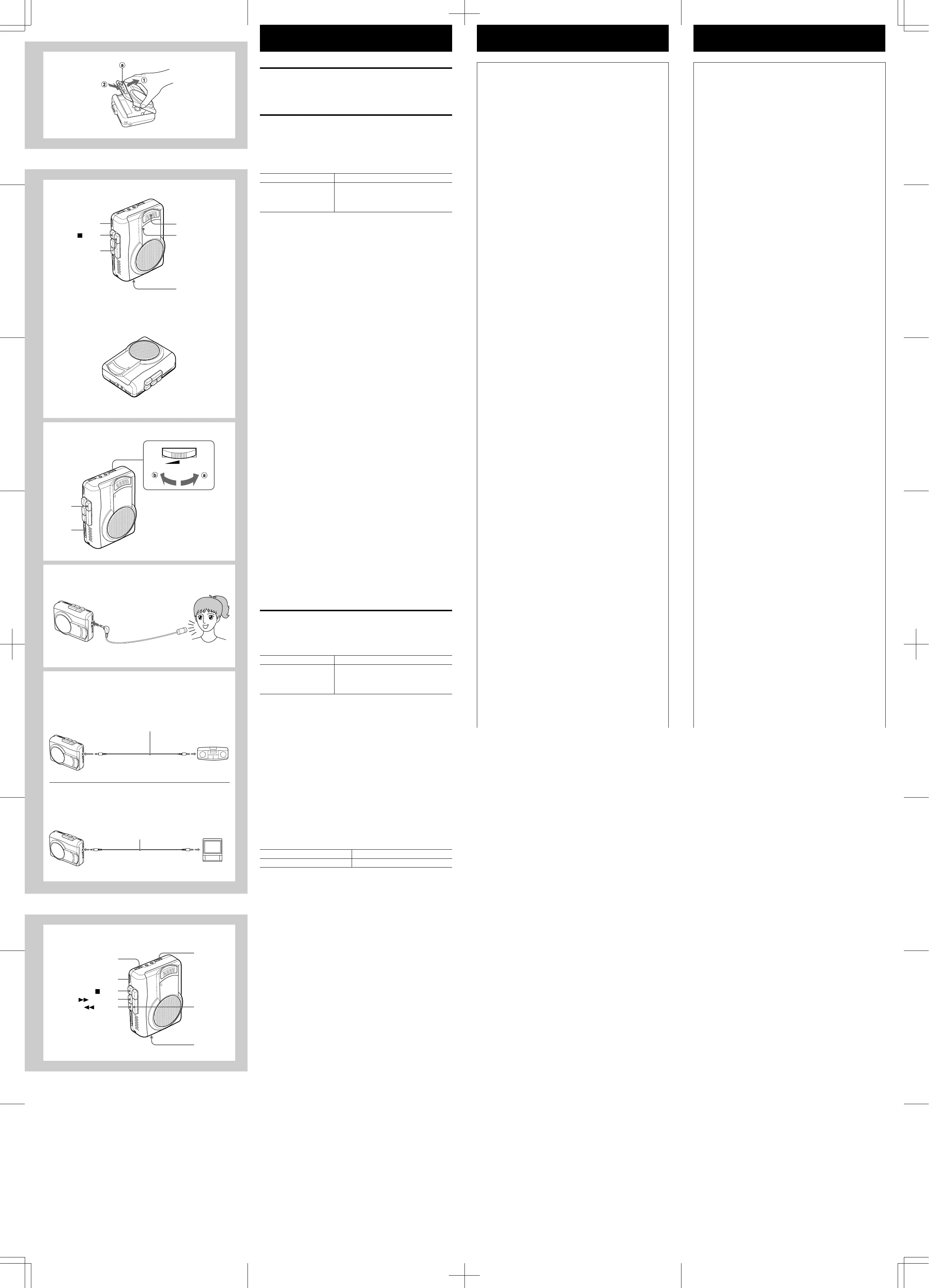
INSERTING A CASSETTE → I
Insert a cassette with the recording/playback side (a) facing the cassette holder.
RECORDING FROM THE BUILT-IN
MICROPHONE → J
1 Insert a cassette.
2 Orient the built-in microphone to the sound source.
3 Press the wREC button to start recording.
The jPLAY button is depressed simultaneously and the OPE/BATT/REC
indicator lights. The indicator lights and goes out according to the voice input.
Basic operation
• The PAUSE switch is released automatically when the sSTOP button is pressed.
When the end of the tape is reached during recording
The tape stops automatically.
When using the unit on the desk → K
Place it as illustrated during recording to reduce the noise.
To record only the sound louder than the preset sound
level → L
Recording will start when the unit detects sound above a certain preset level. If
the unit does not detect the sound for about 7 seconds, recording will pause. This
prevents tape waste and empty recording.
1 Set the V-SENSOR switch to ON.
2 Adjust the sensor level.
Turn the pVOLUME/V-SENSOR LEVEL control in the direction of a to
increase the sensor level. Even relatively quiet sounds will be recorded.
Turn the pVOLUME/V-SENSOR LEVEL control in the direction of b to lower
the sensor level. General background noise will not be recorded, and only
relatively loud sounds will be recorded.
3 Press the wREC button to start recording.
Sensor level adjustment
The ideal sensor level varies according to the loudness of the source sound.
Experiment with the sensor level in advance to determine the optimum level before
you start an important recording. Usually set the pVOLUME/V-SENSOR LEVEL
control to 4 to 6 first, then adjust it according to surrounding conditions.
Note
When the recording resumes after sound detection, the very first sounds may not
be recorded.
Recording from an external microphone → M
To record sound with more clarity, use an optional external microphone.
Connect the microphone to the EXT MIC jack and set the microphone near the
sound source.
Note
Keep the microphone away from the speaker to avoid a howling noise.
To record from another unit → N
Connect the other unit to the EXT MIC jack of this unit, using the appropriate
connecting cords.
a To connect to stereo source equipment
b To connect to monaural source equipment
Note
• The connecting cords may vary according to the type of source equipment.
Before connecting a unit, read the operating instructions of the connected unit.
• If the volume setting of the source equipment is too high, the recorded sound
may be noisy or distorted. Be sure to set the volume of the source equipment to
a moderate level.
PLAYBACK → O
1 Insert a cassette.
2 Press the jPLAY button.
3 Adjust the volume.
Basic operation
• The PAUSE switch is released automatically when the sSTOP button is pressed.
When the end of the tape is reached during playback
The tape stops automatically.
To find the section you want to listen to
To fast forward/rewind
To fast forward: Press the fFF/CUE button during stop mode.
To rewind: Press the gREW/REV button during stop mode.
Press the sSTOP button at the desired point. If the tape winds to the end, the
tape stops but the fFF/CUE or gREW/REV button is not released. Press
the sSTOP button to release it.
To search while monitoring high-speed sound
Keep the fFF/CUE or gREW/REV button pressed during playback by
monitoring the sound. When you reach the desired point, release the button to
start playback.
To increase or decrease the playback speed
You can change the playback speed with the PLAYBACK SPEED control.
Turn the PLAYBACK SPEED control as follows.
After listening, set the PLAYBACK SPEED control to the center position for
playback at normal speed.
L
I
VOLUME
/
V-SENSOR LEVEL
2
1
3
M
b
Attenuation Cable
(Monaural mini-plug ↔ Monaural mini-plug)
####Verbindungskabel mit Widerstand###
######################
####Câble d’atténuation
##########################
N
a
EXT MIC
EXT MIC PHONES
EXT MIC EARPHONE
O
STOP
PAUSE
PLAYBACK SPEED
3
2
1
REW/REV
FF/CUE
J
OPE/BATT/REC
STOP
PAUSE
2
1
3
K
Attenuation Cable
(Monaural mini-plug ↔ Stereo mini-plug)
###Verbindungskabel mit Wide###
####
###Câble d’atténuation
####################### ###
To stop recording
To pause recording
Press the sSTOP button.
Set the PAUSE switch in the direction of the
arrow (o).
To resume recording, set the switch in the
opposite direction.
To stop playback
To pause playback
Press the sSTOP button.
Set the PAUSE switch in the direction of the
arrow (o).
To resume playback, set the switch in the
opposite direction.
Turn to FAST.
Turn to SLOW.
To increase the speed
To decrease the speed


 To Previous Page
 Loading...