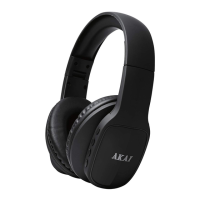
This document is an instruction manual for AKAI On-Ear Headphones with Wireless Bluetooth Connectivity, model A58078. AKAI emphasizes "Tomorrows Technology Today" and highlights "80 Years of Japanese Technology" and a "3 Year Guarantee."
Function Description:
These headphones are designed for wireless audio playback via Bluetooth, wired audio playback via an AUX cable, and include an FM radio function and an SD/TF card slot for music playback. They also feature hands-free calling capabilities.
Important Technical Specifications:
- Model No: A58078
- Power Supply Charge Voltage: DC 5V (USB)
- Battery: 3.7V 300MAH
- Charging Time: 2-3 Hours
- Play Time (Headphone Mode): 4-6 Hours
- FM Range: 87.5-1080MHZ
The product conforms to the following EU directives:
- 2014/30/EU (Electromagnetic Compatibility Directive)
- 2014/35/EU (Low Voltage Directive)
- 2011/65/EU (Restriction of Hazardous Substances Directive)
- 2014/53/EU (Radio Equipment Directive)
RK Wholesale LTD ensures quality assurance.
Guarantee:
The product is guaranteed for 12 months from the date of original purchase. If a defect arises due to faulty materials or workmanship, the product must be returned to the place of purchase. Refund or replacement is at the discretion of the retailer.
Conditions for guarantee:
- Product must be returned with proof of purchase.
- Product must be installed and used according to the instruction guide.
- The item is for domestic purposes only.
- The guarantee does not cover wear and tear, damage, misuse, or consumable parts.
- RK Wholesale Ltd has limited responsibility for incidental or consequential loss or damage.
- Valid in the UK and Eire only.
Users can register their product online at www.akaionline.co for a 3-year guarantee.
- Read instructions carefully before use and retain the manual for future reference.
- Ensure main circuit voltage matches appliance rating.
- Cleaning and user maintenance should not be done by children without supervision.
- Use the appliance on a stable, level, and heat-resistant surface.
- Switch off and unplug when not in use or before cleaning.
- If the supply cord or appliance is damaged, stop use and seek advice from the manufacturer or service agent.
- DO NOT immerse cords, plugs, or any part of the appliance in water or other liquid.
- Close supervision is necessary when used by or near children or pets.
- Children aged 8 and above, and persons with reduced physical, sensory, or mental capabilities, or lack of experience and knowledge, can use the appliance if supervised or instructed on safe use and understand hazards.
- Children shall not play with the appliance.
- DO NOT let the cord hang over table edges or counters, or contact hot surfaces.
- DO NOT use accessory attachments not supplied by the manufacturer.
- DO NOT use extension cords.
- DO NOT pull the plug by the cord.
- DO NOT use the product for anything other than its intended use.
- DO NOT carry the appliance by the power cord.
- DO NOT place anything containing liquid on top of the unit.
- DO NOT spill liquid onto the appliance; if it happens, mop up and seek technician advice.
- DO NOT use next to a swimming pool.
- DO NOT put objects into any openings.
- Keep the unit free from dust, lint, etc.
- DO NOT install near heat sources (radiators, heat registers, stoves, amplifiers).
- Only use manufacturer-specified attachments/accessories.
- Unplug during lightning storms or long periods of disuse.
- Ensure adequate ventilation.
- Battery shall not be exposed to excessive heat (sunshine, fire, etc.).
- DO NOT play music at excessive levels, especially near children.
- In case of a fault, stop using immediately and contact Customer Support Team: +44 (0) 333 220 6042.
Package Contents:
- Instruction Manual
- Headphones
- AUX Cable
- USB Charging Cable
Features and Controls (Numbered on diagram):
- Power On/Off/Pause/Play button
- Volume +/Next Song button
- Volume -/Previous Song button
- Call Accept/Cancel/Reject/Mode-FM button
- LED Light
- Audio Input/Line In Port
- Micro USB Port
- TF Card Slot
Usage Features:
Before First Use:
- Remove product and packaging from the box.
- Retain packaging until all parts are checked.
- Appliance is ready for normal use.
Charging Headphones:
- Connect the included USB cable to a computer/sound device and the charging port on the earphones.
- Red indicator light turns on during charging.
- Charging takes 2-3 hours.
- Red indicator light turns off when fully charged.
- An alarm sounds when battery is low, and headphones will turn off automatically after 3-5 minutes.
Note: Earphones cannot be used while charging.
Powering On/Off & Bluetooth:
- Press the Play/Pause/Power On/Off button for ~4 seconds until red and blue indicator lights flash alternately.
- Turn on Bluetooth on your smartphone.
- Search for Bluetooth devices and select 'A58078'.
- Enter code '0000' if needed.
- If pairing is successful, the blue indicator light will flash.
Note: First-time pairing is required. Afterwards, headphones will connect automatically when switched on.
Incoming calls will pause music; music resumes after the call.
Answering a Call (iPhone/Samsung/HTC/Sony etc.):
- Pick up via Headset: Quick press the Mode/Phone button once to answer, press again to end.
- Pick up via Phone: Press the answer button on your smartphone.
Ending a Call:
- End via your phone or by quick pressing the Mode/Phone button on the headset.
Rejecting a Call:
- Hold the Mode/Phone button for 2 seconds and then release.
Listening to Music:
- Once paired, stream music wirelessly. Refer to your device's manual for streaming issues.
- Playing Music: Use Play/Pause, Skip Backward, and Skip Forward buttons.
- Skip Forward: Short press Skip Forward Button.
- Skip Backward: Short press Skip Backward button.
-
- Volume: Long press Skip Forward button.
-
- Volume: Long Press Skip Backward button.
Wired Headphone Use:
- Plug the 3.5mm cable into the "Line in" port and the other end into a computer or music device.
Note: In Line in mode, FM/MP3 and Bluetooth functions will not work, and volume cannot be adjusted via headphone buttons.
Music Playback with SD Card:
- Transfer tracks onto the SD/TF card.
- Insert the SD/TF card into the SD/TF slot.
- Press the Mode select button until the TF option is reached.
- Use Play/Forward/Previous buttons to skip and play tracks.
FM Mode:
- Short press the Mode/phone button once to enter FM mode.
- Press the play/pause button to scan and memorize FM radio stations.
- Press back forward and skip forward buttons to select channels.
- Press and hold (+) or (-) button to adjust volume.
- An alarm (beep) sounds when maximum volume is reached. Be careful when increasing volume.
Note: To switch between MP3, FM, or Bluetooth modes, quick press the Mode/Phone button until the desired mode is reached.
Do's and Don'ts:
- DO NOT play music at excessive levels (damage to hearing/equipment).
- DO NOT use in wet or damp surroundings.
Troubleshooting the Appliance:
- Headphones won't charge: Try a different USB charging cable or AC adapter.
- Can't find 'A58078' Bluetooth device: Ensure earphones are in pairing mode (red and blue indicator lights flashing alternately by pressing Play/Pause for ~4 seconds). Check if your Bluetooth device is connected to another headset and disconnect it.
- Can't connect to my phone: Ensure headset is charged and within 10 meters (33 feet) of the phone with no solid objects in between. Check or redo Bluetooth settings on the phone. Try pairing again.
Maintenance Features:
Cleaning and Care (Important):
- Clean the appliance with a soft, damp cloth. DO NOT use chemicals or hard abrasives.
- Keep the unit away from wet or damp surroundings.
- Store the headphones in a cool, dry place.
- Disposal: The crossed-out wheelie bin symbol indicates the product must be disposed of environmentally friendly. Contact local authorities for recycling details.
- Visit www.recycle-more.co.uk or www.recyclenow.co.uk for UK recycling information.
- Visit www.weeeireland.ie for Ireland recycling information.
- The WEEE directive (August 2006) states all electrical items must be recycled, not landfilled.
- Take the appliance to your local Civic Amenity site for recycling at the end of its life.
Customer Support:
- For advice, spares, and returns: Call +44 (0)333 220 6042 (8:30 am to 6:00 pm Monday-Friday).
- Visit: www.akaionline.co
- Distributed throughout the UK by RK Wholesale LTD.


 To Next Page
 General