EN-ENGLISH
Operating Instructions:
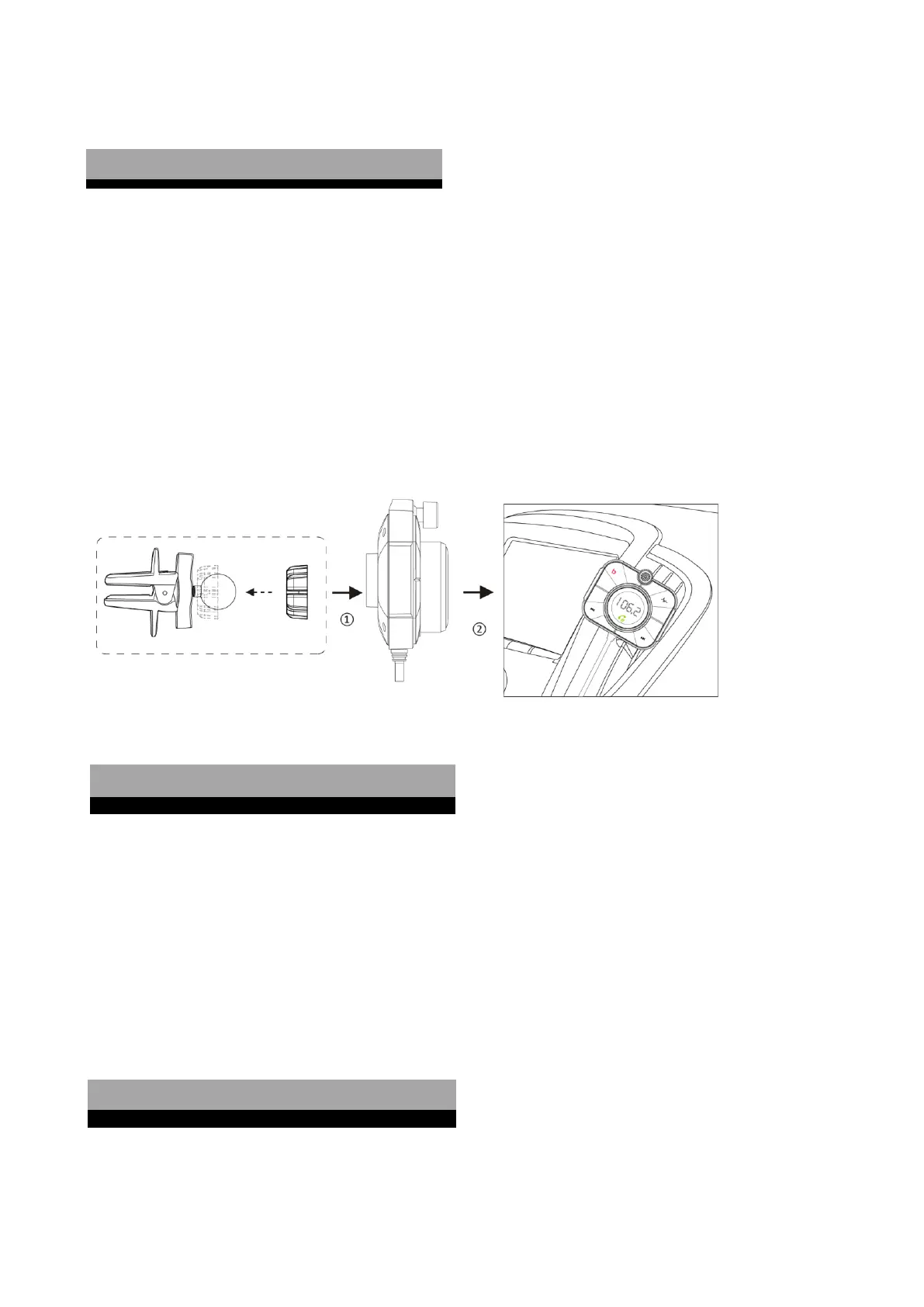
Installing the Product:
⚫ Make sure the ball joint is embedded into the washer before locking the bracket to the back shell of the unit;
(Refer to fig 2)
⚫ Attached the device to the air vent;
⚫ Plug the auxiliary power plug into an auxiliary power outlet.
⚫ The LED display shows the voltage of the battery of the car first for seconds and then shows "bt" to indicate
Bluetooth pairing mode is on.
1. Connect to FM Radio by FM:
⚫ Turn your car radio to an unoccupied FM frequency;
⚫ Press and hold MFB for 3 seconds until FM frequency on the screen flashes;
⚫ Adjust the frequency of device as the same frequency of the car radio by rotating MFB.
2. Connect to FM Radio by Aux:
Use the supplied AUX cable to connect this device & the aux jack on your car head unit.
⚫ Make sure the unit is powered and search for available devices in your phone;
⚫ Select "BT95" from the list, then connect.
⚫ If asked, enter the pairing code ‘0000’ or ‘1234’.


 To Next Page