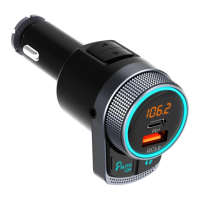
EN-ENGLISH
1. Playing and Controlling the Music:
⚫ Play music directly from the mobile device that is connected to the product via Bluetooth.
⚫ Press the MFB to play or pause music.
⚫ Press “ ” or “ ” to skip to the previous song or go back to the next song.
⚫ Tune the rotatory knob clockwise or anticlockwise to increase or decrease volume.
⚫ Press and hold “ ” to switch loop mode. (sequential play /shuffle play /single circle)
Please note:
A:File Mode: Insert a Micro SD card containing MP3/WMA/APE/FLAC/WAV files in the transmitter which will
automatically start playing music in the files;
B: Switch Audio Source (BT/Micro SD): Press and hold “b” to switch audio source between Bluetooth and Micro
SD.
C: If you receive a call while playing music, the product automatically switches to the phone call.
2. BASS Function
Press “b” to enhance music BASS sound, the LED will appear “b1”. Press again to turn off BASS mode and the LED
display will appear “b0”.
3. Making Phone Calls
⚫ Please press to answer the incoming call. Press and hold to reject the call.
⚫ Please press to hang off a call.
⚫ During a call, press and hold to switch to private conversation.
⚫ When making a call, you can only dial the phone number by your mobile phone, but once the call is connected,
you can use the hands-free function to enjoy it.
Please note: When using handsfree function, please make sure that Bluetooth is well connected.
4. Freeway Noise Canceling
During calling, press “ ” to suppress road noise especially on the freeway and the ring light will flash quickly.
5. Activating Voice Assistant
Under Bluetooth mode, double press MFB to activate voice assistant on your mobile phone (Siri or Google
Assistant ect...)


 To Next Page