EasyManua.ls Logo

Akai M-9 - ADJUSTMENT OF HEADS

Akai M-9
41 pages
Print Icon
To Next Page IconTo Next Page
To Previous Page IconTo Previous Page
Loading...
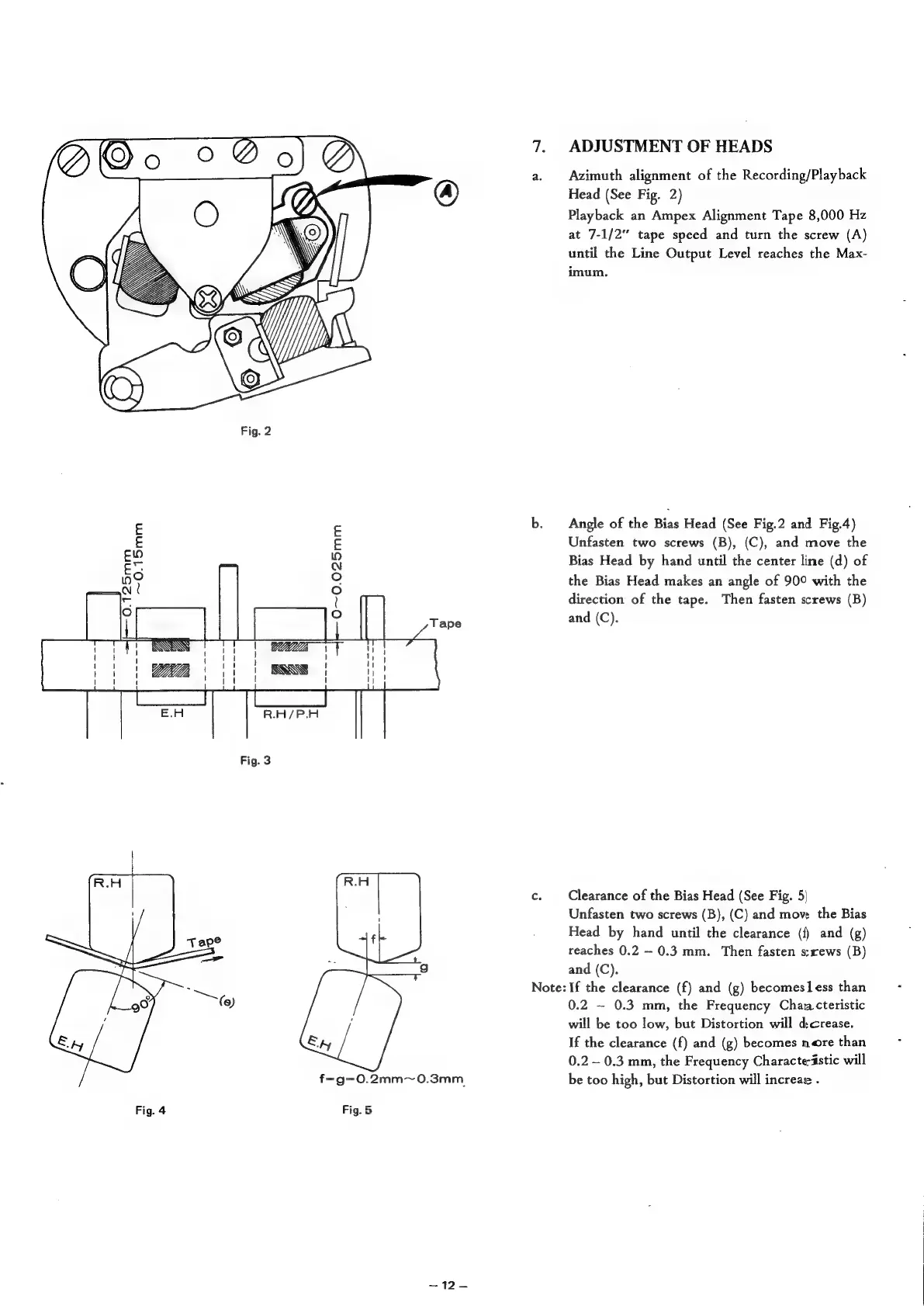
0~0.025mm
A
{
!
ISG
Fig.
3
f=g-0.2mm~0.3mm
Fig.
5
ADJUSTMENT
OF
HEADS
Azimuth
alignment
of
the
Recording/Playback
Head
(See
Fig.
2)
Playback
an
Ampex
Alignment
Tape
8,000
Hz
at
7-1/2"
tape
speed
and
turn
the
screw
(A)
until
the
Line
Output
Level
reaches
the
Max-
imum.
Angle
of
the
Bias
Head
(See
Fig.2
and
Fig.4)
Unfasten
two
screws
(B),
(C),
and
move
the
Bias
Head
by
hand
until
the
center
line
(d)
of
the
Bias
Head
makes
an
angle
of
90°
with
the
direction
of
the
tape.
Then
fasten
screws
(B)
and
(C).
Clearance
of
the
Bias
Head
(See
Fig.
5|
Unfasten
two
screws
(B),
(C)
and
move
the
Bias
Head
by
hand
until
the
clearance
({)
and
(g)
reaches
0.2
0.3
mm.
Then
fasten
s:rews
(B)
and
(C).
Note:
If
the
clearance
(f)
and
(g)
becomesless
than
0.2
~
0.3
mm,
the
Frequency
Chan
cteristic
will
be
too
low,
but
Distortion
will
dcrease.
If
the
clearance
(f)
and
(g)
becomes
nore
than
0.2
-
0.3
mm,
the
Frequency
Characteristic
will
be
too
high,
but
Distortion
will
increae
.