EasyManua.ls Logo

Akai M-9 - ADJUSTMENT OF LINE OUTPUT LEVEL

Akai M-9
41 pages
Print Icon
To Next Page IconTo Next Page
To Previous Page IconTo Previous Page
Loading...
3.
ADJUSTMENT
OF
LINE
OUTPUT
LEVEL
(A)
Playback
(See
Fig.
3)
a.
b.
Cc
Set
the
Record/Playback
Knob
to
“Play”
position
and
the
Equalizer
Switch
to
7-1/2”.
Connect
the
V.T.V.M.
(use
one
with
Milli-Volt
scale)
to
the
Line
Output
Jack.
Playback
the
test
tape
(250
Hz
“0”
VU
recorded)
at
7-1/2"
tape
speed
and
turn
the
volume
VR-201
(20KB)
46
99
until
the
Line
Output
level
reaches
“0”
VU
1.228
V
(+4dB).
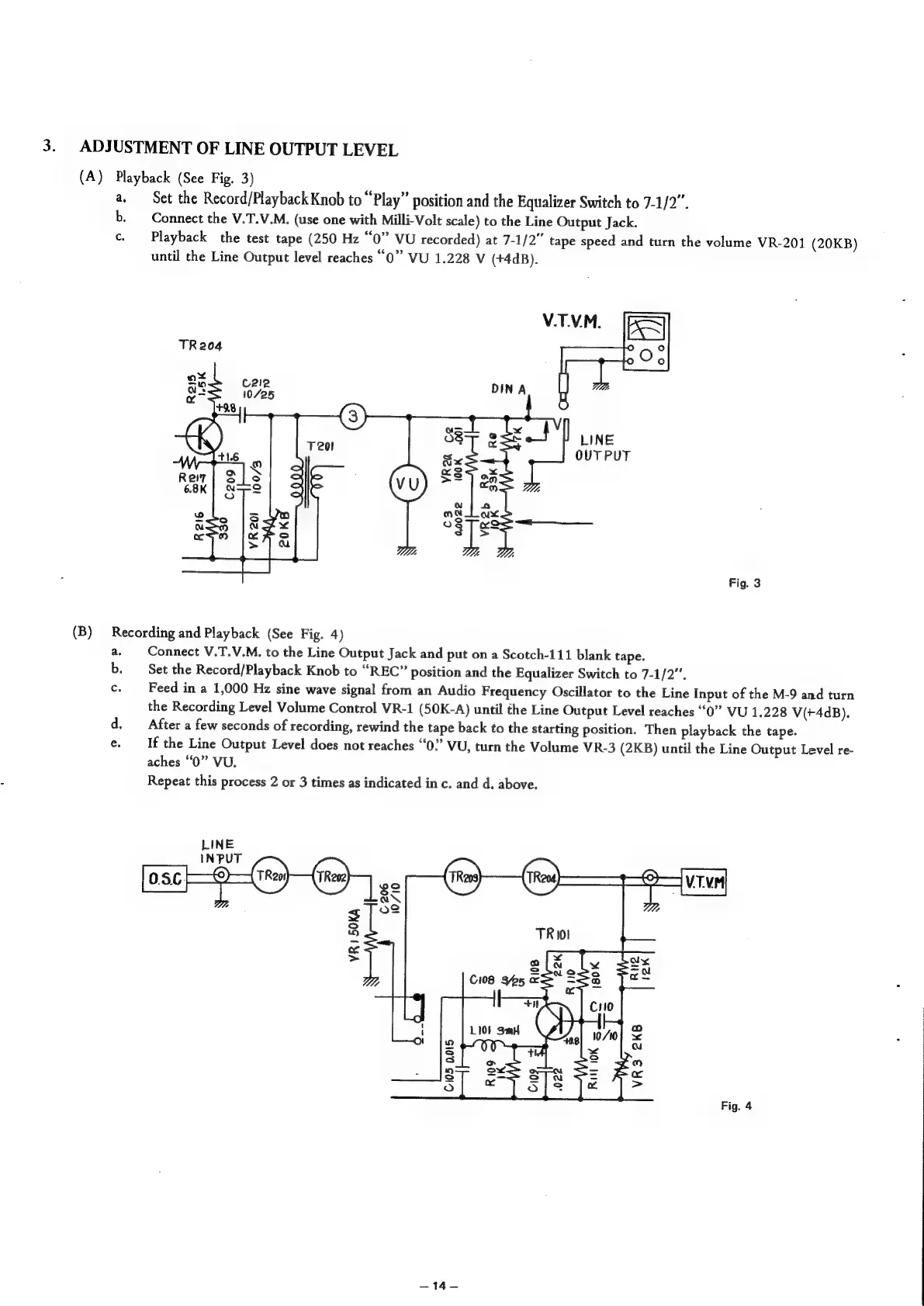
Fig.
3
(B)
Recording
and
Playback
(See
Fig.
4)
a.
b.
Cc.
Connect
V.T.V.M.
to
the
Line
Output
Jack
and
put
on
a
Scotch-111
blank
tape.
Set
the
Record/Playback
Knob
to
“REC”
position
and
the
Equalizer
Switch
to
7-1/2”.
Feed
in
a
1,000
Hz
sine
wave
signal
from
an
Audio
Frequency
Oscillator
to
the
Line
Input
of
the
M-9
and
turn
the
Recording
Level
Volume
Control
VR-1
(50K-A)
until
the
Line
Output
Level
reaches
“0”
VU
1.228
V(+4dB).
After
a
few
seconds
of
recording,
rewind
the
tape
back
to
the
starting
position,
Then
playback
the
tape.
If
the
Line
Output
Level
does
not
reaches
“0?”
VU,
turn
the
Volume
VR-3
(2KB)
until
the
Line
Output
Level
re-
aches
“0”
VU.
Repeat
this
process
2
or
3
times
as
indicated
in
c.
and
d.
above.
LINE
pse}—2-(9)
:
(2)
10/10
VR1
50KA
Fig.
4
—14—