==
57
(59&/9&#%
J.
> 09&/9-B6)5;0*
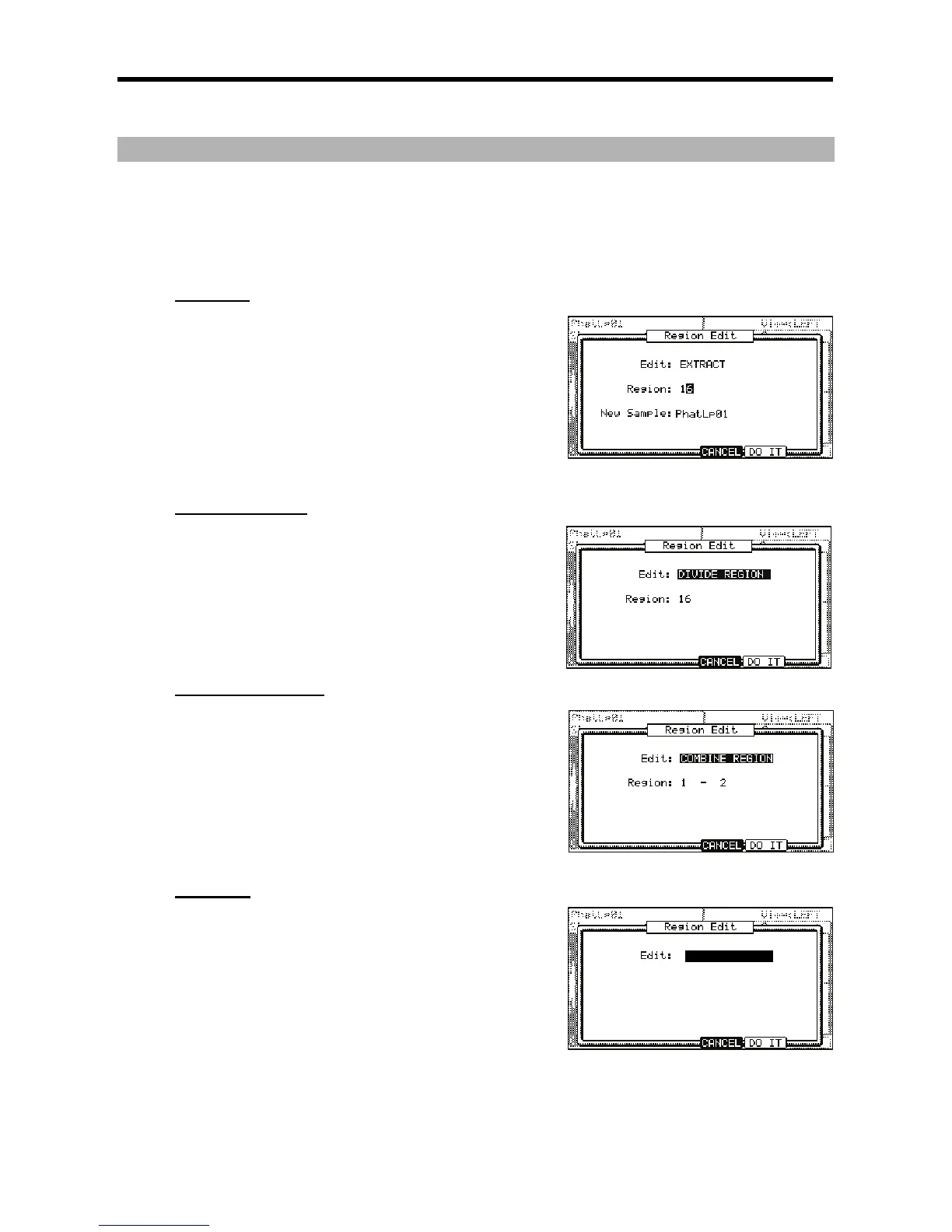
The Region Edit window will be displayed.
0,5,#
A&&
5.
= 0,5,#5F7+
D
You select the number of the region you wish to extract.
"'(D
Sets the new name for the new sample here.
@ 4-6);&0*
The MPC5000 will start the extract process. Pressing [F4] (Cancel) will cancel the extract and the display go back to the CHOP SHOP Page.
5665<6
;%
= 0,5,#;0D0;57580&1
D
Selects the number of the region to divide.
@ 4-6);&0*
The MPC5000 will start dividing the region into two regions. Pressing [F4] (Cancel)
will cancel the process and the display will go back to the CHOP SHOP Page.
!6<6
!
= 0,5,#&(0157580&1
Selects the number of regions to combine.
For example, if you set this 1-5, the regions from 1 to 5 will be combined.
@ 4-6);&0*
The MPC5000 will start combining the regions. Pressing [F4] (Cancel) will cancel
the process and the display will go back to the CHOP SHOP Page.
+&
%
&'
This sets the tempo of the sample.
E2F9;
Cancels the Extract process.
= 4-6);&0*
The MPC5000 will begin processing the Restore, and then the display will go back
to the TRIM page.





 To Next Page