/55;0
>B
."($
J 1# %
()$
%
%#%%%%
=#(5"$"$
5.%%#%
# /
5.%;.%%
+.%%L%
25%
%#
= 0%#%
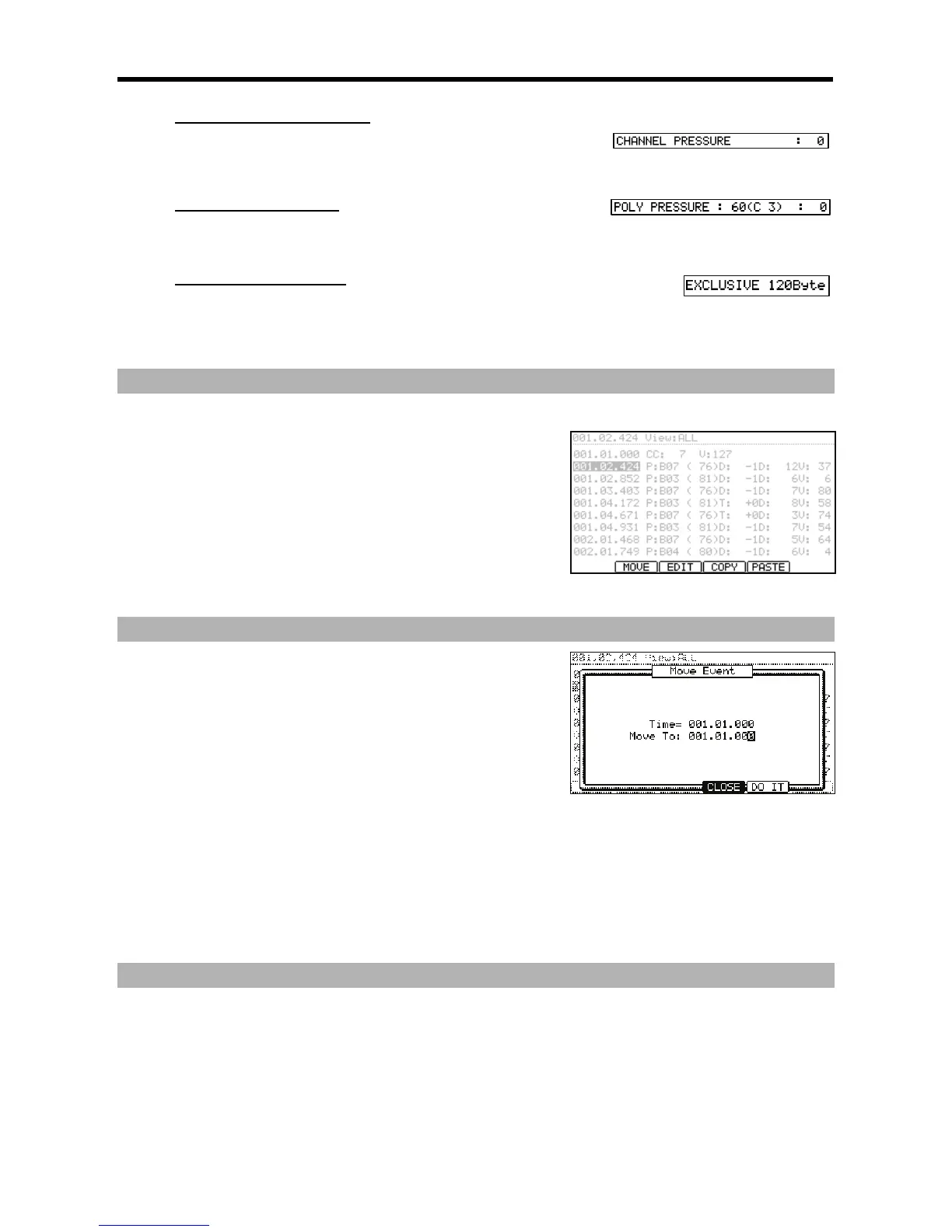
You can select several events by pressing the down cursor button while holding the
[SHIFT] button.
@ 4-G6)5;0*4->6)&J*
When you press [F3] (EDIT), the display of the [F4] and [F5] buttons will change to
(COPY) and (PASTE) respectively until you release the button.
G 0,1,#
%
> 4-G6)5;0*4-6)+/5*
The selected event will be pasted.
%5%
%%#
2 %
%
= 0 5% # 5% % J
% 5%
4/90-6
@ 4-G6)5;0*4-@6)&D5*
When you press [F3] (EDIT), the display of the [F2], [F4], and [F5] buttons will
change to (MOVE), (COPY), and (PASTE) respectively until you release the button.
G %5%
&'P
The selected event time (the start point) is displayed. You can not change this value.
$
You set the time where you wish to move the selected event.
> 4-6);&0*
The selected event will be moved.
;%
5%#
= 05%#5%
You can select several Events by pressing the down cursor button while holding the [SHIFT] button.
@ 4->6);5I55*
The selected Event will be deleted.




 To Next Page