EasyManua.ls Logo

Akai Reference Master GX-75 - Page 4

Akai Reference Master GX-75
55 pages
Print Icon
To Next Page IconTo Next Page
To Previous Page IconTo Previous Page
Loading...
Connections
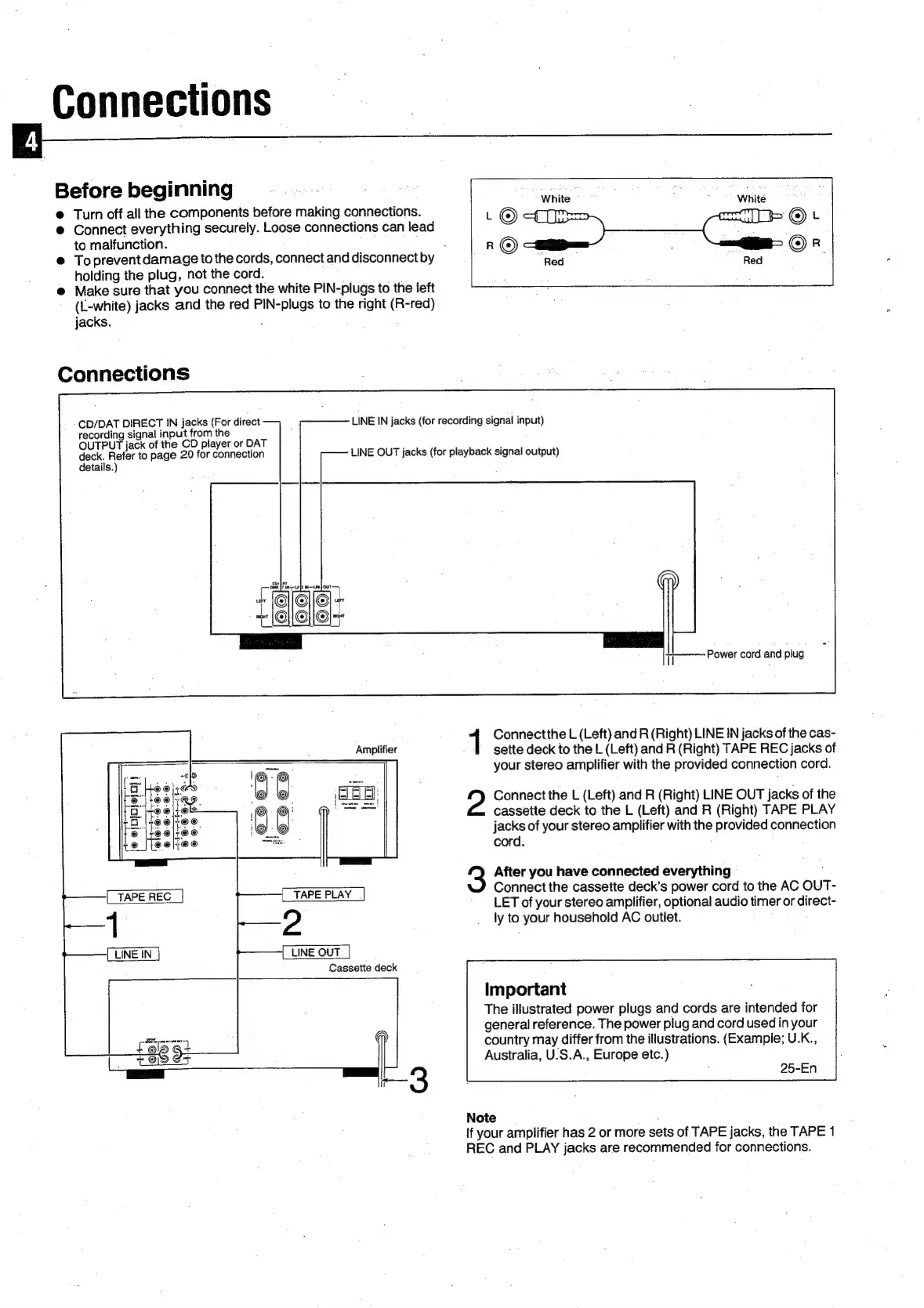
Before
beginning
White
:
White
@
Turn
off
all
the
components
before
making
connections.
©t
@
Connect
everything
securely.
Loose
connections
can
lead
to
malfunction.
.
R
a)
ae
©
R
@
Toprevent
damage
to
the
cords,
connect
and
disconnect
by
Red
Red
:
holding
the
plug,
not
the
cord.
@
Make
sure
that
you
connect
the
white
PIN-plugs
to
the
left
(L-white)
jacks
and
the
red
PIN-plugs
to
the
right
(R-red)
jacks.
Connections
CD/DAT
DIRECT
IN
jacks
(For
direct
LINE
IN
jacks
(for
recording
signal
input)
recording
signal
input
from
the
.
OUTPUT
jack
of
the
CD
player
or
DAT
; ;
deck.
Refer
to
page
20
for
connection
LINE
OUT
jacks
(for
playback
signal
output)
details.)
Power
cord
and
plug
1
Connectthe
L
(Left)
and
R
(Right)
LINE
IN
jacks
of
the
cas-
sette
deck
to
the
L
(Left)
and
R
(Right)
TAPE
REC
jacks
of
your
stereo
amplifier
with
the
provided
connection
cord.
Amplifier
5
i
“@€O6o
©©®©®
2
Connect
the
L
(Left)
and
R
(Right)
LINE
OUT
jacks
of
the
cassette
deck
to
the
L
(Left)
and
R
(Right)
TAPE
PLAY
jacks
of
your
stereo
amplifier
with
the
provided
connection
cord.
3
After
you
have
connected
everything
TAPE
PLAY
Connect
the
cassette
deck’s
power
cord
to
the
AC
OUT-
Lo
LET
of
your
stereo
amplifier,
optional
audio
timer
or
direct-
2
ly
to
your
household
AC
outlet.
LINE
OUT
Cassette
deck
Important
The
illustrated
power
plugs
and
cords
are
intended
for
general
reference.
The
power
plug
and
cord
used
in
your
country
may
differ
from
the
illustrations.
(Example;
U.K.,
Australia,
U.S.A.,
Europe
etc.)
25-En
Note
If
your
amplifier
has
2
or
more
sets
of
TAPE
jacks,
the
TAPE
1
REC
and
PLAY
jacks
are
recommended
for
connections.

Related product manuals