EasyManua.ls Logo

Akai Reference Master GX-75 - Page 7

Akai Reference Master GX-75
55 pages
Print Icon
To Next Page IconTo Next Page
To Previous Page IconTo Previous Page
Loading...
Tarkan
SEPARATED
BLOCKS:HIGH
RIGIO
CONSTRUCTION
SSSETTE
DECK
GX-75
@
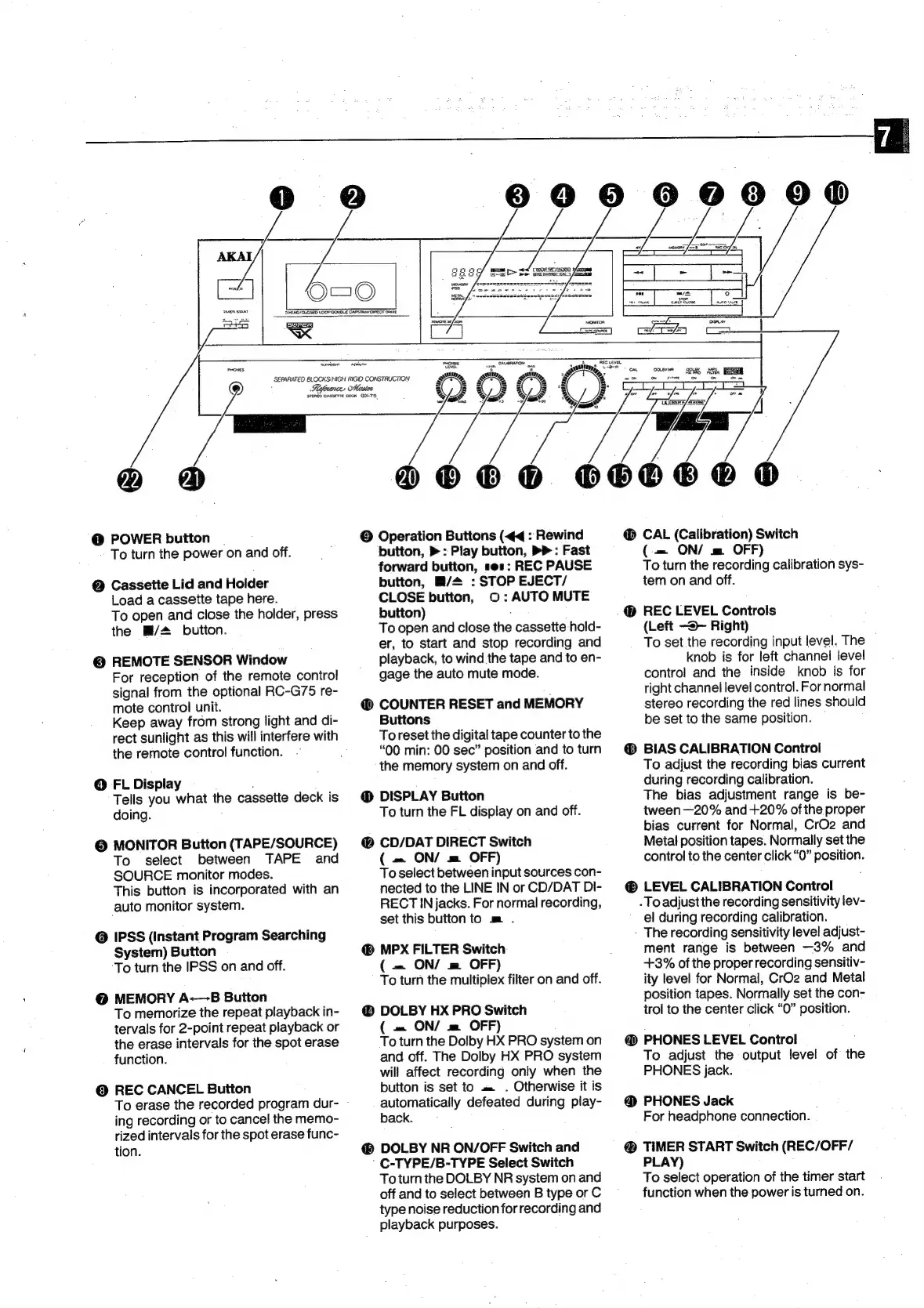
POWER
button
To
turn
the
power
on
and
off.
@
Cassette
Lid
and
Holder
Load
a
cassette
tape
here.
To
open
and
close
the
holder,
press
the
#/4
button.
@
REMOTE
SENSOR
Window
For
reception
of
the
remote
control
signal
from
the
optional
RC-G75
re-
mote
control
unit.
Keep
away
from
strong
light
and
di-
rect
sunlight
as
this
will
interfere
with
the
remote
control
function.
@
FL
Display
Tells
you
what
the
cassette
deck
is
doing.
©
MONITOR
Button
(TAPE/SOURCE)
To
select
between
TAPE
and
SOURCE
monitor
modes.
This
button
is
incorporated
with
an
auto
monitor
system.
@
IPSS
(Instant
Program
Searching
System)
Button
To
turn
the
IPSS
on
and
off.
@
MEMORY
A-—B
Button
To
memorize
the
repeat
playback
in-
tervals
for
2-point
repeat
playback
or
the
erase
intervals
for
the
spot
erase
function.
©
REC
CANCEL
Button
To
erase
the
recorded
program
dur-
ing
recording
or
to
cancel
the
memo-
rized
intervals
for
the
spot
erase
func-
tion.
©
Operation
Buttons
(<<
:
Rewind
button,
>
:
Play
button,
>>
:
Fast
forward
button,
ses:
REC
PAUSE
button,
M/2
:
STOP
EJECT/
CLOSE
button,
©:
AUTO
MUTE
button)
To
open
and
close
the
cassette
hold-
er,
to
start
and
stop
recording
and
playback,
to
wind
the
tape
and
to
en-
gage
the
auto
mute
mode.
@
COUNTER
RESET
and
MEMORY
Buttons
To
reset
the
digital
tape
counter
to
the
“00
min:
00
sec”
position
and
to
turn
the
memory
system
on
and
off.
DISPLAY
Button
To
turn
the
FL
display
on
and
off.
CD/DAT
DIRECT
Switch
(
=
ON/
m=
OFF)
To
select
between
input
sources
con-
nected
to
the
LINE
IN
or
CD/DAT
DI-
RECT
IN
jacks.
For
normal
recording,
set
this
button
to
m
.
MPX
FILTER
Switch
(
=
ON/
m
OFF)
To
turn
the
multiplex
filter
on
and
off.
@
DOLBY
HX
PRO
Switch
(
=
ON/
m
OFF)
To
turn
the
Dolby
HX
PRO
system
on
and
off.
The
Dolby
HX
PRO
system
will
affect
recording
only
when
the
button
is
set
to
=
.
Otherwise
it
is
automatically
defeated
during
play-
back.
DOLBY
NR
ON/OFF
Switch
and
'
C-TYPE/B-TYPE
Select
Switch
To
turn
the
DOLBY
NR
system
on
and
off
and
to
select
between
B
type
or
C
type
noise
reduction
for
recording
and
playback
purposes.
®
CAL
(Calibration)
Switch
(=
ON/
m
OFF)
To
turn
the
recording
calibration
sys-
tem
on
and
off.
@
REC
LEVEL
Controls
(Left
-®—
Right)
To
set
the
recording
input
level.
The
knob
is
for
left
channel
level
control
and
the
inside
knob
is
for
right
channel
level
control.
For
normal
stereo
recording
the
red
lines
should
be
set
to
the
same
position.
®
BIAS
CALIBRATION
Control
To
adjust
the
recording
bias
current
during
recording
calibration.
The
bias
adjustment
range
is
be-
tween—20%
and
+20%
ofthe
proper
bias
current
for
Normal,
CrO2
and
Metal
position
tapes.
Normally
set
the
control
to
the
center
click
“O”
position.
LEVEL
CALIBRATION
Control
-
Toadjustthe
recording
sensitivity
lev-
el
during
recording
calibration.
-
The
recording
sensitivity
level
adjust-
ment
range
is
between
—3%
and
+3%
of
the
proper
recording
sensitiv-
ity
level
for
Normal,
CrO2
and
Metal
position
tapes.
Normally
set
the
con-
trol
to
the
center
click
“O”
position.
@
PHONES
LEVEL
Control
To
adjust
the
output
level
of
the
PHONES
jack.
@
PHONES
Jack
For
headphone
connection.
@
TIMER
START
Switch
(REC/OFF/
PLAY)
To
select
operation
of
the
timer
start
function
when
the
power
is
turned
on.

Related product manuals