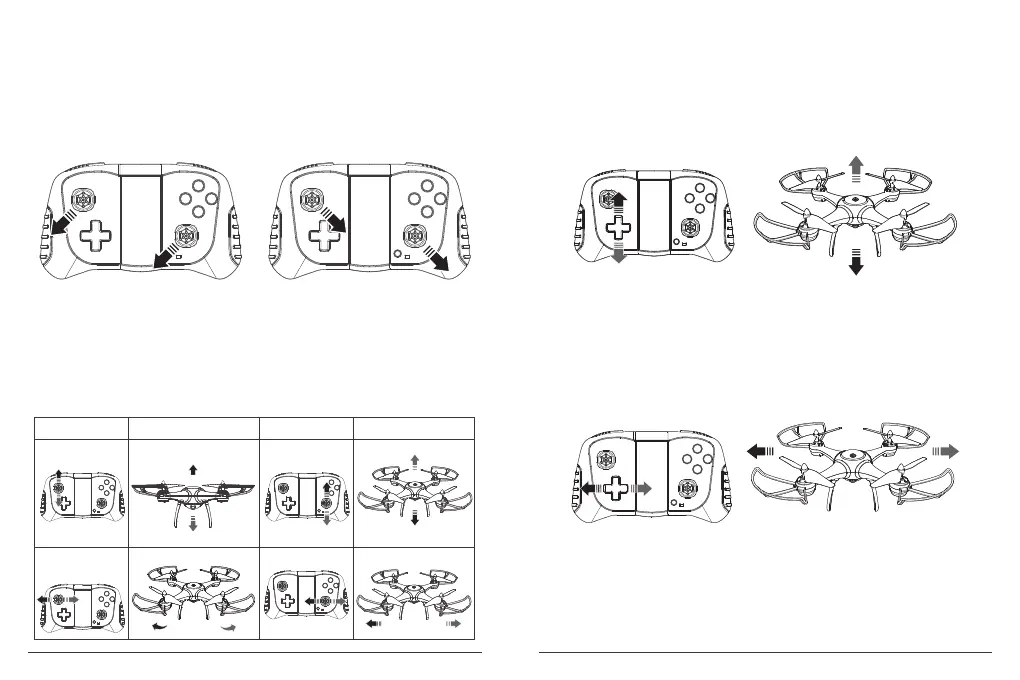
1. Calibrate Drone
① Before take off the drone, please place the drone on a flat surface then calibrate it as
follows.
② Push the both rockers to lower left or lower right at the same time for 4 seconds.
Please refer to below photo.
③ The light of drone will flash quickly, when the light stop flashing that means the
calibration is completed and ready to take off.
2. Flight Control
Before you are familiar with the drone, please don’t fly, read the instruction carefully.
① Place the drone in a clear and open field, and the tail of drone facing to yourself .
② Practice to operate the rockers and buttons (as illustration shows).
Note: Please fly the drone at the height of 3 meters or above, and then perform 3D flips.
If the drone can not vertically take off, it can be calibrated.
Operate OperateILLustration ILLustration
Forward
Backward
Drop
Rise
Mover left
Mover right
Turn left Turn right
3. Fine Tuning Balance
Press the below button to adjust if the drone can not keep balance in the sky at the
beginning of take off.
① Forwards and backwards deviation.
Incline to forwards, press the opposite direction (backward).
Incline to backwards, press the opposite direction (forward).
② Left and Right deviation.
Incline to left, press the opposite direction (right).
Incline to right, press the opposite direction (left).
7 8


 To Next Page