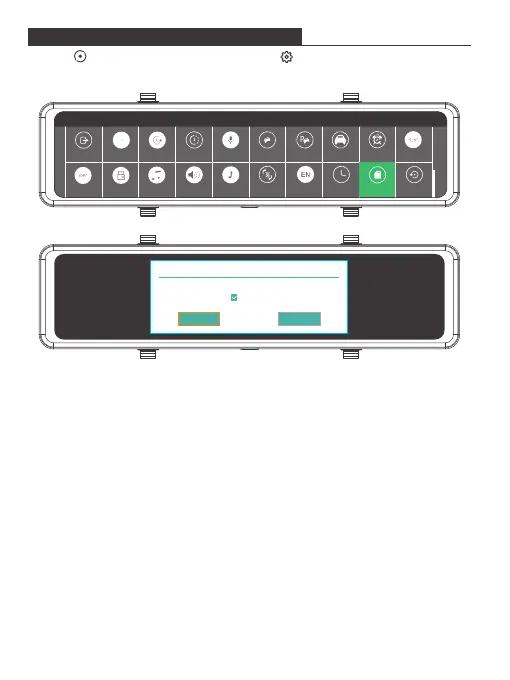
1. Press to stop recording, if necessary. Tap to enter the Settings interface.
2. Select "Format" then tap the "OK" icon to format the microSD card.
FORMATTING THE MICROSD CARD
Note:
① All data will be deleted. Before formatting your microSD card, please remember
to back up your important data on your other devices.
② Every time you insert a microSD card, please format it in the camera to ensure
that the microSD card is compatible with the camera.
Format
Back Resolution Loop Record Time-Lapse Record Audio G-Sensor Parking Guard License Screen Saver Video Encode
DefaultLanguage Date/TimeStream MediaBoot SoundSpeakerKey VoiceUSB ModeFrequency
Format
Notice
Format SD at once?
Cancel OK
Fast format
6


 To Next Page