4. First Use
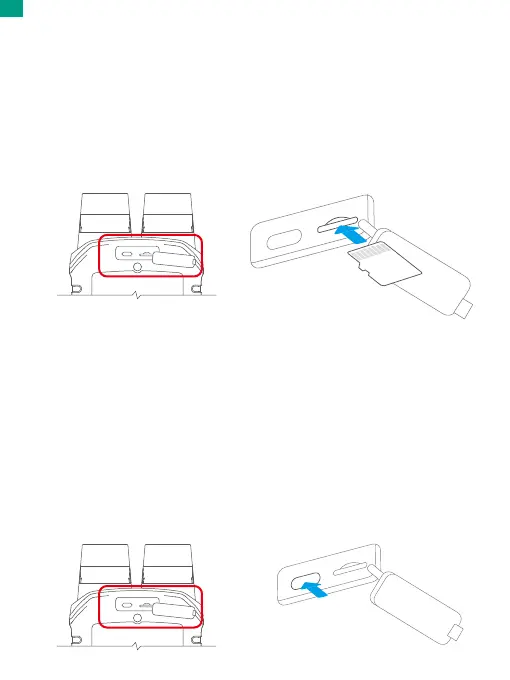
4.1 Inserting the MicroSD Card
To insert the memory card, first press down the buckle of the charging cover to
reveal the memory card slot, then insert the memory card in the orientation
shown and close the cover.
Note: Be sure to turn off the device before installation.
4.2 Installing the Battery
Press down the buckles of the battery cover to reveal the battery slot, then place
the battery into its slot and close the battery cover properly.
4.3 Charging the Night Vision Goggles
To charge the goggles, press down the buckle of the charging cover to reveal the
Type-C power port. Connect the Type-C charging cable to the port, and then plug
the goggles into a USB outlet or a USB port on a computer.
Note: The goggles' indicator light will flash while charging and remain solid when
fully charged. If you prefer not to have the indicator visible, you can easily disable
it in the system settings. However, the indicator will still flash while charging even
when the goggles are powered off, regardless of the "Indicator Light" setting.
01 02 03
04
05 06 07 08
09 10 11 12 13
14 15 16 17 18
19 20 21 22 23
24 25 26 27 28
29 30 31 32 33
EN


 To Next Page