Door Control Unit User Manual
Updated until firmware 404p - 10 -
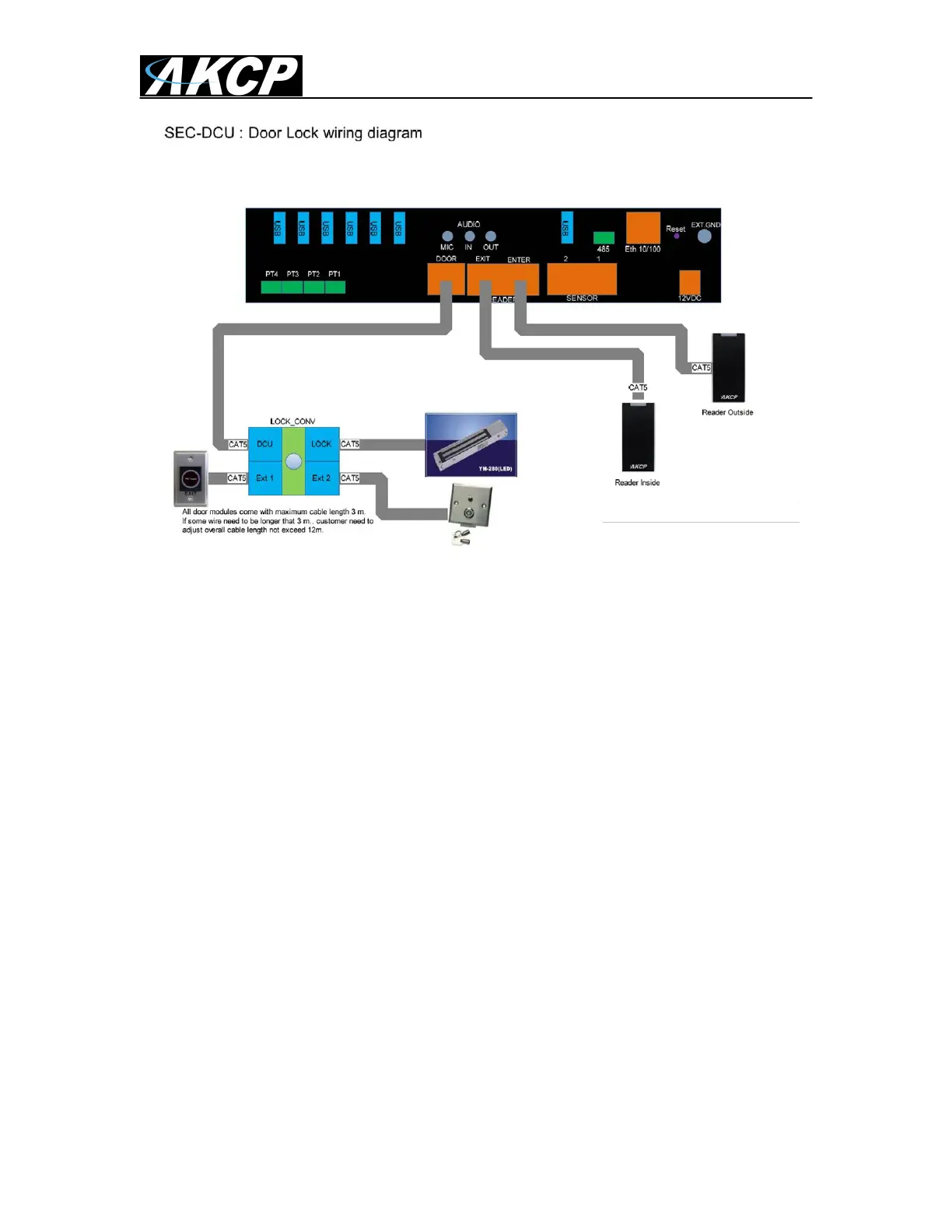
B) Wiring the DCU with card readers, finger print readers
and exit buttons.
External Lock Override
We also ship the DCU with 1 External Key Lock Override so in the event of a problem
where the door cannot be opened by a card swipe or some other reason you can use
the key switch to override the system and open the door from the outside. What this
does, it only cuts the electrical power to the door lock.
Exit Button with “Kill Switch”
The IR exit button shown in the diagram above and on the next page includes a “Kill
Switch” that must be installed along with the card or finger print reader. The Kill
Switch will override the power to the door lock allowing for quick exit in an emergency
or power failure.
Wiring Sizes and Types
CAT5/6 (Ethernet cable) can be used for all DCU and door accessories. The Door
Lock, and Infrared Exit button are pre-wired with 3 meters of cable length while the
Card Readers with 5 meters of cable length. The External Lock Override includes the
RJ-45 connector for ease of use, a length of 3 meters is recommended.
Important Note: The External Lock Override is mandatory item that must be
included when installing the access control system. AKCess Pro / AKCP will not be
responsible for any loss, damages or claims in the event this override switch is not
installed or is not installed properly.


 To Next Page
 Loading...