Door Control Unit User Manual
Updated until firmware 404p - 17 -
E) Setup & Configuration of the DCU web interface
Since the DCU uses the same hardware as the securityProbe 5ESV the web interface is
very similar but has been scaled down as most of the configuration should be performed
from the AKCess Pro Server software.
If you able to log in to the DCU‟s web interface exactly the same as you would a
securityProbe 5ES or 5ESV. If you are not familiar with the tabs and settings in the
DCU‟s web interface please refer to the securityProbe 5ESV‟s user manual.
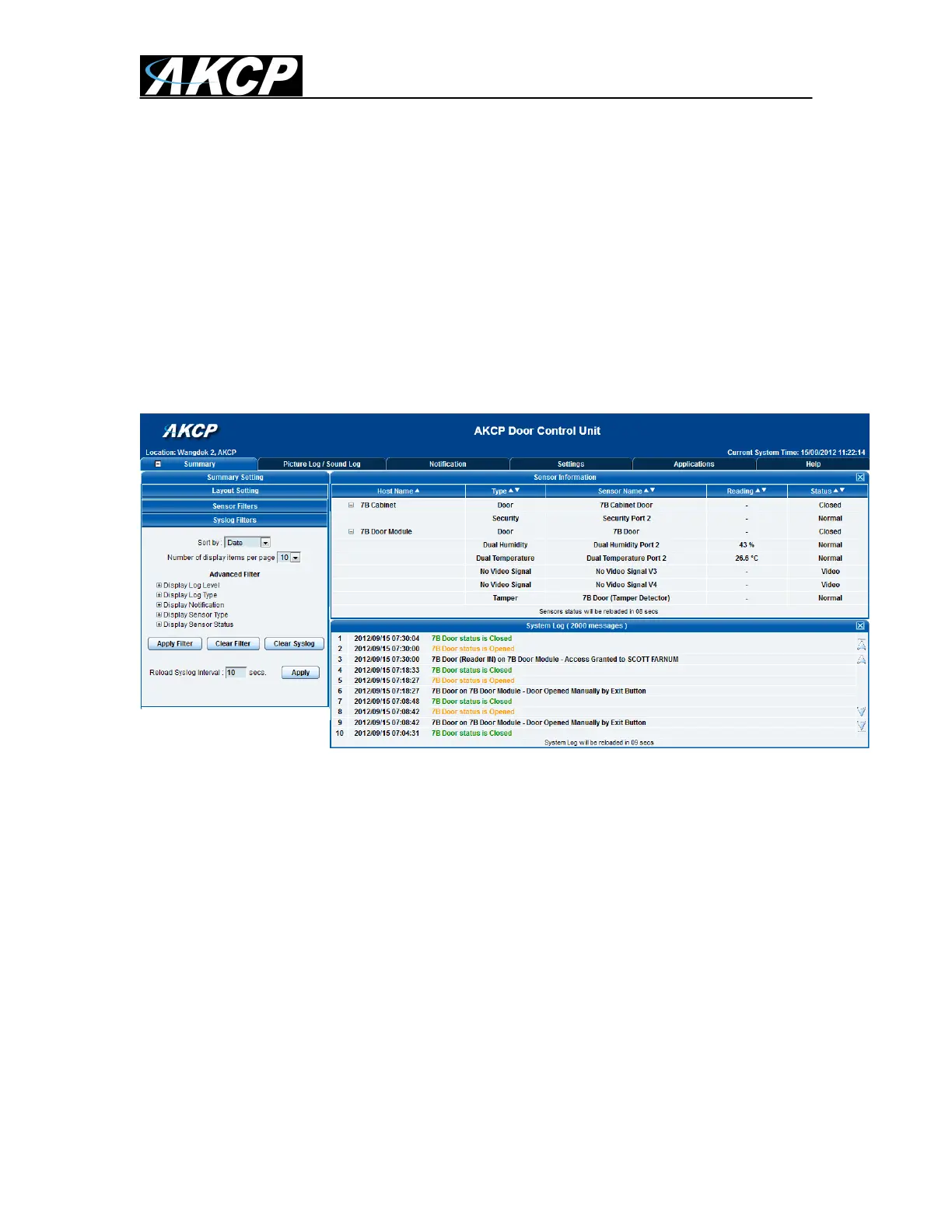
Below is an example of how the DCU‟s web interface appears after logging directly into
the unit. (the camera display in the Summery page was removed for increased
performance. The cameras should be viewed from the AKCess Pro Server Software.)
The following tabs and settings have been removed from the web interface of the DCU;
Camera Settings and Viewing – Viewing of the live streaming from the cameras on the
Summery page and camera settings can be viewed and configured from the AKCess Pro
Server software.
Map – The mapping feature can be used on the AKCess Pro Server.
Sensors & Graphing – All of the sensors that are connected to the DCU can be
configured and graphed from the AKCess Pro Server software.
For configuration and setup of the other Access Control features in the AKCess Pro
Server such as adding users, time and attendance etc., please see the separate manual
for this titled “AKCess Pro Server / Access Control.


 To Next Page
 Loading...