Door Control Unit User Manual
Updated until firmware 404p - 27 -
Door Held Open Alert - We can set this time so that if the door is held open for a certain
amount of time the DCU will send an alert.
Door Lock Time – This is the time that the door will remain unlocked after it is triggered.
(count an additional 2 seconds due to hardware timing)
Door Status – Shows us the status of the door weather it is Closed or Open.
Manual Control – Allows us to manually unlock the door from the Door tab.
Please Note: The Advanced Settings Tab has been removed from the latest version of
the AKCess Pro Server software. The tab was for setting up the dry contact on the door
lock which is no longer available.
Reader Settings
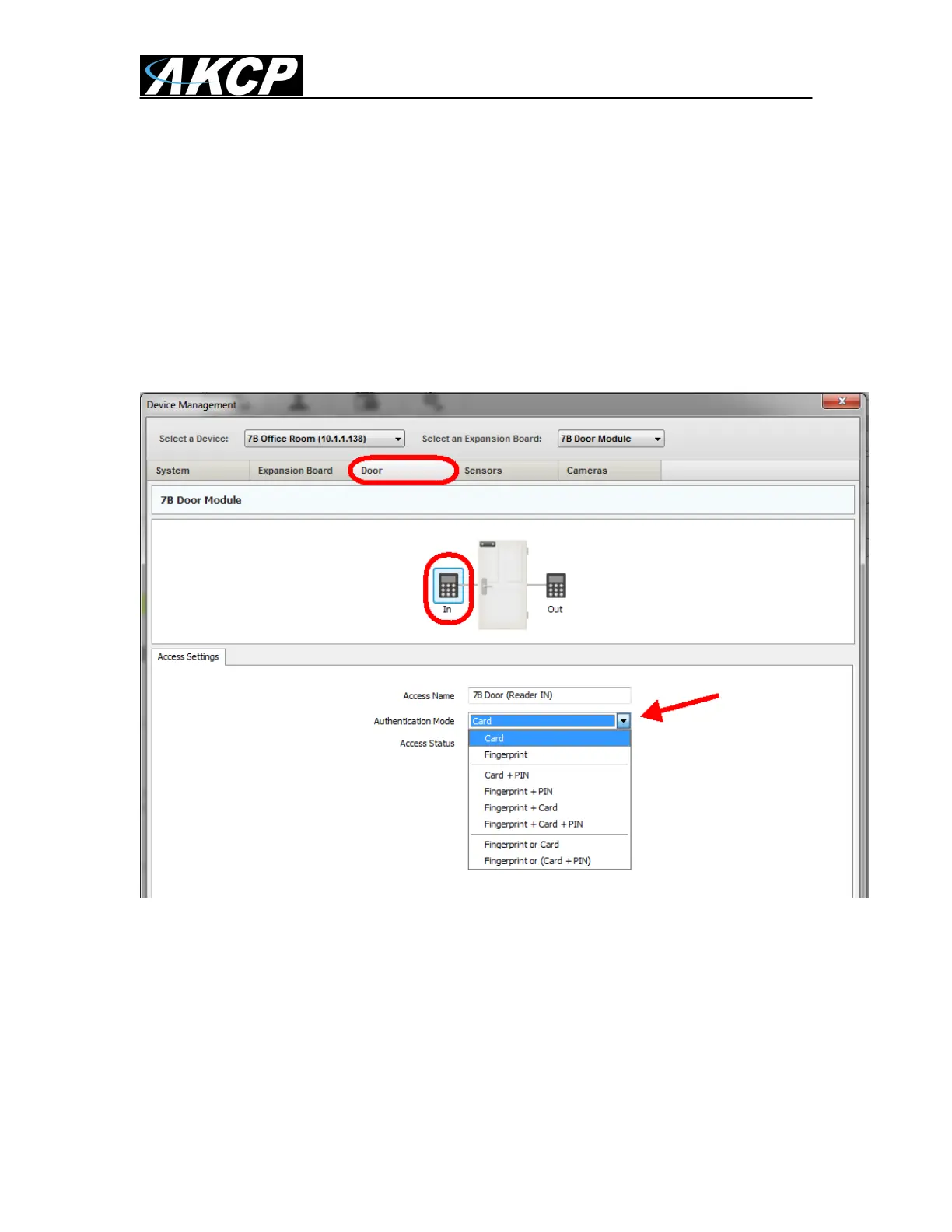
After clicking on the Reader In Icon as shown in the screen shot above we can first name
our access point in the Access Name field.
Then we can choose the Authentication Mode from the drop down menu as also shown
above. We can choose from the RFID Card reader, Fingerprint reader a combination of
both or either or.
These same options also apply when clicking on and configuring the Out Reader icon.
Both the In and Out Reader pages also show the Access Status.


 To Next Page
 Loading...