EasyManua.ls Logo

Akiyama SIRION SC MIDI DJ CONTROLLER - User Manual

Akiyama SIRION SC MIDI DJ CONTROLLER
34 pages
Go to English
Print Icon
To Next Page IconTo Next Page
Loading...
USER MANUAL
MANUAL DE USUARIO
MIDI DJ CONTROLLER
W/SOUND CARD
SIRION SC
Question and Answer IconNeed help?

Do you have a question about the Akiyama SIRION SC MIDI DJ CONTROLLER and is the answer not in the manual?

Overview

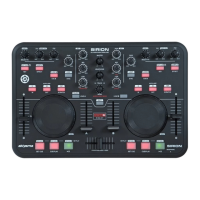
The Akiyama Sirion SC is a MIDI DJ Controller with a built-in sound card, designed for use with music mixing software. It connects to a computer via a USB cable and features a comprehensive set of controls for DJing.

Function Description:

The Sirion SC offers a wide array of controls for mixing and manipulating audio and video.

  • Master Control (1): Adjusts the final output signal level.
  • Headphone Control (2): Manages the volume level for headphones.
  • Track Selection (3): Allows users to select tracks for playback and confirm folder or track selections.
  • Gain and Equalizer (4):
    • Gain: Adjusts the input signal sensitivity.
    • High: Adjusts the high-frequency equalizer.
    • Mid: Adjusts the mid-frequency equalizer.
    • Low: Adjusts the low-frequency equalizer.
  • Load A, B (5): Loads tracks onto the respective channels.
  • Play/Pause (6): Initiates or pauses track playback.
  • Cue/Play (7): Pauses playback at the last memorized cue point. Holding the button plays the track, releasing it returns to the cue point.
  • Set Cue (8): Establishes a cue point without interrupting playback, allowing for precise cue point creation in both play and pause modes.
  • Effect Parameter (9):
    • Select FX: Chooses a specific effect.
    • FX-1/Sample Vol: Adjusts parameter 1 of the VDJ effect.
    • FX-2: Adjusts parameter 2 of the VDJ effect.
  • Effect On/Off (10): Activates or deactivates the digital effect function.
  • Seamless Loop (11):
    • IN/OUT: Creates a loop.
    • Shift + IN/OUT: Decreases or increases loop length.
  • Scratch (12): Activates or deactivates the scratch function.
  • Cue (13): Monitors the desired channel.
  • Sync (14): Instantly synchronizes with the BPM of the other channel.
  • Key (15): Activates or deactivates KEY mode, maintaining a constant tempo regardless of pitch slider movement.
  • Line Fader (16): Adjusts the channel output sound level.
  • Crossfader (17): Switches between or mixes music from two channels.
  • Pitch Fader (18): Adjusts the pitch to match the beat of the other channel.
  • Jog Wheel (19):
    • Shift + Wheel: Quickly navigates through a track.
    • Wheel: Fine-tunes pitch or performs scratch effects.
  • Shift (20): When pressed in conjunction with other controls, activates secondary functions.
    • Audio/Video Mode Switch (20.1): Toggles between audio and video modes.
    • Key Adjust (20.2): Adjusts the key of the playing track without affecting tempo.
    • Folder (20.3): Opens or closes subfolders, and allows navigation back to track selection.
    • Smart Cue (20.4): Automatically re-synchronizes songs when jumping to a new position or cue.
    • Hot Cue (20.5): Sets cue points (Hot Cue 1, 2, 3) without interrupting playback, ready for recall.
    • Sample (20.6): Activates/deactivates Sample mode, selects samples, and adjusts Sample Parameter 1.
    • Clone A, B (20.7): Copies a track from one channel to the other.
    • Smart Loop (20.8): Creates loops as close as possible to neighboring beats.
    • Smart Cue (20.9): Adjusts the CUE to the nearest beat.
    • Quick Search (Seek) (20.10): Uses the wheel to fast-scroll through the track.
    • Autoloop (20.11): Sets the length of an autoloop using IN and OUT buttons, and activates/deactivates it.
    • Tap (20.12): Manually sets the BPM by tapping to the beat of the music.
  • Headphone Output (21): 3.5mm jack for headphones.
  • Mic Input (22): 6.8mm jack for a microphone.
  • Master Output (23): RCA sockets for connecting to speakers.
  • Touch Sensitive Curve (24): Adjusts the touch sensitivity of the jog wheels.
  • USB Connector (25): Connects to a laptop or desktop.
  • Microphone Volume Control (26): Adjusts the microphone volume.

Important Technical Specifications:

  • Sampling Frequency: 44.1 KHz
  • Audio Resolution: 16 bit
  • Output Level: 1.2V ± 0.2V
  • THD+N: < 0.03%
  • S/N: > 80dB
  • Crosstalk: > 80dB
  • Dimensions: 4 (width) x 6.9 (height) x 20.8 (depth) cm
  • Weight: 970 gr

Computer Minimal Requirements (PC Platform):

  • Processor: Intel® Pentium® 4 or AMD Athlon™ XP
  • Video: 1024x768 SVGA
  • Soundcard: DirectX compatible
  • RAM: 512MB
  • Hard Drive: 20MB free
  • Processor: Intel® Core™ 2 or AMD Athlon™ X2
  • Video: 1024x768 SVGA
  • Soundcard: Multi-channel DirectX compatible
  • RAM: 1024MB
  • Hard Drive: 30MB free

Additional Requirements for Video Mixing (PC Platform):

  • RAM: 2048MB (2GB)
  • Video Card: ATI™ or NVIDIA® with 256MB of Dedicated DDR3 RAM
  • Video Output: Dual-screen output

Computer Minimal Requirements (Mac Platform):

  • Processor: Intel®
  • Operating System: Mac OS X v10.5
  • Video: 1024x768 SVGA
  • Soundcard: CoreAudio compatible
  • RAM: 1024MB
  • Hard Drive: 30MB free
  • Processor: Intel®
  • Operating System: Latest Mac OS version (currently v10.6.3)
  • Video: 1024x768 SVGA
  • Soundcard: Multi-channel CoreAudio compatible
  • RAM: 2048MB (2GB)
  • Hard Drive: 200 MB free

Additional Requirements for Video Mixing (Mac Platform):

  • Video Card: ATI™ or NVIDIA® video chipset with 256MB of Dedicated DDR3 RAM
  • Video Output: Dual-screen output

Usage Features:

  • LED Backlighting: Buttons illuminate when the device is connected.
  • Software Integration: Designed for seamless control with music mixing software, particularly VirtualDJ LE (included on CD).
  • ASIO4ALL Driver: A free driver that reduces latency between the controller and the computer, essential for optimal performance on Windows.
  • Aggregate Device (Mac): Allows combining the Sirion SC's sound card with the built-in output for flexible audio routing on Mac systems.
  • MIDI Mapping: Controls are MIDI-mappable, allowing users to assign functions within their DJ software. The manual provides a MIDI map in hexadecimal and decimal values for configuration.
  • Shift Functionality: Many controls have secondary functions activated by holding the "Shift" button, expanding the device's versatility.
  • Precise Cue Point Setting: The jog wheel can be used in pause mode to precisely select cue points.
  • Autoloop and Loop Adjustment: Users can set autoloops and dynamically adjust loop lengths during playback.
  • Video Mixing: The controller supports video mixing, allowing users to load video files, transition between them, and apply visual effects.

Maintenance Features:

  • No User-Serviceable Parts (Internal): The device's interior does not contain parts requiring maintenance, except for external wear parts. Unauthorized internal modifications are prohibited and void the warranty.
  • Cleaning: Clean the appliance by wiping with a cloth slightly damp with water. Avoid using cleaning sprays near controls or connectors.
  • Software Updates: Akiyama provides regular software updates for the Sirion SC, accessible via their website. Users are encouraged to check periodically for the latest firmware and software upgrades.
  • Warranty: The serial number must not be removed to uphold warranty rights. Damage caused by improper use or unauthorized modifications is not covered.

Akiyama SIRION SC MIDI DJ CONTROLLER Specifications

General IconGeneral
BrandAkiyama
ModelSIRION SC MIDI DJ CONTROLLER
CategoryDJ Equipment
LanguageEnglish

Related product manuals