Syncron User manual. Akiyama ASIO Drivers.
18
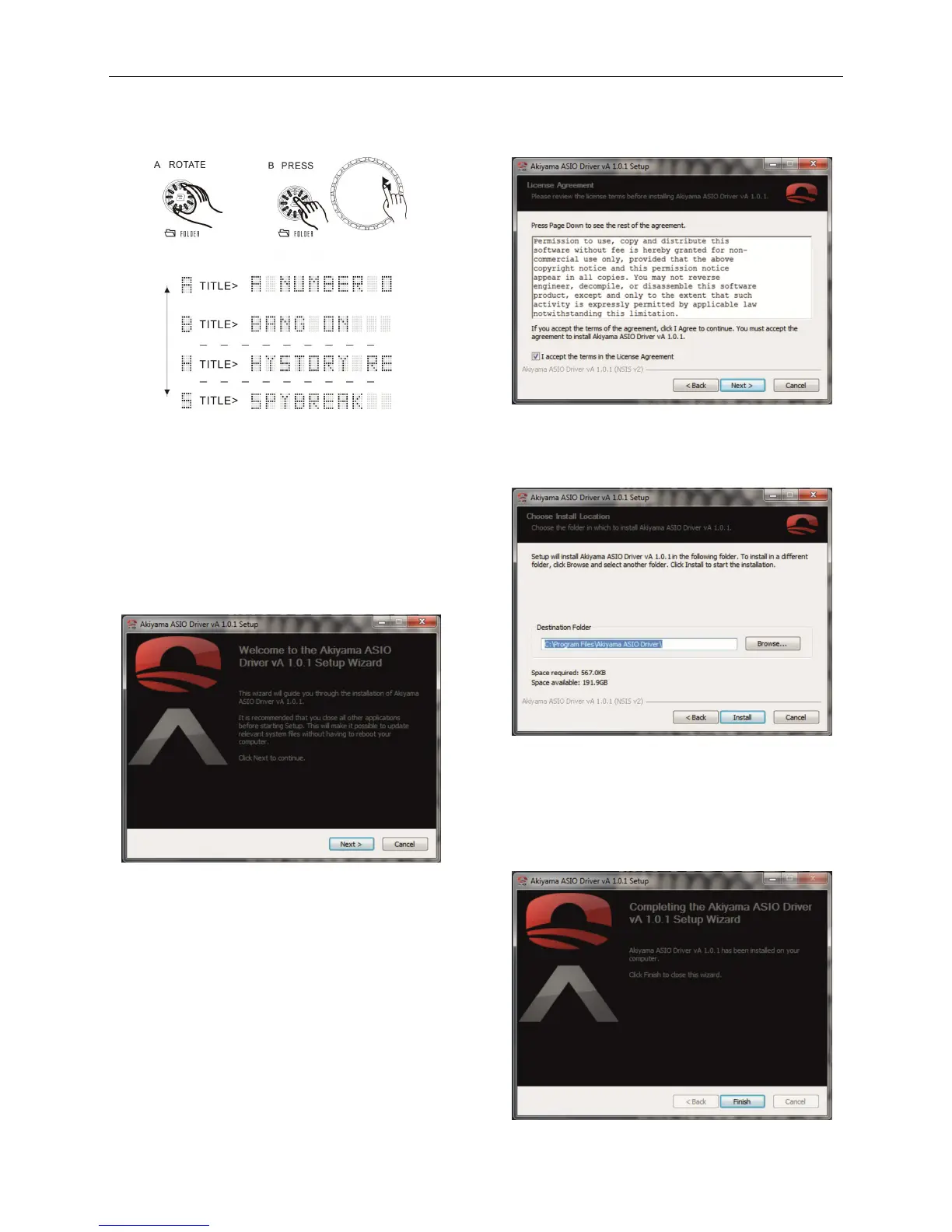
B. Press FOLDER and turn the wheel. We move through the albums
sorted alphabetically by the "Artist ".
AKIYAMA ASIO DRIVERS
Installation
Run Setup.exe clicking on Akiyama_ASIO_Driver_Setup.exe file
The installation starts with below image
Before selecting “Next” read the information displayed on the
Welcome image.
It is recommended that you close all open applications before
starting the installation. This will make it possible to update
important system files without having to restart your computer. "
Select "Next" to start the installation. Then opens the license
agreement.
You must select the box in which you accept the license agreement
and click "Next".
You must select the folder you want to install the drivers. By default
the folder will be installed:
C:\Program Files\Akiyama ASIO Driver\
To select another folder, click "Browse ..." and locate the folder in
which to install the drivers.
Then select "Install".


 To Next Page