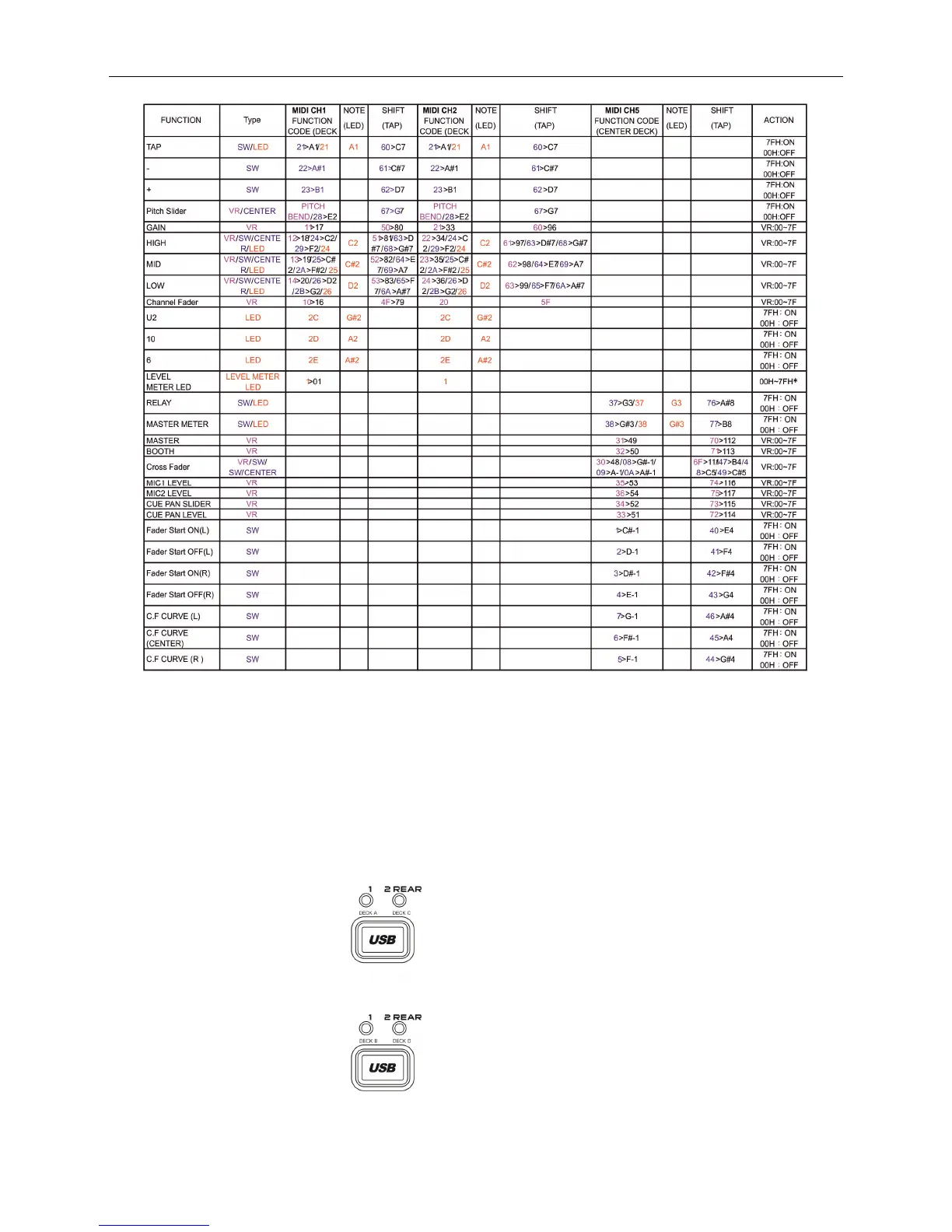
Syncron User manual. Midi map.
32
The MIDI Map has been implemented so that SYNCRON is divided into five areas. Each area will send the MIDI messages by a particular channel.
The five areas as following:
DECK A for MIDI CH1
DECK C for MIDI CH3
DECK B for MIDI CH2
DECK D for MIDI CH4
MIXER for MIDI CH5
Since the DECK A & C and DECK B & D share controls we can select each Deck or MIDI channels using the controls:
DECK A & C
DECK B & D
Physically Deck A and Deck C share the left SYNCRON player. When
you select Deck A corresponding LED illuminates. Also for Deck C.
By default we are in Deck A.
Physically Deck B and Deck D share the right SYNCRON player.
When selecting Deck B the corresponding LED lights. Also for Deck
C. By default we are in Deck B.


 To Next Page