4MP Outdoor Camera Floodlight (ADC-V729/V729AC/VC729P) -
Installation Guide
Important: This guide contains installation information for 3 different models of the ADC-V729 camera:
• ADC-V729
• ADC-V729AC
• ADC-VC729P
While these cameras are similar, some installation steps only pertain to one model. Make sure to select the
accordions relevant to the model camera you are using. The camera model can be found on the box.
When installing the ADC-V729AC, make sure to verify if the local building code requires the ADC-V729AC to be
installed by a certified electrician.
Any information that does not list a specific model number applies to all models of this camera.
What model are you interested in?
None
Pre-installation checklist
When using the ADC-V729:
• ADC-V729 camera
• 24V DC 2A power supply (included)
Caution: A 24V DC adapter is different than the standard 12V adapters used for other ADC cameras.
• Mounting hardware (included)
• Broadband (Cable, DSL, or Fiber Optic) internet connection with router
Note: If the router does not have the WPS button, you will need the case-sensitive SSID (wireless network name)
and the network WPA or WEP key (if the encryption is enabled at the router).
English
https://answers.alarm.com/Partner/Installation_and_Troubleshooting/Video_Devices/4MP_Outdoor_Floodlight_Camera_(ADC…
Updated: Sun, 05 Jan 2025 13:22:41 GMT
1

 Need help?
 General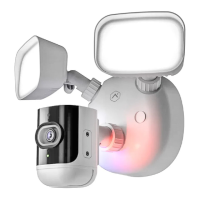

 To Next Page