Copyright © 2016 Alarm.com | www.alarm.com | v1.0
Concord 4 LTE Module | Installation Guide
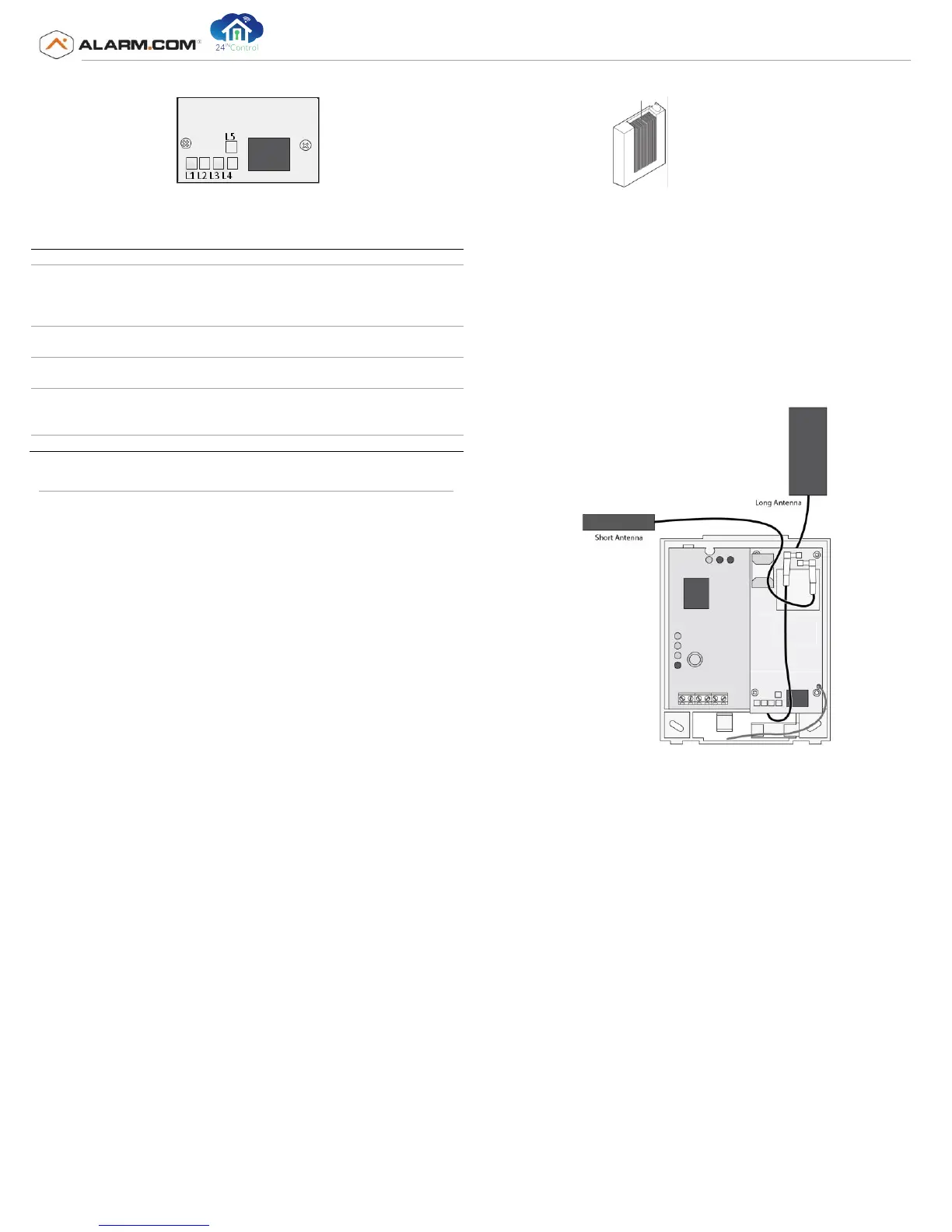
Figure 2: LTE Status LEDs L1-L5
Bottom of LTE Module
Table 3: Module Status LED Functions
Error LED: L1 will
flash 1 to 8 times in
a
four-second interval to ind
i
ca
te
spec
i
f
ic
error
cond
i
t
io
ns
such as
a
network
erro
r
,
panel
commu
nication
erro
r
,
or
LTE
ra
d
i
o
error. See
Table 5 on page 4 for a
list of the errors indicated by L1.
Panel communication
LED: L2 f
la
shes
every time a data packet is
r
e
c
e
ived from the
p
a
ne
l
LTE
communication
LED: L3 f
la
shes
every time a data packet is r
e
c
e
ived
from the
LTE
ra
d
i
o.
LTE
signal
le
v
e
l
LED: L4 f
l
ashe
s
0 to
5
times indicating the module signal
strength, or toggles on/off
when
communicating w
i
th
the Alarm.com
ser
v
ers.
Z-Wave Error LED: See
Table 6
on page 4 for more information.
Module Installation
Tools and Supplies Needed
You will need the following tools and supplies:
• Small blade and Phillips screwdriver
• Drill and bits for screws and/or anchors
• Wire cutter/stripper
• Four-conductor, 22-gauge or larger stranded wire
• #6 panhead screws (4 included)
• Wall anchors (4 included)
• 2 KΩ EOL resistor (included)
Module Location Guidelines
Prior to beginning installation, use the following guidelines to choose a
location for the module:
• Check the signal strength before choosing a location. Perform a
walking signal strength test by powering the module off the battery
directly (connect the GND and +12V terminals). After two minutes,
LTE status LED L4 will flash between one and five times to indicate
the LTE signal strength level (where 5 is the strongest signal).
Alarm.com recommends a signal level of two or higher for proper
operation of the LTE Module.
• Avoid mounting the module in areas with excessive metal or
electrical wiring, such as furnace or utility rooms.
• Locate the module near an outside wall, preferably on an upper
level.
• Do not mount the module gateway inside of the panel’s metal box.
Doing so will negatively impact Z-Wave performance.
• For homes or businesses located in canyons or with hills nearby, it is
necessary to place the antenna higher in the building.
Mounting the Module and Connecting the Antenna
To mount the module:
1)
Press down on the top of the enclosure cover (See Figure 3) and set it
aside.
Figure 3: Enclosure Cover
2) The LTE module requires 2 antennas for proper operation. Both
antennas are pre-installed for convenience. The larger antenna will be
connected to antenna connector 1 and the smaller antenna will be
connected to antenna connector 2.
3) For optimal signal strength the antennas should be placed as far
away from the module as possible and as far away from each other as
possible. The recommended antenna orientation is shown in Figure 4
Figure 4: Antenna wire orientation
4)
Place the module back plate on the wall at the desired mounting
location, check for level, and mark the three mounting holes and the
wire access area (Figure 4). Be sure to leave room above the back
plate to route the antennas.
5)
Set the back plate aside and drill holes at the mounting and wire
access area locations.
6)
Use wall anchors where studs are not present and secure the back
plate to the wall with the enclosed screws.
CAUTION: You must be free of static electricity before handling electronic
components. Touch a grounded metal surface before touching the circuit board.
Wiring
To wire the module to the panel, do the following:
1)
Remove panel AC Power and disconnect the backup battery. This is
necessary to prevent damaging the panel or module while making
wiring connections.
2)
Wire the module to the panel bus and to the battery terminals for
power as shown in Figure
5
.
Not
e
:
T
h
e
module can also be powered off
th
e
S
up
e
r
B
us
2000 two amp
power supply
(
600
-101
9)
,
but should not be powered
d
i
r
e
ctly
of
f
t
h
e
pa
nel.



 To Next Page
 Loading...